


Understanding the Power of the Lightning Component Framework for Developers

Create powerful applications with the Lightning Component Framework! Learn what you can build, from web apps to mobile-friendly experiences. The Lightning Component Framework is a powerful platform for creating interactive web and mobile experiences. From customized UI interactions to enterprise-grade apps, the Framework empowers developers to create everything from simple user interfaces to complex integrations. CloudVandana will discuss what can be developed with this Framework in this blog. What Is the Lightning Component Framework? This Framework is a programming model that makes it easier for you to create reusable user interface components. These components are then connected together, allowing you to quickly and easily build simplified user interfaces and more complex apps. Components can also be used in various places like mobile apps, Salesforce Platform, and communities, giving your app a consistent look and feel across all platforms. Building Responsive Single-Page Applications The Framework makes it easier for developers to create engaging, mobile-friendly, responsive single-page applications. These apps can communicate with other services, such as Chatter and Analytics Cloud, to enable a wide variety of user experiences and interactions. With the correct design and implementation, users will be able to use these apps on any device with a modern web browser. Integrate with Lightning Data Services With Salesforce Lightning Data Services, developers can create custom components that access Salesforce data directly. These components can be used to quickly search and retrieve information, display complex details in a tabular format, or even serve as the entry point for data-driven interactions like creating an account or logging in to an existing one. Data Services make lightning application development more efficient by allowing developers to control how data is fetched, cached, and manipulated without relying on external services. Adding Events and Interactions with Components This Framework also supports events and interactions between components. For example, you can use the Event type to declaratively create an event that other components can subscribe to, allowing for more dynamic and responsive applications. Developers can then use JavaScript code in their controllers to control what happens when one of these events is triggered, giving them maximum flexibility and control over the application’s design. Accessing Salesforce Data in Your Components The Component Framework makes it easy for developers to access data from Salesforce in their components. It allows them to use the Standard Controller framework from within their components, allowing them to quickly and easily access objects from Salesforce, such as Accounts, Contacts, and Opportunities. Developers can also take advantage of the advanced features of the Lightning Data Service, which provides an intuitive way to query, create, update, and delete records in Salesforce. Are you looking for expert LWC resources to maintain your Lightning framework? Please schedule a call with CloudVandana, a reputed Salesforce partner in India, and get the best solution best suited for your business. Call us now. Request a Free Consultation YOU MIGHT ALSO LIKE
Learn with Salesforce Trailhead – What is It and How Does it Work?
Get an in-depth look at Salesforce Trailhead and learn how utilizing the program can benefit businesses. Start on your path to success with Trailhead today! In this article, CloudVandana, a reputed Salesforce partner in India, will discuss Trailhead and its working process. Salesforce Trailhead is an interactive learning platform designed to help businesses better utilize the Salesforce platform. With Trailhead, you can learn everything from basic setup and customer service best practices to creating efficient back-end processes and scaling your business. What is Salesforce Trailhead? Salesforce Trailhead is an online platform that enables businesses to learn and master Salesforce products. It provides step-by-step tutorials, interactive challenges and projects, and certifications designed to help users get the most out of their Salesforce investments. Salesforce Trailhead makes it easy for businesses to learn and stay up-to-date on the newest features. How Does Salesforce Trailhead Work? Salesforce Trailhead is a scalable, interactive learning program where users can learn at their own pace. It offers tutorials, hands-on projects, and certifications to help users gain the skills and knowledge needed to get the most out of Salesforce products. Users take on challenges in themed “trails” that offer badges upon completion of each trailblazer mission. Once they complete a certification exam, they become a certified Trailhead Ranger with an official badge on their profile. Advantages of Using Trailhead for Your Business Using Trailhead is a great way to keep your business knowledge up-to-date. It provides the resources needed to stay on top of the ever-changing landscape of Salesforce products, technology, and best practices. With its wide range of trails and badges, users can tailor their learning plan to fit their needs and goals. Trailhead also allows internal teams and departments to collaborate easily with each other. This helps organizations work more efficiently since everyone is working towards a common goal under the same platform. The Types of Trails You Can Learn Through When it comes to learning with Salesforce Trailhead, the possibilities are endless. There are a variety of trails you can take, each focusing on a different aspect of the Salesforce platform and its products. From Administration Basics and App Builder to Chatter and Security, there’s something for everyone. Each trial is made up of multiple modules that not only explain a given concept but also show an example in action. After completing each module, users can test their knowledge with user quizzes and assessments. Ultimately, users who complete all the modules in a trial receive a badge for their achievements which serves as validation of their know-how. Tips for Making the Most Out of Trailhead Taking the time to really understand the content and concepts presented in each module will help you get the most out of Trailhead. Spending a little extra time preparing for user assessments and quizzes by knowing the information presented in prior modules can save time as well. Additionally, reading other Salesforce resources, such as developer blogs, will also help supplement your knowledge. Finally, take advantage of the ‘Trailmix’ feature, which allows you to customize trails and create personalized learning journeys based on your skill level and areas of interest. Are you looking for expert Salesforce professionals to care for your Salesforce projects? Please feel free to contact CloudVandana and hire on-demand remote Salesforce developers on a contract basis for faster deployment. Call us now. Request a Free Consultation YOU MIGHT ALSO LIKE
How to Maintain Account and Contact Relationships In Salesforce

Building and managing relationships with customers is essential for any successful business or organization. Account and Contact Relationships in Salesforce offer powerful tools to maintain those important relationships and take your sales performance to the next level! In this blog, CloudVandana will discuss how to maintain an account and contact relationships in Salesforce. Account and Contact Relationships In Salesforce Implementing Salesforce’s powerful Account and Contact relationship features is essential to managing relationships with customers, improving sales performance, and staying competitive in the marketplace. Learn how to leverage these tools, maintain customer relationships, and optimize your organizational success. Automate Lead, Contact, and Account Enrichment Automate contact and account enrichment processes with the Salesforce Contact Builder tool. With this tool, leads are matched to contacts and accounts, ensuring your presentations have the same information and easy access to customer data. This helps sales representatives quickly build and maintain relationships that can turn into opportunities faster. The Contact Builder also uses machine learning capabilities to enrich contact profiles with more valuable customer insights as time goes on. Track Changes in Customer Relationships with Audit Fields In Salesforce, you can use the Audit Fields feature to track changes in customer relationships. This is especially useful when tracking contact activity and all contact data updates. You will be able to see, modify and revise the content of each contact’s history or conversations at any time. This helps ensure that sales representatives have reliable and accurate information when contacting the customer or potential customer. Manage Contacts Across Multiple Companies and Organizational Hierarchies Salesforce offers many ways to manage contacts across multiple companies and complex organizational structures. The Hierarchy View feature allows you to view all contact information for each lead, customer, and account in an orderly manner that supports viewing cross-functional objectives. Additionally, you can set alerts to remember past events and follow up on potential business deals or opportunities. All the information gathered from customers can be monitored and updated on a regular basis with just a few clicks. Utilize Relationship Maps to Visualize Accounts and Their Connections Relationship Maps are a powerful tool for keeping track of customer relationships at a glance. They provide intuitive visual representations of relationships between accounts and contacts in your Salesforce environment, enabling you to keep all relationships aligned with business objectives. You can link accounts and contacts to each other, depending on their roles in the transaction, allowing you to view critical information quickly and easily. This helps keep communication consistent across departments and provides greater control over account maintenance activities. Leverage Revenue Forecasting to Measure ROI of Relationships & Deals Revenue forecasting is a powerful tool that enables sales teams to measure the return on investment (ROI) of relationships and deals. This allows you to evaluate the success of deals over time and set goals for future performance. With revenue forecasting in Salesforce, you can develop a strong picture of long-term customer relationships and accurately anticipate their progress. Leveraging this feature helps ensure that all departments in your organization are working towards similar results. Are you looking for a successful Salesforce implementation to enhance your organizational process? Please feel to schedule a consultation call with CloudVandana, a reputed Salesforce Partner in India, and get the Salesforce solution best suited for your business. Call our experts now. Request a Free Consultation YOU MIGHT ALSO LIKE
A Comprehensive Guide to Understanding Multithreading in Java

Find out how to use multithreading in Java to process multiple tasks concurrently. Discover all you need to know about understanding and implementing multithreading! In this article, CloudVandana will share a comprehensive guide to understanding multithreading in Java. It is an important concept in Java that allows a program to execute multiple tasks concurrently. It is used to improve application performance and make the most use of a system’s computing resources. This article will explore how the process works and how it can be implemented in Java. What is Multithreading? It is a process by which multiple tasks can be executed concurrently in a single program. This process divides the program into smaller parts that are independent of one another, allowing them to be processed simultaneously. By utilizing this process, these applications are able to utilize the computing resources available on modern computers efficiently. Why Use Multithreading in Java? Multithreading in Java offers several advantages. Allowing multiple tasks to be processed in parallel increases the program’s overall efficiency. This way, it is possible to take full advantage of the computing power available on modern machines with multiple cores. Furthermore, the process allows for smoother UI animations and more responsive user interfaces, as processes can be handled faster and with less lag. How to Create and Run a Thread in Java If you want to use this process, then you first need to create and launch a thread. To do this, Java provides the Thread class to create and control threads. The basic outline of creating a Thread is as such: Create an instance of the Thread class, passing in a Runnable object that defines what should be done when the thread runs. Finally, call start() on the instance of your Thread to launch it. Implementing Synchronization Synchronization is a feature of this feature that ensures that only one thread can access or manipulate a resource or data at any given time. This helps prevent race conditions and other thread-related issues. To use synchronization, you create a synchronized block that will only allow one thread to enter it at a time. Once the thread completes its operations, the block is released so that another thread can acquire the lock and access it. Using Callable and Future for Interacting with Running Thread Callable and Future are two classes used for interacting with threads that are already running. Callable is a method that returns an object, while Future is an interface that provides methods to check if the computation is complete and to retrieve the result of the computation. These classes make it easier to manage the lifecycle of threads and obtain results from them. Are you looking for experienced Java developers to handle and deploy your projects faster? Please feel free to schedule a consultation call with CloudVandana, a reputed Staff Augmentation firm in India, and select the best team of remote developers from the huge talent pool. Call Us Now. Request a Free Consultation YOU MIGHT ALSO LIKE
Using Social Insights in Salesforce to Make Smarter Decisions

Access the power of social insights in Salesforce and take advantage of new opportunities for more effective customer interactions by tapping into conversations about your brand, competitors, and industry. In this blog, CloudVandana will describe how using social insights can make smarter decisions in Salesforce. Social Insights in Salesforce With the Social Insights in Salesforce, users can tap into conversations happening around your brand, competitors, and industry to gain deeper insights about prospects and customers. Discover new opportunities for more effective customer interactions and leverage powerful data-driven strategies to close more deals faster. Leverage insights from social conversations Use insights from social conversations to identify customer sentiment, measure brand sentiment, and track competitor performance and industry trends. This data can help you understand customer reactions to different products or services, inform product design decisions, develop more effective messaging, and tailor content to the right audiences. Social Insights also helps you discover new leads, find potential partners, and quickly deliver tailored responses that engage customers in ways that nurture relationships. Get customer sentiment analysis in real time With Social Insights, you can get real-time sentiment analysis for customer conversations about your products and services. Find out the topics trending among your customers in order to create tailored messaging and cultivate relationships. Monitor brand loyalty and engagement, so you can stay responsive to customer needs and quickly pivot campaigns or product design to address emerging trends. Identify potential customers and influencers With Social Insights, you can identify potential customers and influencers who may be interested in what your brand is offering. Increase your visibility to new audiences by understanding demographic data and their interests. Leverage social engagement to acquire new leads and skyrocket ROI. Uncover conversations that might provide valuable information about current customer pain points that you can use to improve your offerings. Uncover emerging trends and topics related to your brand Keep an eye on what’s happening in your market with advanced sentiment analysis capabilities. Monitor new topics and trends that arise throughout the day and use this data to respond quickly and accurately to tailor pitches to customers. Make sure your message has maximum impact by targeting campaigns or offerings based on the latest industry developments. This way, you can create thoughtful conversations around current events, topics, and trends affiliated with your brand. Automate data capture and enrichment with Salesforce integration tools Streamline the process of gathering and managing all your social insights. Utilizing a Salesforce integration tool can easily bring keyword-based triggers and real-time data capture into your CRM to cut down on manual data entry. Automatically store conversations, posts, and profiles in Salesforce for easy retrieval by anyone on your team. This will enable quick, consistent access to up-to-date information when crafting customer outreach messages. Are you looking for a Salesforce partner for a successful Salesforce Implementation? Please feel free to schedule a consultation call with CloudVandana, a reputed Salesforce partner in India, and get the best solution best suited for your business. Call Now. Request a Free Consultation YOU MIGHT ALSO LIKE
Screen Flow – An Essential Component of a Salesforce Solution

Build a better customer experience with Screen Flow! This easy-to-use, drag-and-drop technology helps you customize each step of the user journey in Salesforce. In this article, CloudVandana will discuss Screen Flow in detail. Let’s have a look. Screen Flow in Salesforce is an excellent tool for streamlining and improving the user journey. With easy-to-use drag-and-drop technology, you can customize each step of the customer experience, creating an efficient and enjoyable flow through the Salesforce platform. Here’s a guide to setting it up Setting up Flow in Salesforce is relatively simple, even for a beginner. First, select the objects you want to include in your Salesforce Journey Builder, then drag and drop components such as filters, decision boxes, mappings, and actions into the Flow canvas. From there, customize each step with data mapping, logic configurations, and UI elements. Once you have everything set up according to your needs, save your Flow and deploy it on the platform. Choose the Services You Want in Your Screen Flows Screen Flows provide different services depending on your requirements, like sending emails, updating records in Salesforce, or creating tasks. You need to define which services you need by selecting the advanced options found under each respective service in the drag-and-drop canvas. Be sure to set up everything before deploying and activating it – otherwise, your journey will not flow as planned. Once you have chosen and configured all services, deploy your flow and watch it take off! Create a Profile for Each Interaction Sequence When creating a Flow, it is important to create a profile for each interaction sequence that describes the user’s journey. This profile should include actions such as updating records, sending emails, and creating tasks. Each action should have its own record type, field selection, and template selection specified. If a step needs further configuration, such as creating visual elements or choosing the source of data for an output or record layout, be sure to configure them before deploying and activating your flow! Create the Nodes and Links That Connect These Actions Once you have identified all the actions that need to be taken, create nodes and links that connect each action together. When creating multiple flows, the placement of nodes will be key to producing a smooth transition between flows. Creating these organized nodes also makes it easier to troubleshoot and understand how each node is connected if an issue arises. Take the time to review your workflow and ensure that the nodes and links accurately reflect the customer interaction sequence you are trying to achieve. Configure Your Elements to Fulfill Different Business Processes and Goals When configuring the flow, break down each purpose of the process and create elements that will fulfill those business processes and goals. Consider how certain steps of the customer journey need to be accounted for, such as customer onboarding, customer service requests, or upsell. Once you have identified these needs, think about how best to design each element within the Salesforce framework accordingly. Your ultimate aim should be a smooth and efficient user experience that caters to different customer requirements. Are you looking for a reputed Salesforce partner for a successful Salesforce Implementation and to experience all the benefits of this CRM platform? Please schedule a free consultation call with CloudVandana and get the best solution best suited for your business. Request a Free Consultation YOU MIGHT ALSO LIKE
5 Reasons You Should Invest in Salesforce Managed Services

Discover the benefits of investing in Salesforce Managed Services! From saving time to reducing costs, this post outlines five reasons why it’s worth it. Salesforce Managed Services It is an approach to help businesses run and manage Salesforce CRM smoothly. If you’re considering a Salesforce deployment, you may find it beneficial to invest in managed services that can help optimize your use of the platform. Managed services give you access to skilled professionals who can identify opportunities for process automation and streamline, as well as provide ongoing support, maintenance, and monitoring. Streamlined Performance and Maintenance The services simplify and streamline your performance management, maintenance, and system security. The managed services team can help ensure that your Salesforce implementation is optimized for peak performance and stability by optimizing database queries, implementing CRM platform upgrades, and ensuring access security through properly setting user roles and profiles. This helps to ensure your data is secure and protected while also allowing your business to make the most out of its deployment going forward. Access to Trained Experts With managed services, you gain immediate access to a team of Salesforce experts who can provide timely and accurate answers to any questions that may arise. This prevents bottlenecks within the organization, as the staffs get time to focus on their core duties instead of trying to find a solution for Salesforce-related issues. Additionally, with on-site maintenance from professionals, you feel confident that tasks are completed in accordance with best practices and within the defined timeframe. This can go a long way toward helping ensure your business runs smoothly. 24/7 Support With managed services, you can access 24/7 support for the products and services that you use. At any time of the day or night, your administrator will be able to pick up the phone and call a dedicated customer service line to address their queries. This way, you can rest assured knowing that you have access to assistance whenever it’s needed. Plus, with reliable support comes peace of mind – knowing that someone is always there if something were to ever go wrong. Maximize ROI & Results Tracking Managed services also offer invaluable insights into the effectiveness of your deployment. Your managed service provider can monitor the performance of your Salesforce products and provide detailed data on user activity, usage metrics, and other key indicators of success. With this intelligence, you’ll be able to get a better understanding of which features are being used most and how users interact with the platform. This information can then be used to inform future decisions and investments in Salesforce, helping you maximize your ROI & results tracking over time. Improved Data Security & Compliance with Regulatory Standards With managed services, you will benefit from improved security measures to keep data safe and help ensure compliance with regulatory standards such as HIPAA or GDPR. Managed service providers often have specialized expertise in establishing enterprise-level security protocols to protect sensitive customer information within Salesforce. The providers can also stay up to date on changes in the regulatory environment, so you don’t have to worry about being compliant with the latest regulations. There are various other benefits that organizations can experience when they invest in Managed services. Please feel free to schedule a call with CloudVandana, a reputed Salesforce partner in India, and touch your goal faster. Call Now. Request a Free Consultation YOU MIGHT ALSO LIKE
Visualforce with Lightning Components in Salesforce

Maximize the power of lightning components in Salesforce with Visualforce. This guide by CloudVandana walks you through the best practices for creating a custom Salesforce user experience. The platform can help you customize the Salesforce user experience, giving your users a more efficient and intuitive way to work with their data. Visualforce can also help you quickly build and deploy lightning components in Salesforce, allowing you to take advantage of best practices for creating a seamless customer experience. Understand How Visualforce & Lightning Components Work Together To get the most out of Lightning components in Salesforce, it’s important to understand how Visualforce and Lightning Components work together. Visualforce is a powerful set of tools that allow you to create and deploy applications for your users quickly. Meanwhile, Lightning Components offer a desktop-like experience tailored for different user scenarios, making them perfect for creating unique customer experiences with data visualizations, client-side logic, and other custom features. By combining the two technologies, you can create powerful and intuitive applications tailored to your users’ needs. Utilize Salesforce Developer Tools and Libraries to Extend Functionality One of the best practices for using Visualforce with Lightning Components is to take advantage of Salesforce’s existing developer tools and libraries. Using these tools, you can create custom components that extend the functionality of existing features or introduce new features to your application. Additionally, you can easily integrate third-party frameworks and libraries, such as React or Angular, to create a more sophisticated user experience while still leveraging Salesforce’s core technologies. Ensure Security With Clear Authorization Rules for Users When developing your Visualforce application with Lightning components, it’s important to define authorization rules for users accessing it. Depending on the data type and functionality you’re providing access to, you may need to set up user profiles and permission sets. By using Salesforce’s existing security features, such as Oauth protocols and encryption algorithms, you can ensure that the data contained in your application is secure and only accessible to those who have permission. Optimize for Usability Across All Devices It’s important to ensure that your Visualforce application with Lightning components is optimized for use across all devices. This means ensuring that the user experience is consistent across different platforms, such as mobile, tablet, and desktop. Consider using responsive design techniques or adaptive layouts so that users can access your application regardless of the device they’re using. Optimizing for usability also includes ensuring the interface layout is simple and easy to navigate, so users can quickly find the information or functions they need without having to search too much. Test Your Work Regularly to Identify Issues Early On While creating a Visualforce application with lightning components is not overly complex, it’s important to test the work you’ve done so far regularly. Testing can help you identify issues quickly and fix them as soon as possible. It is a good idea to have a team of testers who can provide feedback about any potential usability or performance problems. Make sure to record all the details related to any bugs that are identified so that they can be fixed in a future release of your application. Are you looking for a reputed Salesforce consulting partner for a successful Salesforce implementation and experience all the benefits of this CRM platform? Please feel free to schedule a consultation call with CloudVandana and get the best Salesforce experience best suited for your business. Call Now. Request a Free Consultation YOU MIGHT ALSO LIKE
How to Automate Your Business Processes with Salesforce Flow
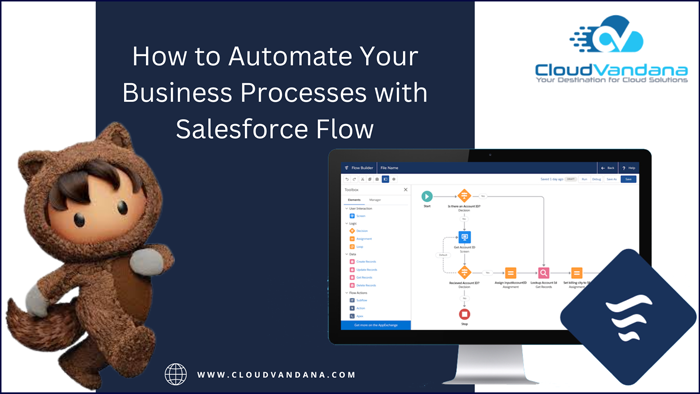
Automate your business processes with Salesforce Flow, a powerful cloud-based automation platform. Get started with a comprehensive guide by CloudVandana. Salesforce Flow is a powerful automation platform that can help you streamline your business processes and save time by automating repetitive tasks. Whether you’re just getting started or already have experience with Salesforce Flow, our comprehensive guide will help you get up and running quickly. Learn the Basics of Salesforce Flow Before you can start automating your business processes with Salesforce Flow, it’s important to understand the basics of how the platform works. The platform consists of building blocks called Flows and Triggers, which control how data moves between systems and applications. These building blocks are then connected together in a logical series, allowing you to create automated processes that save time and effort. Create Flows to Automate Business Processes Once you understand the basics of Flow, you can begin using it to automate your business processes. You can create Flows from scratch or from pre-built templates that make it easy to get up and run quickly. You’ll then be able to configure the Flows, setting triggers and preferences such as the number of users and timeframes, so they run automatically according to your specific needs. Utilize Conditions and Loops in Your Flows To get the most out of Salesforce Flow, make use of conditions and loops. With conditions, you can determine whether or not a certain step or action should be taken depending on certain criteria. For example, if you want to update records based on their status, you can use a “condition” step in your Flow to ensure that the updates only occur for certain statuses. Meanwhile, with loops, you can repeat certain processes until specified criteria are met. For instance, if you need to send out an email notification every day until a task is completed, a loop would enable you to do this automatically. Utilizing these features can help make your Flows more robust and efficient. Use Visual Workflows for a More Intuitive User Experience Using Salesforce Flow’s Visual Workflows feature, you can quickly create and edit business processes via an intuitive drag-and-drop interface. It’s a great way to break down complex processes into visual segments, making it easier for users to follow along with the process as it runs. With Visual Workflows, you can customize the look and feel of each step in the flow. You can also drill down into details such as component configuration, step actions, and more. Creating visually engaging experiences with Salesforce Flow will make your automation process both efficient and easy to use by anyone in your organization. Integrate with Other Salesforce Products for Greater Efficiency To truly maximize the power of Salesforce Flow, consider integrating it with other Salesforce products. Integrations allow you to leverage features like Salesforce Einstein AI and Analytics Cloud, giving your organization the ability to automatically surface relevant customer insights or create more intelligent business processes. With Salesforce integrations, the amount of data being worked with is usually much larger than when dealing with standalone products, so it’s important to have an understanding of how these different platforms can work together. With deep integration capability, Salesforce Flow can be empowered by adding key components for your organization. Are you looking for a reputed Salesforce partner? Please feel free to schedule a call with the reputed Salesforce partner CloudVandana and experience the highest benefits of this customer relationship management platform. Call us now. Request a Free Consultation YOU MIGHT ALSO LIKE
Leveraging AI & Automation for Streamlined Salesforce Staff Augmentation

Improve your Salesforce Staff Augmentation using AI & Automation! Discover the potential efficiencies gained from automating the recruitment process to identify outstanding talent faster and more efficiently. In this article, CloudVandana, a reputed Staff Augmentation firm in India, will discuss a streamlined Salesforce Staff Augmentation process to enhance the organizations and their workflow. Salesforce staff augmentation is an effective way to grow your team quickly, but it can become costly and inefficient if done manually. Fortunately, advances in AI and automation can help streamline the recruitment process, making it easier to find the right people for the job and preserve cost-efficiency. Understand Your Salesforce Staff Augmentation Needs Before diving into the automated recruitment process, it’s important to understand your team’s needs and requirements for staff augmentation. Take a close look at your current Salesforce staff roster and identify any gaps in knowledge, skill sets, or resources that could be filled through additional staff augmentation. Doing this will ensure you select potential candidates who will provide the most benefit to your team based on the unique qualities they bring to the table. Prioritize Salesforce Security and Compliance When screening potential candidates for Salesforce staff augmentation, it’s important to prioritize Salesforce security and compliance. Make sure the candidate you select has a strong understanding of data privacy guidelines, encryption protocols, and the latest best practices in security monitoring to protect business data. Having an extra pair of eyes with the right expertise can give your current staff peace of mind that your Salesforce platform is protected from cyber threats and breaches. Utilize Recruiting Automation Software Utilizing recruiting automation software is a great way to streamline your staff augmentation process. Automation technology provides an effective platform to source, filter and identify the ideal candidate faster. Not only does this cut down on manual sourcing activities, but it helps teams select quality talent more accurately. With automated recruiting tools, Salesforce professionals can quickly assess candidates’ skill sets and work habits without any bias or prejudice. Strategically Evaluate Candidate Pools With AI Leveraging AI to evaluate candidate pools is an effective way to assess the best matches for open roles. Automation tools can quickly scan through vast amounts of data, pinpointing applicants that have the right skill set and experience level. With AI-assisted evaluation, recruiters can ensure candidates are maximally qualified for their desired role and appropriately suited for their team’s culture. This helps eliminate unnecessary interview rounds, ensuring efficient use of company resources. Take Advantage of Salesforce Communities for Succession Planning With Salesforce Communities, recruiters and admins can access a database of the entire team’s professional development. This allows admins to keep track of the capabilities of each employee and make smarter decisions on who should be upskilled or cross-trained in order to meet company demands. By leveraging AI & Automation tools, staff augmentation initiatives can be monitored more closely, enabling succession planning that is automated too. This helps ensure a smooth transition as roles evolve over time. Are you looking for experienced Salesforce resources for a faster deployment process? Please feel free to schedule a consultation call with CloudVandana, a reputed Staff Augmentation firm in India, and experience the huge talent pool best suited for your organization. Call Now. Request a Free Consultation YOU MIGHT ALSO LIKE



