A customer downloads an ebook from your website. Marketing knows.
A week later, that customer requests a product demo. Sales knows.
After becoming a customer, they contact support about an implementation issue. Service knows.
But does everyone know?
That is where many customer experiences begin to break down. Each department may have excellent technology, skilled employees, and well-designed processes, yet customers can still feel as though they are dealing with three different companies.
Salesforce Customer 360 is designed to change that.
Instead of allowing sales, marketing, service, commerce, and other customer-facing functions to operate as isolated islands, Customer 360 brings applications, customer context, automation, data, and AI together around a more complete view of the customer.
For businesses, this can mean better collaboration and more informed decisions. For customers, it can mean something much simpler: they do not have to keep explaining who they are.
This guide explores what Salesforce Customer 360 is, how it connects Sales, Service, and Marketing teams, how Data 360 supports the unified customer profile, and how businesses can build a practical Customer 360 strategy. Salesforce can become the center of customer engagement, sales, service, automation, and increasingly AI-powered work. But Salesforce rarely operates alone.
Behind almost every customer interaction is a much larger technology landscape.
Orders may live in an ERP. Invoices may be generated by a finance platform. Inventory information may sit in SAP. Billing data may be managed in another application. Employee information could reside in an HR system, while product, logistics, procurement, and legacy applications each maintain their own pieces of business-critical information.
The problem is not necessarily a lack of data.
The problem is that the data is fragmented.
That is where MuleSoft Salesforce integration becomes important.
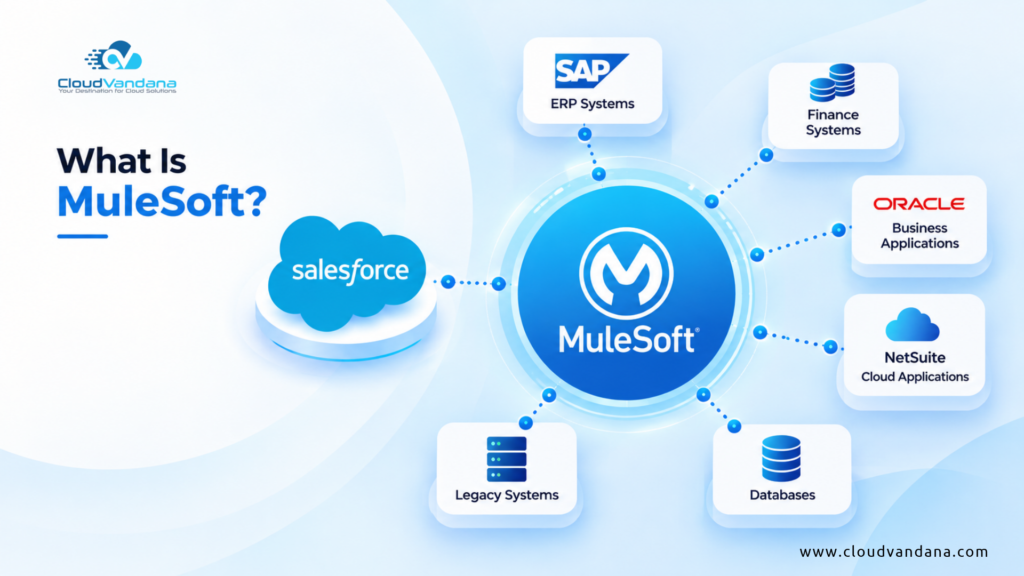
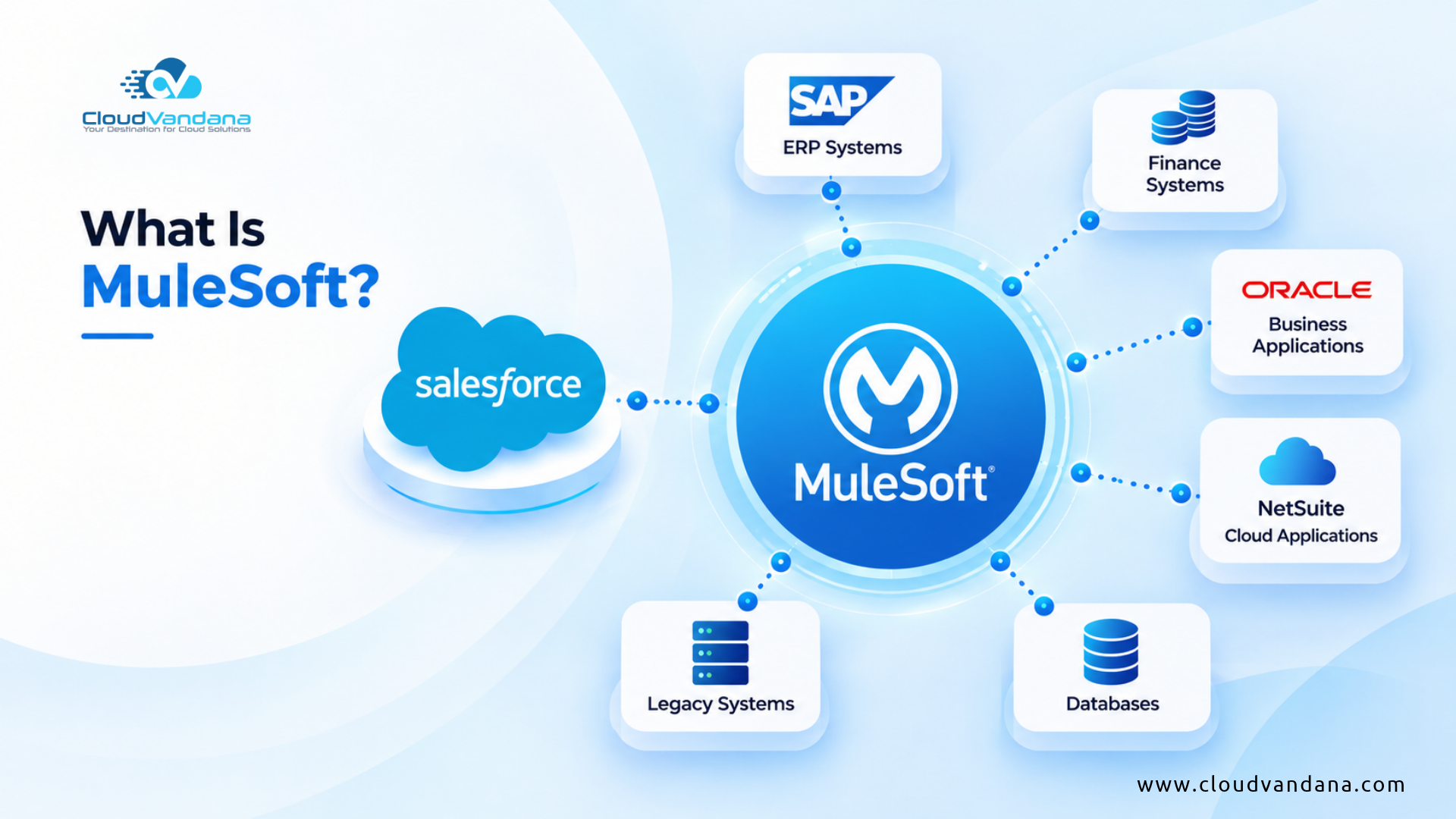
MuleSoft creates a connectivity layer between Salesforce and the wider enterprise. Instead of forcing employees to jump between applications or building a growing web of fragile point-to-point integrations, organizations can use APIs, connectors, integration flows, and automation to make their systems work together.
The result is bigger than data synchronization.
Sales teams can see inventory before promising a delivery date. Service teams can access order and billing information without leaving Salesforce. Finance teams can receive accurate customer and transaction information. Automated workflows can span multiple platforms. And AI agents can eventually act across enterprise systems rather than remaining confined to CRM data.
This guide explains how MuleSoft connects Salesforce with ERP, finance, legacy, and other business systems, how the architecture works, where organizations can use it, and why integration is becoming increasingly important in an AI-driven enterprise.
What Is MuleSoft?
MuleSoft is an integration and API platform that helps organizations connect applications, data, APIs, workflows, and enterprise systems.
It provides the technological bridge that allows different applications to exchange information and participate in shared business processes.
Consider a company using:
- Salesforce for CRM
- SAP for ERP
- NetSuite for finance
- A custom application for logistics
- A data warehouse for analytics
- An eCommerce platform for online orders
- Several legacy databases
- AI agents for employee and customer interactions
Without a structured integration architecture, these systems can become isolated islands.
MuleSoft helps connect them.
Its value is particularly significant in large organizations where hundreds of applications may participate in a single customer or operational journey.
Instead of treating integration as a collection of individual connections, MuleSoft encourages organizations to build reusable integration capabilities.
That distinction matters.
A well-designed integration architecture does not merely move information from Application A to Application B. It creates reusable digital building blocks that can support future applications, workflows, analytics, automation, and AI initiatives.
What Is MuleSoft Salesforce Integration?
MuleSoft Salesforce integration is the process of using MuleSoft APIs, connectors, and integration capabilities to connect Salesforce with external applications and enterprise systems.
These may include:
- ERP platforms
- Finance applications
- Accounting software
- Supply chain systems
- Databases
- HR platforms
- eCommerce applications
- Data warehouses
- Legacy systems
- Custom applications
- Cloud platforms
- AI applications
Salesforce’s MuleSoft connector can work with Salesforce APIs including REST, SOAP, Bulk, and Streaming APIs depending on the required integration operation. Salesforce documentation specifically identifies ERP integration, data aggregation, legacy modernization, and connected customer experiences among common use cases.
The goal is simple:
Make the right information and business capabilities available to the right system at the right moment.
For example, when a salesperson opens an account in Salesforce, MuleSoft could retrieve:
Customer information → ERP
Outstanding invoices → Finance platform
Available inventory → Inventory system
Shipment status → Logistics platform
Support history → Service system
The salesperson gets a more complete view without manually opening five different applications.
Why Salesforce Cannot Operate in Isolation
Salesforce is powerful, but CRM represents only part of an organization’s operational environment.
Salesforce may know:
- Who the customer is
- Which opportunity is active
- What the customer wants
- Which sales representative owns the relationship
But another system may know:
- Whether inventory is available
- Whether an invoice has been paid
- Whether the customer’s account is on credit hold
- When an order will ship
- What contract exists
- Which products have already been purchased
This creates an important distinction.
CRM provides customer context. Other enterprise systems often provide operational context.
Employees need both.
A connected architecture allows Salesforce to become an interface through which users can access relevant enterprise information without turning Salesforce itself into the storage location for every piece of enterprise data.
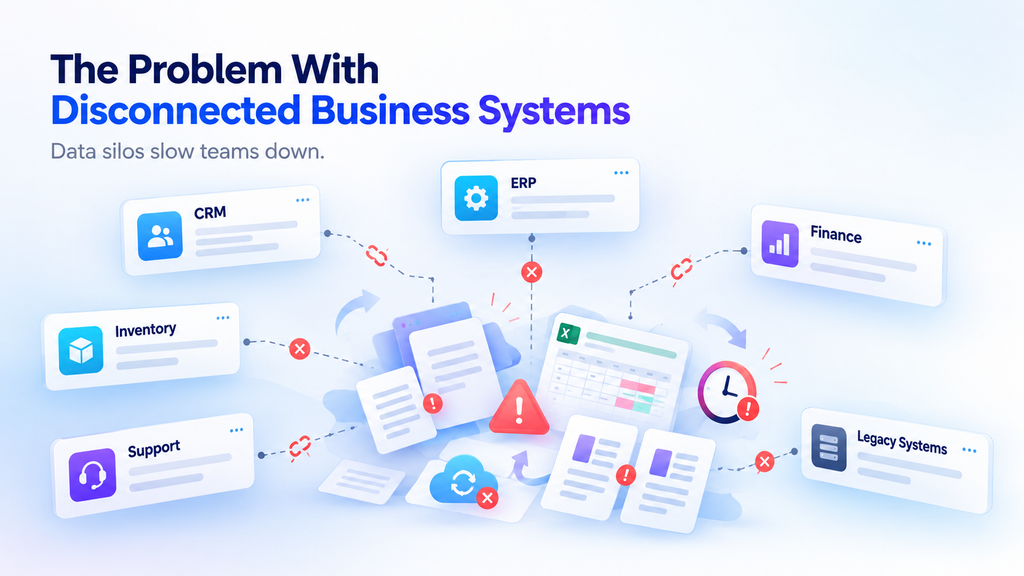
The Problem With Disconnected Business Systems
Disconnected applications create friction everywhere.
A sales representative closes an opportunity in Salesforce.
Someone exports the information.
Another employee enters it into the ERP.
Finance creates an invoice.
Operations checks inventory.
The customer contacts support about delivery.
The support representative then asks another department for an update.
Every handoff introduces delay.
Worse, every manual transfer introduces the possibility of error.
Customer names may differ between systems. Addresses become outdated. Product codes may not match. Order statuses may be stale. Employees may begin maintaining spreadsheets because the official systems do not communicate effectively.
This gradually creates data entropy—the deterioration of information consistency as data moves across disconnected processes.
Integration attacks this problem at the architectural level.
How MuleSoft Connects Salesforce With Other Systems
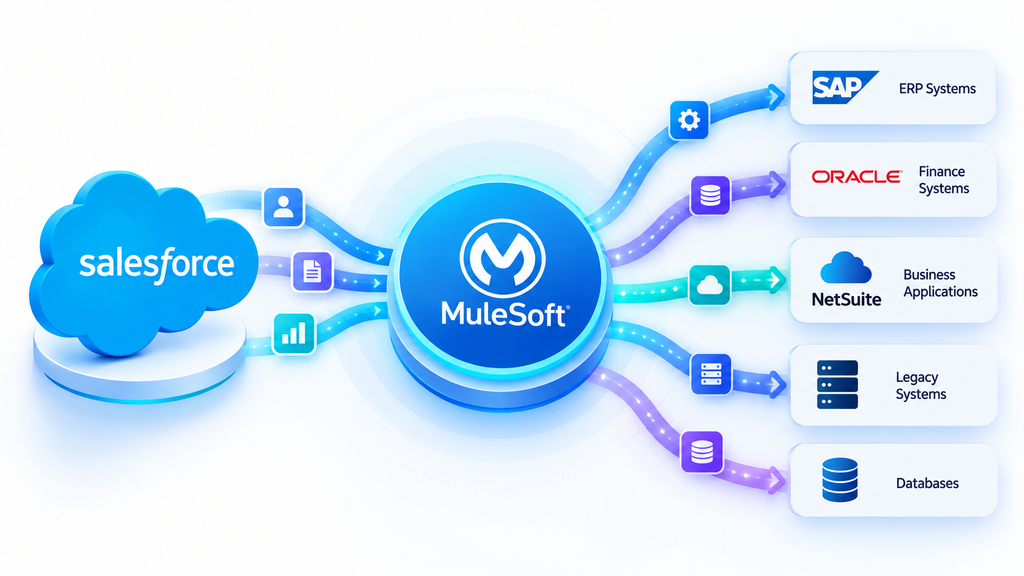
MuleSoft typically sits between Salesforce and other applications as an integration and API layer.
Imagine the following flow:
Salesforce → MuleSoft → ERP
Salesforce requests information.
MuleSoft receives the request.
It communicates with the ERP.
The ERP returns its data.
MuleSoft transforms the response into the format Salesforce expects.
Salesforce presents the information to the user.
But MuleSoft can do considerably more than simply transport data.
It can:
- Transform data formats
- Apply business logic
- Authenticate requests
- Route transactions
- Coordinate multiple systems
- Handle errors
- Apply API policies
- Trigger downstream processes
- Monitor integrations
- Expose reusable services
This creates a controlled interoperability layer between otherwise independent systems.
Understanding MuleSoft Anypoint Platform
MuleSoft’s Anypoint Platform provides capabilities for building, managing, securing, and monitoring APIs and integrations.
Rather than creating integration code separately for every system, organizations can manage connectivity through a more unified architecture.
For example, an organization may create standardized APIs for:
Customer data
Product availability
Order creation
Invoice status
Shipment tracking
Once these capabilities exist as governed APIs, multiple applications can potentially reuse them.
Salesforce might use the shipment API.
A customer portal might use it too.
A mobile application could use the same capability.
An AI agent could eventually invoke it when answering a customer question.
One integration asset therefore becomes reusable infrastructure.
What Is API-Led Connectivity?
API-led connectivity is an integration approach in which business systems, processes, and experiences are exposed through reusable APIs instead of repeatedly creating direct point-to-point integrations.
MuleSoft commonly describes three conceptual API layers:
System APIs
Process APIs
Experience APIs
These layers help separate system connectivity from business logic and consumer-specific experiences.
A simplified architecture could look like:
Experience APIs
↓
Salesforce | Mobile App | Customer Portal | AI Agent
↓
Process APIs
Customer 360 | Order Management | Quote-to-Cash
↓
System APIs
Salesforce | SAP | Oracle | NetSuite | Databases
This separation creates loose coupling.
Systems can change without forcing every consuming application to be rebuilt.
System APIs: Unlocking Systems of Record
System APIs provide controlled access to underlying systems.
For example:
SAP System API
might expose:
- Customer information
- Products
- Inventory
- Orders
- Invoices
A Salesforce developer does not necessarily need to understand every internal SAP table or interface.
Instead, Salesforce consumes the standardized API.
This abstraction protects downstream applications from some of the complexity of the underlying system.
MuleSoft identifies ERP, billing systems, customer platforms, and proprietary databases as examples of systems that System APIs can unlock.
Process APIs: Orchestrating Business Processes
Process APIs sit above individual systems.
Their purpose is to combine data or capabilities into meaningful business processes.
Imagine Salesforce needs a complete order status.
That information may require data from:
ERP → Order information
Warehouse → Fulfillment status
Logistics → Shipment tracking
Finance → Payment status
Rather than forcing Salesforce to communicate separately with all four systems, a Process API can orchestrate those calls.
Salesforce asks:
“What is the status of Order 10458?”
The Process API coordinates the required systems and returns a coherent answer.
That makes integrations more modular and easier to reuse.
Experience APIs: Delivering Data Where It Is Needed
Different users need different representations of the same information.
A customer using a mobile application may need:
Order number
Status
Expected delivery date
A service agent may need:
Order details
Payment status
Warehouse information
Shipment history
Exceptions
An AI agent may need structured order information and permitted actions.
Experience APIs tailor information for these different consumers while allowing the underlying systems and processes to remain consistent.
This reduces duplication.
MuleSoft vs. Traditional Point-to-Point Integration
Point-to-point integration can appear attractive initially.
Connect Salesforce directly to SAP.
Then connect Salesforce directly to the billing platform.
Then the eCommerce system.
Then the warehouse.
Then the mobile application.
Eventually, the architecture resembles a plate of spaghetti.
Every application depends directly on several others.
When one interface changes, multiple integrations may break.
MuleSoft’s API-led model offers another approach:
Systems → Reusable APIs → Business Processes → Experiences
The objective is not to eliminate complexity magically.
It is to organize complexity.
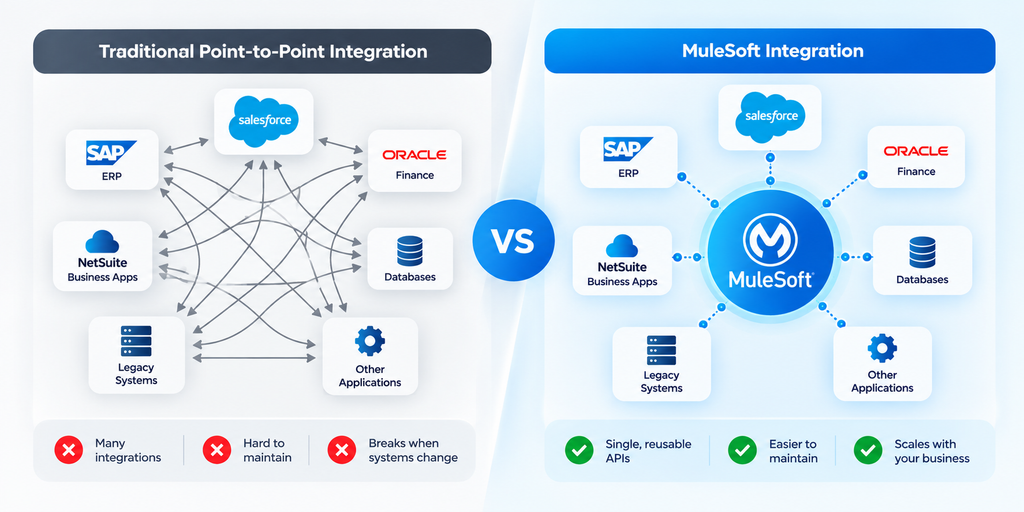
That makes enterprise integration more governable as the technology landscape grows.
How MuleSoft Connects Salesforce With ERP Systems
ERP integration is one of the most valuable MuleSoft Salesforce integration scenarios.
ERP platforms frequently contain operational information Salesforce users need, including:
- Inventory
- Orders
- Pricing
- Products
- Manufacturing information
- Procurement
- Billing
- Payments
- Fulfillment
Salesforce contains customer-facing information.
Connecting the two creates a bridge between customer demand and operational execution.
For example:
Salesforce Opportunity Closed Won
↓
MuleSoft validates customer and product information
↓
ERP sales order created
↓
ERP returns order number
↓
Salesforce opportunity updated
↓
Fulfillment begins
↓
Shipping status returned to Salesforce
This eliminates numerous manual handoffs.
Salesforce and SAP Integration With MuleSoft
SAP frequently operates as a central ERP in complex enterprises.
Salesforce, meanwhile, may manage sales, service, marketing, and customer engagement.
Connecting Salesforce and SAP allows information to flow between front-office and back-office operations.
A typical integration might synchronize:
- Accounts
- Customers
- Products
- Pricing
- Orders
- Inventory
- Invoices
- Credit status
- Shipment information
Consider a manufacturing sales representative preparing a quote.
Without integration, the representative may need to contact operations to determine whether the requested quantity can be delivered.
With Salesforce-SAP integration, Salesforce can retrieve relevant availability or product information through MuleSoft.
The sales conversation becomes faster and more informed.
Salesforce and Oracle Integration With MuleSoft
Organizations using Oracle applications can similarly connect operational and financial information with Salesforce.
Common integration scenarios include:
Salesforce → Oracle
- New customer creation
- Approved orders
- Contract information
- Opportunity information
Oracle → Salesforce
- Invoice status
- Payment status
- Product information
- Fulfillment information
- Customer account data
The objective is not indiscriminate synchronization.
Good architecture determines which system owns which information.
For example:
Salesforce may own prospect and opportunity data.
Oracle may own financial transactions.
The integration allows both systems to participate in the business process without creating unnecessary duplication.
Salesforce and NetSuite Integration With MuleSoft
NetSuite is another common platform organizations may need to connect with Salesforce.
A growing company might use:
Salesforce for sales and CRM
and
NetSuite for ERP, accounting, orders, and finance.
When an opportunity closes, integration can help turn the commercial transaction into an operational one.
For example:
Opportunity Closed Won
↓
Customer validated
↓
Sales order created in NetSuite
↓
Order ID returned
↓
Salesforce updated
↓
Invoice created later
↓
Invoice status available to Salesforce
Salesforce also supports MuleSoft for Flow integration scenarios involving systems such as NetSuite, allowing business workflows and external system actions to become more accessible from Salesforce automation.
Connecting Salesforce With Finance and Accounting Systems
Finance data is extremely valuable to customer-facing teams.
A salesperson should not necessarily need direct access to an accounting platform simply to understand whether a customer has outstanding invoices.
A service representative should not have to email finance to determine whether a refund was processed.
MuleSoft can expose appropriate financial information to Salesforce while maintaining governance around what information different users can access.
Common integration objects include:
- Invoices
- Payments
- Credit limits
- Refunds
- Account balances
- Tax information
- Subscription status
- Billing schedules
This creates a more complete operational view of the customer.
Salesforce Order-to-Cash Integration
Order-to-cash is a powerful example because it crosses several systems.
The process may begin with a salesperson.
1. Opportunity closes in Salesforce
The customer agrees to purchase.
2. MuleSoft receives the business event
Integration logic validates the information.
3. Customer information is checked
The ERP or finance system verifies the account.
4. Sales order is created
Products, quantities, pricing, and customer information are transferred.
5. Inventory is allocated
ERP or warehouse systems process fulfillment.
6. Shipment begins
Logistics systems provide tracking information.
7. Invoice is generated
Finance takes over the financial transaction.
8. Salesforce receives updates
Sales and service users can see relevant order, shipment, and invoice status.
Instead of eight disconnected steps, the process becomes a connected digital workflow.
Connecting Salesforce With Inventory and Supply Chain Systems
One of the most frustrating situations for sales teams is selling without visibility into operational reality.
A salesperson promises a product.
Then discovers it is unavailable.
Integration reduces this disconnect.
Salesforce users can potentially access:
- Available-to-promise quantities
- Warehouse availability
- Product locations
- Backorder information
- Estimated replenishment dates
- Shipment status
The CRM becomes more than a record of customer conversations.
It becomes an interface to the operational capabilities supporting those conversations.
Connecting Salesforce With Legacy and On-Premises Applications
Not every enterprise system has a modern REST API.
Some organizations still depend on:
- Mainframes
- Custom databases
- Older ERP applications
- Proprietary systems
- On-premises applications
- SOAP services
- File-based processes
Replacing these systems immediately may be unrealistic.
MuleSoft can provide an abstraction layer that helps expose useful data or functions through modern interfaces.
This is particularly important during digital transformation.
Organizations can modernize access to legacy capabilities without necessarily replacing every backend system simultaneously.
Salesforce can then consume standardized services while the complexity of the legacy environment remains behind the integration layer.
Real-Time vs. Batch Salesforce Integration
Not every piece of information needs to move instantly.
Choosing the right integration pattern is important.
Real-Time Integration
Real-time or near-real-time integration is useful when immediate information affects a decision.
Examples include:
- Inventory availability
- Credit checks
- Order submission
- Customer verification
- Shipment status
- AI agent actions
Batch Integration
Batch processing can be appropriate for large volumes of information that do not require immediate synchronization.
Examples include:
- Nightly master-data updates
- Historical transactions
- Large product catalogs
- Reporting datasets
- Periodic reconciliation
A mature integration architecture uses both patterns according to business requirements.
Making everything real time can create unnecessary complexity and cost.
Making everything batch-based can create stale experiences.
Architecture should follow the business need.
Data Transformation and Mapping With MuleSoft
Different systems rarely describe information identically.
Salesforce might represent a customer one way.
SAP may use another structure.
A legacy database may use obscure field names developed twenty years ago.
Integration therefore requires transformation.
For example:
Salesforce
FirstName
LastName
BillingStreet
BillingCity
might need to become:
ERP
CUSTOMER_NAME
ADDRESS_LINE_1
CITY_CODE
There may also be transformations involving:
- Dates
- Currencies
- Product codes
- Units of measurement
- Country codes
- Tax structures
- Nested data
- XML
- JSON
MuleSoft helps mediate these differences so applications do not need to understand each other’s internal structures directly.
Business Process Automation Across Multiple Systems
Integration becomes much more valuable when it moves beyond synchronization.
Consider customer onboarding.
A new customer signs a contract.
That single event could trigger:
Salesforce → Update account
ERP → Create customer
Finance → Create billing profile
Support → Create service entitlement
Identity system → Create access
Email platform → Send onboarding communication
One business event activates several systems.
This is cross-system orchestration.
It removes repetitive administrative work while helping ensure that critical steps are not forgotten.
How MuleSoft Supports Salesforce Flow
Salesforce Flow automates processes inside the Salesforce ecosystem.
MuleSoft extends the reach of automation beyond Salesforce.
Salesforce describes MuleSoft for Flow: Integration as a way to create automated connections between systems, keep information updated, reduce manual work, and respond to business events.
That creates an important combination:
Salesforce Flow + MuleSoft = Cross-System Business Automation
Imagine a service agent approving a refund.
A Salesforce Flow could orchestrate the Salesforce-side process while integration triggers the appropriate transaction in an external finance platform.
Once completed, the external result can update Salesforce.
The employee experiences one workflow.
Behind the scenes, several applications may participate.
MuleSoft, Data 360, and Enterprise Data
Integration and data unification solve related but different problems.
MuleSoft helps applications connect and exchange data or actions.
Salesforce Data 360 can help unify enterprise information into usable customer and business context.
Together, they can support a broader enterprise data architecture.
External operational systems remain important because many business actions still need to occur inside those systems.
An AI agent may understand a customer using unified data, for example, but actually processing an order cancellation could require calling an ERP or order-management system.
This is where connectivity becomes essential.
MuleSoft and Agentforce
The emergence of enterprise AI agents makes integration even more consequential.
An AI agent that can only answer questions is useful.
An AI agent that can securely interact with enterprise systems can become operationally transformative.
Salesforce positions MuleSoft as an integration layer that allows Agentforce to access external systems and take governed actions across them.
Consider this customer request:
“Where is my order, and can I change the delivery address?”
An agent may need to:
Identify customer → Salesforce
Retrieve order → ERP
Check shipment → Logistics platform
Determine whether modification is permitted → Business rules
Update address → Fulfillment platform
Record interaction → Salesforce
Confirm result → Customer
That is not simply AI-generated text.
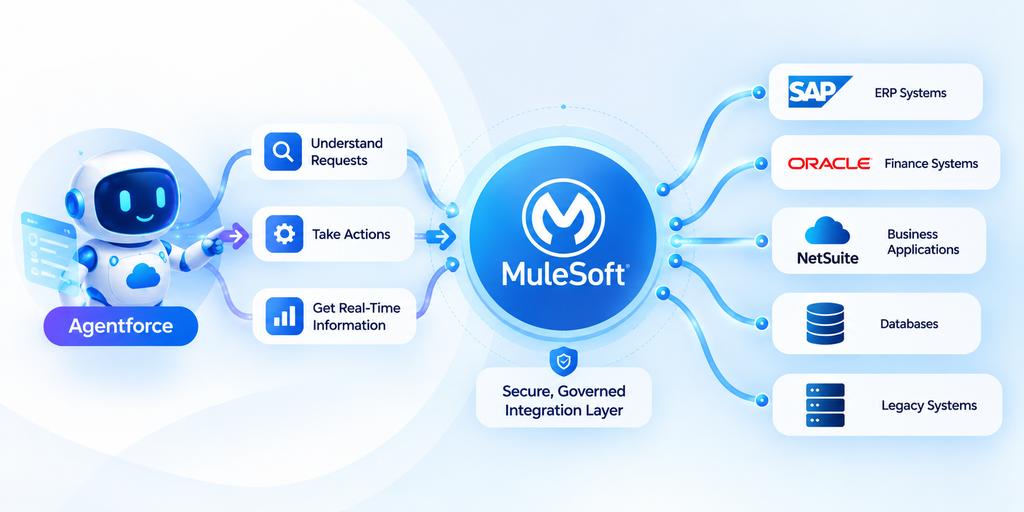
It is an orchestrated enterprise transaction.
MuleSoft helps provide the connectivity required for agents to move beyond conversation toward governed action.
API Security, Governance, and Control
Connecting systems creates enormous capability.
It also creates responsibility.
APIs must be controlled.
Organizations need to determine:
- Who can access an API?
- Which applications can invoke it?
- Which data can be returned?
- How frequently can it be called?
- Which actions are permitted?
- How are transactions audited?
- What happens when suspicious activity occurs?
API management therefore becomes part of enterprise security architecture.
This becomes even more important when AI agents are involved.
An AI agent should not automatically gain unrestricted access simply because an API exists.
Actions need authorization, policy enforcement, observability, and governance.
Error Handling and Integration Monitoring
Enterprise integrations eventually encounter failures.
A destination system may be unavailable.
Authentication may expire.
A field may contain invalid data.
An API may reach a limit.
A transaction may time out.
Professional integration architecture assumes failures will occur and determines what should happen next.
For example:
Request fails
↓
Retry automatically
↓
Still fails
↓
Place transaction in exception queue
↓
Alert integration team
↓
Correct issue
↓
Replay transaction
Monitoring also helps answer operational questions such as:
- Which integrations are failing?
- How long are API requests taking?
- Which systems are generating errors?
- How many transactions are being processed?
- Are integrations meeting expected service levels?
Integration without observability becomes difficult to operate at scale.
Common MuleSoft Salesforce Integration Use Cases
Organizations can use MuleSoft Salesforce integration across numerous business processes.
Sales and ERP
Create orders after opportunities close.
Sales and Finance
Display invoices and payment information inside Salesforce.
Service and ERP
Give service representatives access to order and product information.
Inventory Visibility
Retrieve stock information during sales conversations.
Customer Onboarding
Create customer records across CRM, ERP, billing, and support systems.
eCommerce Integration
Synchronize customers, orders, inventory, and fulfillment.
Quote-to-Cash
Connect quoting, contracting, ordering, invoicing, and payment workflows.
Legacy Modernization
Expose legacy information through reusable APIs.
Customer 360
Aggregate information from multiple enterprise systems.
AI Agent Integration
Allow governed AI agents to retrieve information and execute actions across systems.
Business Benefits of MuleSoft Salesforce Integration
The technical architecture matters because it produces business outcomes.
A More Complete Customer View
Employees gain access to customer, order, financial, and operational information across systems.
Less Manual Data Entry
Information can move automatically between applications.
Faster Business Processes
Sales, finance, service, and operations spend less time waiting for cross-department updates.
Better Data Consistency
Structured integrations reduce duplicate manual entry and uncontrolled data movement.
Improved Customer Experience
Employees can answer questions faster because information is accessible when needed.
Reusable Integration Assets
APIs created for one initiative may support future applications and workflows.
Easier Automation
Processes can extend beyond Salesforce into ERP, finance, logistics, and other platforms.
AI Readiness
Connected and governed enterprise capabilities give AI agents more useful context and a controlled mechanism for taking action.
Common Integration Mistakes to Avoid
Technology alone does not create a good integration architecture.
Several mistakes repeatedly cause problems.
Integrating Everything
Not every field needs synchronization.
Move only information that supports a legitimate business process.
Ignoring System Ownership
Every critical data domain should have an authoritative system of record.
Otherwise systems may continuously overwrite each other.
Creating Too Many Point-to-Point Connections
This increases technical debt and makes future changes harder.
Treating APIs as One-Time Projects
Reusable APIs should be treated as long-term digital products.
Ignoring Error Handling
Failures need defined recovery mechanisms.
Overusing Real-Time Integration
Real-time processing should be used when the business genuinely requires immediacy.
Forgetting Security
Integration expands the surface through which enterprise information can be accessed.
Governance cannot be an afterthought.
How to Plan a MuleSoft Salesforce Integration
Successful integration begins before development.
A practical process looks like this:
Step 1: Define the business outcome
Do not begin with APIs.
Begin with the process.
For example:
“Sales representatives need real-time inventory visibility while preparing quotes.”
That is much clearer than:
“We need Salesforce connected to SAP.”
Step 2: Identify participating systems
Document every application involved.
Step 3: Establish systems of record
Determine which application owns each important data domain.
Step 4: Define integration patterns
Choose between synchronous, asynchronous, event-driven, scheduled, or batch integration according to the use case.
Step 5: Design APIs for reuse
Look beyond the immediate project.
Could another application need the same capability?
Step 6: Define transformations
Map fields, formats, codes, and business rules.
Step 7: Design security
Determine authentication, authorization, permissions, and API policies.
Step 8: Plan error handling
Define retries, exceptions, logging, and alerts.
Step 9: Test realistic scenarios
Test failures as thoroughly as successful transactions.
Step 10: Monitor after deployment
Integration is an operational capability, not merely a development deliverable.
Why API Reusability Matters
Imagine three projects need inventory information:
Salesforce quoting
Customer portal
Mobile application
A point-to-point model may create three different inventory integrations.
An API-led model can potentially create one reusable inventory capability.
That difference becomes increasingly important over time.
Today, Salesforce needs the API.
Tomorrow, an eCommerce application needs it.
Next year, an AI agent needs it.
Reusable APIs reduce repeated integration effort while creating a more composable enterprise architecture.
The strategic question therefore changes from:
“How do we connect these two applications?”
to:
“What reusable business capability should we expose?”
That is a much more scalable way to think about integration.
When Should a Business Consider MuleSoft?
MuleSoft becomes particularly valuable when integration complexity begins increasing.
Organizations should consider it when:
- Salesforce must connect with multiple enterprise applications
- SAP, Oracle, NetSuite, or another ERP plays a major operational role
- Manual data entry exists between systems
- Multiple teams need the same backend information
- Existing point-to-point integrations are becoming difficult to maintain
- Legacy systems need modern API access
- Cross-system automation is a strategic priority
- API governance is becoming important
- The organization is preparing for enterprise AI agents
- Integration capabilities need to be reusable across multiple projects
For a very small environment with one simple integration, a full API-led architecture may be unnecessary.
Architecture should remain proportional to business complexity.
Building an Integration Foundation for the Agentic Enterprise
For years, enterprise integration was primarily discussed as a data problem.
How do we move information between applications?
That question is evolving.
In an agentic enterprise, the question becomes:
How can humans, applications, automations, and AI agents securely access and execute business capabilities across the organization?
An AI agent may need to:
Check inventory.
Create an order.
Verify an invoice.
Schedule a delivery.
Update an ERP record.
Retrieve contract information.
Create a support case.
Trigger a refund.
Each action depends on enterprise connectivity.
Salesforce describes its current integration and automation architecture as combining MuleSoft, Flow, APIs, enterprise data, and AI agents to support governed action across systems.
This changes the strategic importance of integration.
APIs are no longer merely plumbing between applications.
They can become controlled interfaces to enterprise capabilities.
That makes a well-designed MuleSoft architecture an important foundation not only for Salesforce integration today, but also for increasingly autonomous business processes tomorrow.
Why Work With a Salesforce and MuleSoft Integration Partner?
Enterprise integration crosses technology, data, security, and business processes.
A technically functional connection is not automatically a good architecture.
Organizations need to consider:
- Salesforce architecture
- MuleSoft architecture
- ERP architecture
- API design
- Data modeling
- Security
- Integration patterns
- Automation
- Error handling
- Governance
- Performance
- Scalability
- Future AI use cases
The most effective implementations therefore begin with the business process rather than the connector.
A knowledgeable Salesforce and MuleSoft integration partner can help determine what should be connected, which system should own the data, how information should move, where APIs should be reusable, and how the architecture can evolve without accumulating unnecessary technical debt.
Connect Salesforce With Your Enterprise Through CloudVandana
Your customers do not care which application stores their order, invoice, payment, or shipment information.
They expect your business to know.
Your employees expect the same.
If Salesforce is disconnected from ERP, finance, inventory, legacy, and operational systems, teams spend valuable time searching for information, switching applications, entering data manually, and waiting for other departments.
CloudVandana can help you build a connected Salesforce ecosystem.
As a Salesforce consulting partner, CloudVandana helps organizations connect Salesforce with enterprise applications and design integrations around real business processes—not isolated technical requirements.
Whether your goal is to:
- Connect Salesforce with ERP systems
- Integrate Salesforce with SAP, Oracle, or NetSuite
- Connect finance and accounting applications
- Automate order-to-cash workflows
- Integrate legacy applications
- Build reusable APIs
- Improve Salesforce data availability
- Automate cross-system processes
- Prepare enterprise systems for Agentforce and AI
- Modernize an existing integration architecture
CloudVandana can help assess your current environment, identify integration gaps, and design a scalable roadmap.
Stop Making Your Teams Work Around Disconnected Systems
Connect Salesforce, ERP, finance, data, and business applications into one coordinated enterprise ecosystem.
Talk to CloudVandana’s Salesforce integration experts today and discover where connected systems can eliminate manual work, accelerate operations, and prepare your business for AI-powered automation.
Frequently Asked Questions About MuleSoft Salesforce Integration
1. What is MuleSoft Salesforce integration?
MuleSoft Salesforce integration uses APIs, connectors, and integration workflows to connect Salesforce with external applications such as ERP, finance, accounting, eCommerce, databases, legacy systems, and custom applications. It allows information and business actions to move securely between Salesforce and other enterprise systems.
2. Can MuleSoft connect Salesforce with an ERP?
Yes. MuleSoft can connect Salesforce with ERP platforms so customer, product, pricing, order, inventory, invoice, and other operational information can move between CRM and ERP systems. ERP integration is one of the common use cases identified for MuleSoft’s Salesforce connectivity.
3. Can MuleSoft integrate Salesforce with SAP?
Yes. MuleSoft can be used to integrate Salesforce with SAP. Common Salesforce-SAP integration scenarios include customer synchronization, product and pricing information, order creation, inventory visibility, invoice status, and fulfillment information.
4. Can MuleSoft connect Salesforce and NetSuite?
Yes. Salesforce and NetSuite can be connected through MuleSoft to support processes involving customers, sales orders, products, finance, billing, and other ERP information. This is particularly useful for organizations using Salesforce for CRM and NetSuite for ERP or financial operations.
5. What is API-led connectivity in MuleSoft?
API-led connectivity is an architectural approach that organizes integration capabilities into reusable APIs. MuleSoft commonly describes System APIs for accessing systems of record, Process APIs for orchestrating business processes, and Experience APIs for delivering information to particular applications or users.
6. What is the difference between MuleSoft and Salesforce Flow?
Salesforce Flow primarily automates business processes in the Salesforce ecosystem. MuleSoft specializes in integration and connectivity across applications and enterprise systems. Used together, they can support workflows that begin in Salesforce and continue into ERP, finance, logistics, and other external platforms.
7. Does MuleSoft support real-time Salesforce integration?
Yes. MuleSoft can support real-time and near-real-time integration patterns as well as asynchronous and batch processing. The appropriate pattern depends on the business requirement, transaction volume, system capabilities, performance expectations, and data freshness requirements.
8. Can MuleSoft connect Salesforce with legacy systems?
Yes. MuleSoft can help expose information and capabilities from legacy databases, on-premises applications, older ERP systems, SOAP services, proprietary applications, and other enterprise technologies. APIs can provide a modern abstraction layer so Salesforce and newer applications do not need to interact directly with legacy complexity.
9. How does MuleSoft help with Salesforce ERP integration?
MuleSoft acts as an integration layer between Salesforce and ERP applications. It can retrieve and transform data, orchestrate transactions, apply security, manage APIs, handle integration errors, and coordinate processes involving multiple applications.
10. How does MuleSoft work with Agentforce?
MuleSoft can connect Agentforce with external enterprise systems through governed APIs and integrations. This can allow AI agents to retrieve information and, where appropriate permissions and controls exist, perform actions across third-party applications rather than operating only with information stored directly in Salesforce.
11. What are the main benefits of using MuleSoft with Salesforce?
Major benefits include improved access to enterprise information, reduced manual data entry, faster workflows, reusable APIs, better system interoperability, cross-system automation, stronger API governance, and an integration foundation that can support AI-powered processes.
12. Is MuleSoft necessary for every Salesforce integration?
No. Integration architecture should match the complexity of the requirement. A simple organization with one limited integration may not require a broad API-led architecture. MuleSoft becomes particularly valuable when multiple systems, reusable APIs, complex business processes, enterprise governance, legacy applications, or large-scale automation are involved.
Final Thoughts
Salesforce can transform how an organization manages customers, sales, service, data, automation, and AI.
But its value increases substantially when it is connected to the rest of the enterprise.
ERP knows what was ordered.
Finance knows what was paid.
Inventory knows what is available.
Logistics knows what was shipped.
Salesforce knows the customer.
MuleSoft helps those systems communicate.
Through APIs, connectors, transformations, orchestration, security, and reusable integration architecture, organizations can move away from isolated applications toward connected business processes.
And that transition is becoming increasingly important.
As Salesforce environments evolve from traditional CRM toward automation, unified data, and AI agents, businesses will need more than information stored in Salesforce. They will need secure access to the systems where real operational work happens.
That is the larger role of MuleSoft.
It does not simply connect Salesforce to another application. It helps turn a fragmented technology landscape into a connected enterprise capable of supporting people, workflows, applications, and AI agents together.

Atul Gupta is CloudVandana’s founder and an 8X Salesforce Certified Professional who works with globally situated businesses to create Custom Salesforce Solutions.
Atul Gupta, a dynamic leader, directs CloudVandana’s Implementation Team, Analytics, and IT functions, ensuring seamless operations and innovative solutions.
YOU MIGHT ALSO LIKE
How MuleSoft Connects Salesforce With ERP, Finance and Business Systems

Salesforce Customer 360: Connecting Sales, Service and Marketing Teams

Salesforce and Anthropic Launch Claudeforce: What It Means for the Future of Enterprise AI

Salesforce AIforce: What It Means for the Future of Enterprise Software

The Biggest Dreamforce 2026 Theme: The Agentic Enterprise