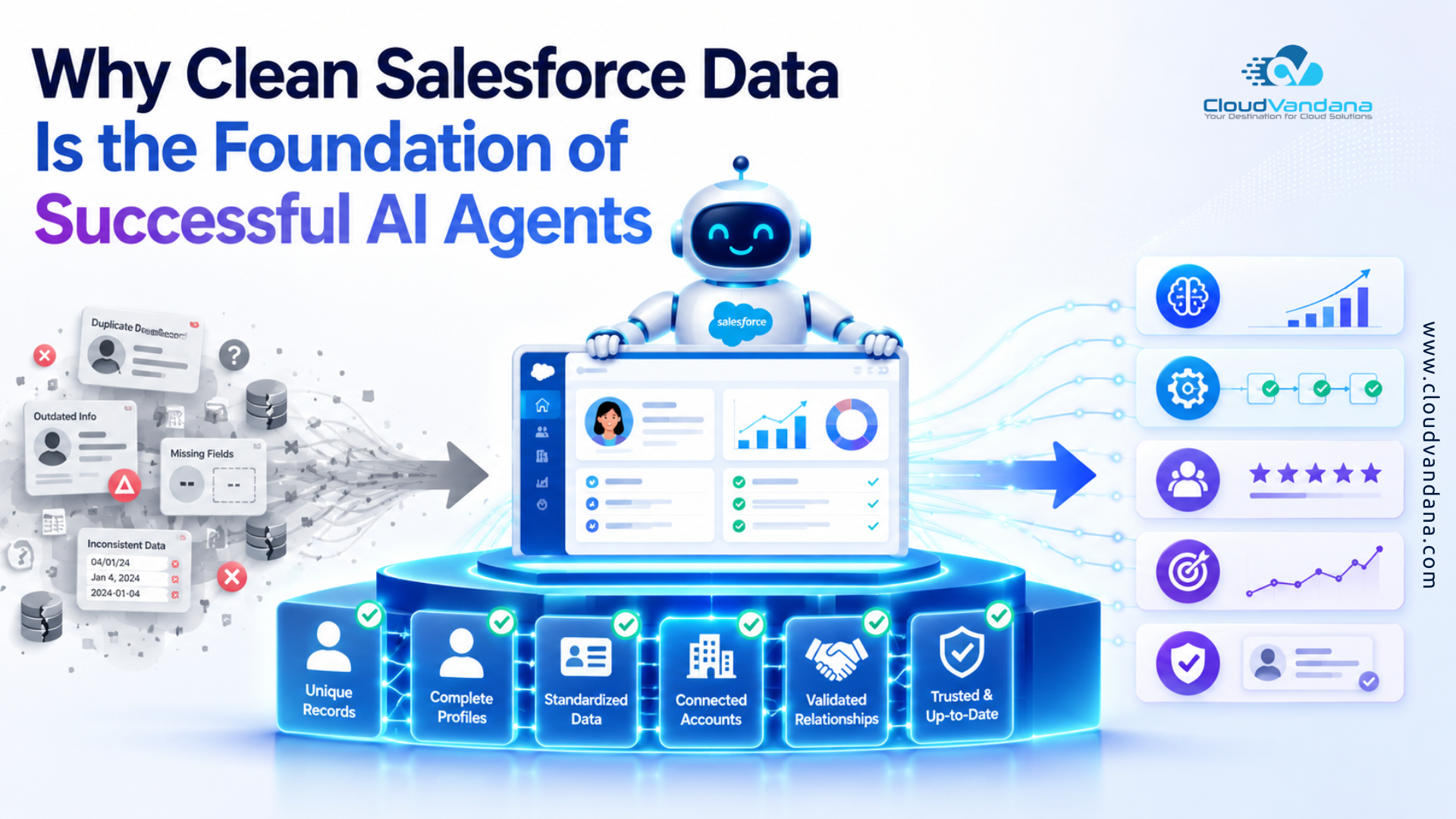
The AI Agent Revolution Has a Data Problem
AI agents are changing what businesses expect from Salesforce. Instead of simply displaying records, dashboards, and task lists, an AI agent can interpret a request, retrieve information, recommend an action, update a record, trigger a workflow, draft a response, or complete a multi-step process.
That is powerful. It is also unforgiving.
A CRM user may notice a duplicate contact, an incorrect opportunity amount, or an outdated article and pause to investigate. An autonomous or semi-autonomous agent moves faster—and can scale the consequences of unreliable data.
The central truth is simple: an AI agent cannot create dependable business intelligence from an undependable system of record.
Salesforce describes AI data readiness as an extension of traditional data-quality practices, with a focus on ensuring that only trustworthy and relevant information is accessible to agents. (Trailhead)
This is why data cleanup is not a minor technical task to complete after an Agentforce implementation. It is a foundational workstream that should begin before agent design, testing, or deployment.
What “Clean Salesforce Data” Actually Means
Clean data is not merely data without spelling mistakes. It must be usable, interpretable, current, governed, and appropriate for the task.
An opportunity can contain every required field yet still carry an outdated close date, inflated amount, and incorrect stage. It is technically complete but operationally untrustworthy.
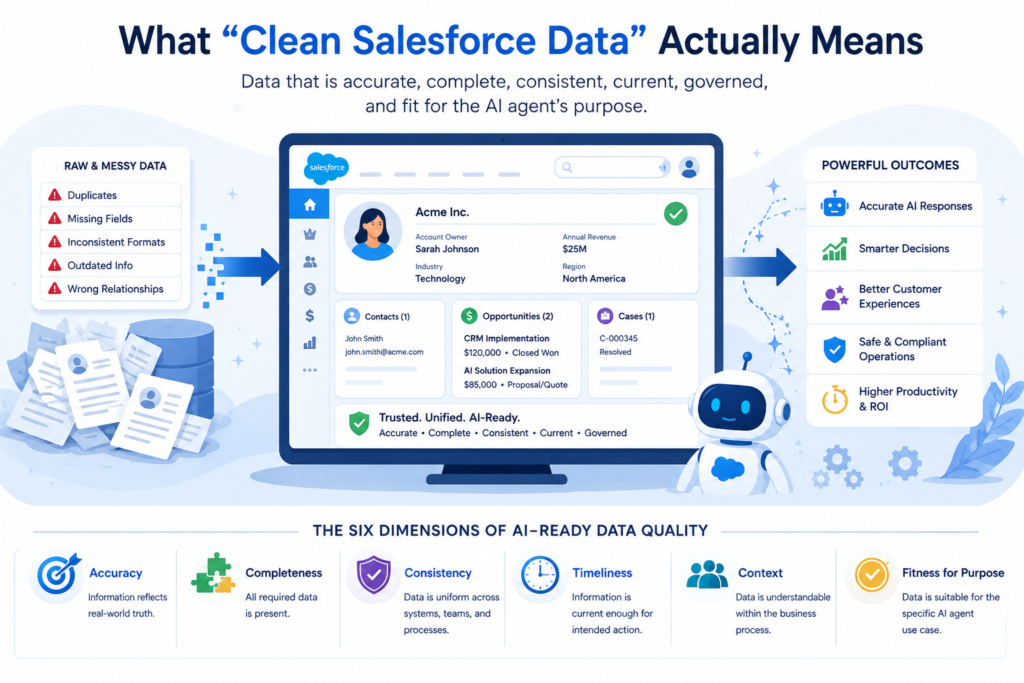
Salesforce identifies multiple dimensions of data quality, including consistency, completeness, correctness, timeliness, context, and relevance or fitness for purpose. (Trailhead)
For AI agents, each dimension affects the quality of reasoning and action.
The Six Dimensions of AI-Ready Data Quality
Accuracy: Does the information reflect reality?
Completeness: Are the fields required for the agent’s decision populated?
Consistency: Are values represented in the same way across records, systems, teams, and regions?
Timeliness: Is the information current enough for the intended action?
Context: Can the agent understand what the data means within the business process?
Fitness for purpose: Is the data suitable for the specific agent use case?
A billing agent and a lead-qualification agent need very different evidence. The same Salesforce org can therefore be ready for one agent and unready for another.
AI readiness is always use-case specific.
How Salesforce AI Agents Use Business Data
Salesforce AI agents do more than retrieve a single field.
Depending on their configuration, they may use structured CRM records, Data 360 profiles, Salesforce Knowledge, uploaded documents, emails, transcripts, Flow outputs, Apex actions, external systems, and other approved sources.
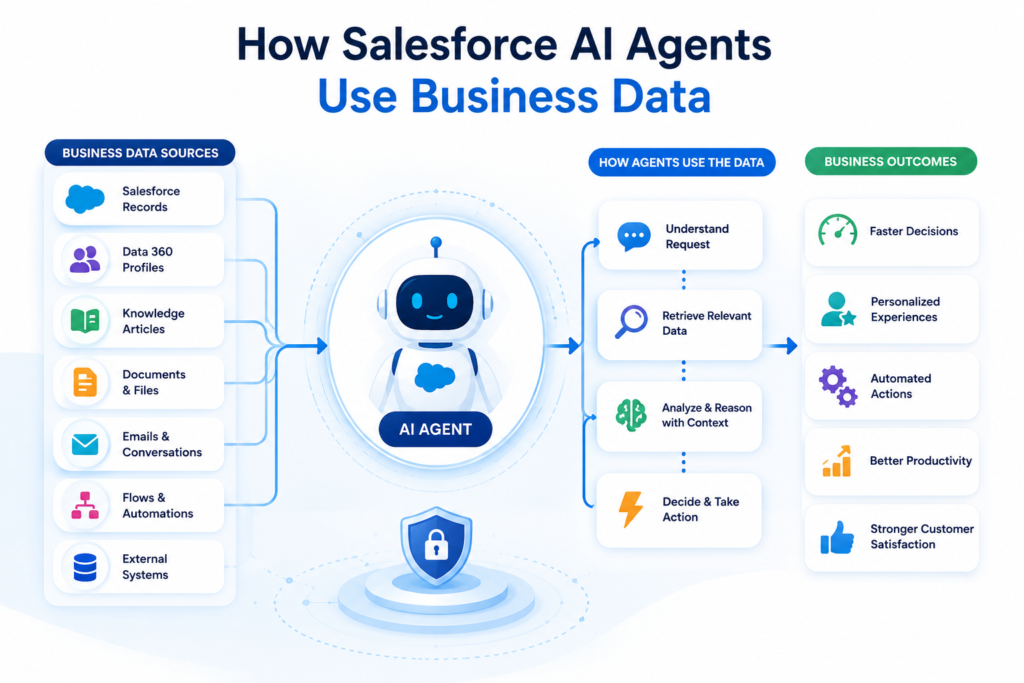
Salesforce explains that grounding can connect agents with structured data—such as Accounts, Contacts, Cases, and data model objects—as well as unstructured data such as documents, emails, chat logs, and social content. (Trailhead)
This creates an information chain:
Source data → Retrieval → Context → Reasoning → Action → Business outcome
A defect at the beginning propagates through the chain. Duplicates create conflicting context, empty fields weaken decisions, obsolete articles distort recommendations, and excessive permissions expose inappropriate information.
Clean data strengthens the agent’s entire operating mechanism.
Grounding: The Bridge Between AI and Your CRM
Large language models possess broad linguistic capability, but they do not inherently understand your customer contracts, pricing rules, escalation paths, product catalogue, case history, or sales methodology.
Grounding supplies this proprietary context.
Salesforce states that a strong agent uses organisational data to deliver high-quality responses and that Agentforce Data Libraries can organise and link relevant data to agents. (Salesforce)
Salesforce also describes retrieval-augmented generation, or RAG, as a way to improve the quality, accuracy, and relevance of generated responses by retrieving information from approved sources. (Salesforce)
Grounding is often discussed as the cure for hallucination. Yet grounding is only as reliable as the information retrieved.
Grounding cannot resolve five conflicting refund policies by magic. Nor can it turn an obsolete support article or fragmented customer profile into reliable truth.
Grounding reduces uncertainty only when the underlying information corpus is curated.
Why Better Models Cannot Rescue Bad CRM Data
Businesses sometimes assume that a more advanced AI model will compensate for poor data.
It will not.
A sophisticated model may express an incorrect conclusion more persuasively. It can infer missing context, but inference is not evidence. Without authoritative signals, it cannot reliably determine which conflicting record is true.
The output may sound confident while the source remains weak.
The remedy is not endless prompt refinement. Prompts can define behaviour, tone, boundaries, and decision logic. They cannot correct a customer’s wrong email address, repair a broken account hierarchy, identify the latest contract without metadata, or deduplicate records representing the same person.
Prompt engineering matters.
Data engineering, stewardship, and governance matter first.
Duplicate Records Create Conflicting Customer Truths
Duplicate records are among the most common barriers to successful AI agents.
Suppose Salesforce contains three contact records for the same buyer:
- One record shows an active opportunity.
- One contains recent support escalations.
- One contains the correct email address and consent status.
A human salesperson may recognise the duplication. An agent may treat the records as three different people, retrieve only one record, or combine details incorrectly.
The resulting outreach could be irrelevant, repetitive, or noncompliant.
Salesforce provides Duplicate Management, matching rules, and duplicate rules to detect, prevent, and manage duplicate Accounts, Contacts, and Leads. Salesforce also notes that clean, accurate data builds user trust and helps organisations work toward privacy and data-protection obligations. (Salesforce)
For AI use cases, duplicate prevention should be treated as a continuous control—not a one-time cleanup campaign.
Incomplete Fields Produce Incomplete Decisions
Required fields are often designed for human reporting rather than agent execution. That distinction matters.
A sales agent asked to prioritise leads may need employee count, region, product interest, engagement activity, existing technology, account tier, and disqualification reason.
When half of those fields are blank, the agent is not prioritising intelligently. It is ranking records based on partial evidence.
Missing data can make agents:
- Route work incorrectly.
- Draft generic messages.
- Skip qualified prospects.
- Recommend unsuitable products.
- Overlook contractual entitlements.
- Ask customers for information the business already possesses.
Completeness should be measured against the agent’s decision requirements—not merely the percentage of populated CRM fields.
Outdated Data Makes Agents Act on Yesterday’s Reality
AI agents can operate in real time, but real-time action on stale data is still wrong.
An account owner may have changed. A customer may have cancelled. A product may have been retired. A service-level agreement may have expired. A contact may have left the company. A legal consent status may have been withdrawn.
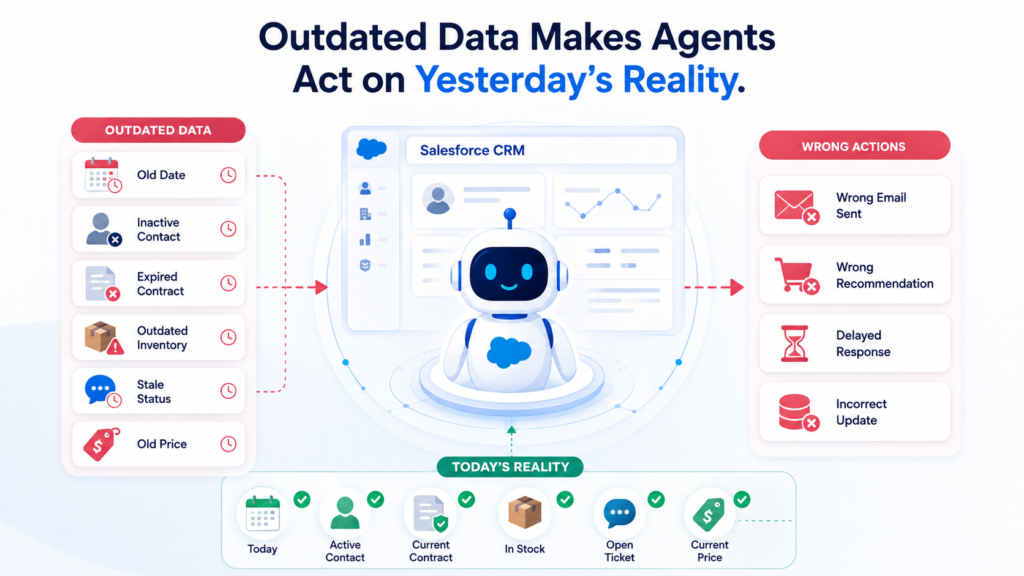
Without freshness controls, an agent can automate obsolete assumptions.
Every critical field needs a refresh expectation. Inventory, case status, meeting availability, pricing eligibility, and payment status may require near-real-time synchronisation.
Data timeliness must match the velocity of the decision.
Inconsistent Naming and Picklists Break Context
Humans can usually infer that “United States,” “USA,” “U.S.,” and “US” refer to the same country.
Automated segmentation, retrieval, and decision rules may not.
Inconsistent picklists, free-text values, abbreviations, currencies, date formats, product names, lifecycle stages, and industry labels create semantic fragmentation.
An agent may miss relevant records because the same concept appears under different labels.
Standardisation creates a common business vocabulary through:
- Controlled picklists.
- Canonical product names.
- Normalised geographic values.
- Consistent phone and address formats.
- Defined stage criteria.
- Shared reason codes.
- Clear field descriptions.
- A maintained data dictionary.
The objective is not cosmetic tidiness. It is machine-readable meaning.
Incorrect Relationships Distort the Customer Journey
Salesforce derives much of its value from relationships.
Contacts belong to Accounts. Opportunities connect to products. Cases relate to assets. Activities belong to people and deals. Parent-child account structures reveal complex buying groups.
When those relationships are wrong, the agent receives a distorted map.
A service agent may not see that a customer owns a covered asset. A sales agent may overlook that a prospect belongs to an existing global account. A renewal agent may contact a subsidiary without understanding the parent agreement.
An executive briefing agent may even aggregate performance under the wrong account hierarchy.
Relationship integrity is therefore essential for agents that reason across multiple objects.
Poor Knowledge Content Weakens Agent Responses
Structured CRM data is only one part of the picture.
Many agents depend on unstructured knowledge such as policies, procedures, implementation guides, product documentation, troubleshooting articles, and approved response templates.
Salesforce explains that Agentforce Data Libraries break large volumes of structured and unstructured information into smaller indexed pieces for retrieval. (Salesforce)
The retrieval system can only work well when the source content is clear, current, searchable, and authoritative.
Before grounding an agent:
- Remove duplicate or obsolete articles.
- Resolve contradictory instructions.
- Improve titles and summaries.
- Split oversized documents into focused topics.
- Assign ownership and review dates.
- Mark effective and expiry dates.
- Separate internal guidance from customer-facing instructions.
Knowledge hygiene is data hygiene.
Weak Permissions Turn Data Quality Into a Trust Risk
Data quality is inseparable from data access.
An agent should not retrieve every field simply because the data exists. Sensitive personal information, employee records, legal notes, financial details, health information, confidential pricing, and internal risk assessments require deliberate access controls.
Salesforce’s Einstein Trust Layer includes CRM grounding, sensitive-data masking, toxicity detection, audit trails, feedback capabilities, and zero-data-retention arrangements with third-party model providers. (Developer)
These controls are important, but they do not replace sound permission design.
A clean data foundation must answer two questions:
Is the information correct?
Is this agent allowed to use it for this purpose?
Trust requires both.
The Difference Between Hallucination and Bad Grounding
Not every inaccurate AI response is a pure hallucination.
A hallucination occurs when a model generates unsupported information. Bad grounding occurs when the model uses information supplied by the business, but that information is outdated, incomplete, ambiguous, or wrong.
The distinction matters because the remedies differ.
Hallucination risk may be reduced through better grounding, stronger instructions, constrained actions, citations, confidence thresholds, and human review.
Bad grounding requires source correction, data governance, content retirement, deduplication, metadata improvement, or integration repair.
Blaming the model for a bad record can conceal the real operational weakness.
How Dirty Data Damages Sales AI Agents
Sales AI agents may research accounts, qualify leads, recommend next actions, draft emails, summarise opportunities, prepare meetings, update records, or identify pipeline risk.
Dirty data can cause a sales agent to:
- Contact duplicate or disqualified leads.
- Personalise outreach with an incorrect title.
- Recommend the wrong product.
- Misread an opportunity’s true stage.
- Exaggerate forecast confidence.
- Ignore a parent-account relationship.
- Re-engage a customer who has opted out.
- Summarise activity from an incomplete record.
- Route a lead to the wrong territory.
The visible error may be a poor email.
The deeper cost is lost trust. Once salespeople believe the agent’s recommendations are unreliable, adoption deteriorates quickly.
How Dirty Data Damages Service AI Agents
Service agents are especially sensitive to data accuracy because their answers can affect customer satisfaction, refunds, entitlements, security, and compliance.
A service agent needs access to the correct customer, product, asset, case history, entitlement, knowledge article, warranty status, and escalation policy.
One incorrect relationship or obsolete policy can produce an inappropriate resolution.
Clean service data helps an agent distinguish a first-time question from a repeated failure, recognise an active escalation, and avoid making customers repeat information.
Fast service is valuable.
Correct service is indispensable.
How Dirty Data Damages Marketing and Commerce Agents
Marketing and commerce agents depend on identity, preferences, behaviour, catalogue information, pricing, inventory, and consent data.
When profiles are fragmented, a customer may receive repetitive messages across channels. When product data is inconsistent, recommendations become irrelevant.
When consent data is stale, outreach can create legal and reputational exposure. When inventory or pricing data is delayed, an agent may promote an unavailable or ineligible offer.
Personalisation without clean data becomes automated misrecognition.
The Role of Data 360 and Identity Resolution
Many organisations hold customer information across multiple Salesforce orgs, websites, commerce systems, data warehouses, support platforms, and marketing tools.
Cleaning Salesforce CRM alone may not produce a unified customer view.
Salesforce Data 360—formerly known as Data Cloud—can connect and unify data from multiple sources. Identity-resolution rules use matching and reconciliation logic to link source profiles into unified profiles. (Salesforce)
Salesforce architecture guidance describes Data 360 as a foundational intelligence layer that helps Agentforce agents access appropriate context at the right moment. (Architect)
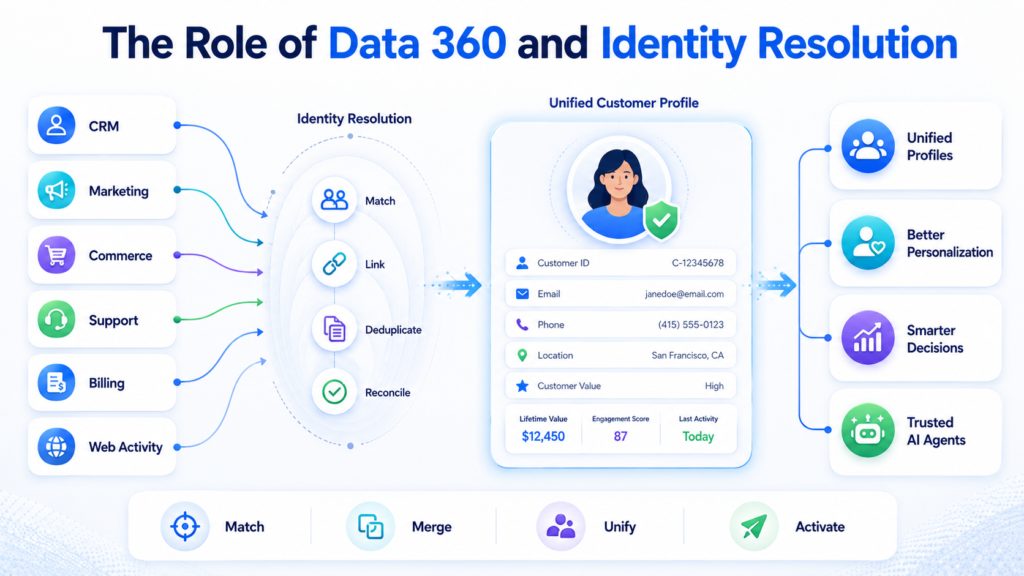
Identity resolution is not a substitute for governance.
Weak rules can over-merge different people or under-merge the same person, while unclear source priorities create doubtful profiles.
A unified profile is useful only when the unification logic is trustworthy.
The Business Case for Cleaning Salesforce Before AI
Data cleanup is sometimes viewed as an administrative cost.
In reality, it is an AI performance investment.
Clean Salesforce data can improve:
- Agent response accuracy.
- Task-completion rates.
- Customer personalisation.
- Routing quality.
- Sales prioritisation.
- Forecast credibility.
- Service-resolution consistency.
- Automation reliability.
- User adoption.
- Auditability.
- Compliance posture.
- Return on AI investment.
It also reduces exception costs.
Every incorrect AI action creates rework for a salesperson, service representative, administrator, integration team, or manager.
The cleaner the foundation, the less human effort is spent supervising avoidable errors.
How to Assess Salesforce Data Readiness for AI Agents
Start with a focused readiness assessment rather than a generic database audit.
Ask:
- What action will the agent take?
- Which objects, fields, documents, and systems support that action?
- Which source is authoritative for each value?
- How current must each field be?
- What permissions should apply?
- What failure could create customer, financial, legal, or reputational risk?
- Where is human approval required?
- How will the outcome be measured?
Then profile the relevant data.
Measure completeness, duplication, validity, consistency, freshness, ownership, relationship integrity, and source reliability across records, integrations, knowledge, identity rules, and automation.
A useful assessment produces a prioritised remediation backlog—not merely a quality score.
A Practical Salesforce Data Cleaning Framework
Step 1: Prioritise the AI Use Case
Do not attempt to clean the entire enterprise before starting.
Choose one high-value, bounded use case such as lead qualification, case summarisation, appointment scheduling, renewal preparation, or knowledge-based customer service.
Identify the minimum trustworthy dataset required.
This narrows the remediation effort and creates a direct connection between data work and business value.
Step 2: Profile and Score Existing Data
Data profiling establishes the baseline.
Salesforce’s data-quality guidance treats profiling as a starting point for assessing completeness, consistency, correctness, and other quality dimensions. (Trailhead)
Score every critical field and source for:
- Population.
- Validity.
- Duplication.
- Freshness.
- Conflicting values.
- Ownership.
- Relationship accuracy.
- Exception frequency.
Do not rely only on averages. A 95% completion rate means little when the missing 5% contains the accounts targeted by the agent.
Step 3: Remove and Prevent Duplicates
Merge records only after defining survivorship rules.
Decide which values should win when duplicate records conflict. The newest value is not always the correct value.
A verified customer update may be more authoritative than a recent form submission. A finance system may own billing status, while Salesforce owns opportunity stage.
After cleanup, use:
- Matching rules.
- Duplicate rules.
- Unique external IDs.
- Integration-level deduplication.
- User alerts.
- Recurring duplicate monitoring.
Prevention protects the investment.
Step 4: Standardise Fields, Formats, and Taxonomies
Create canonical formats for the data the agent will interpret.
Replace uncontrolled free text with picklists where appropriate. Normalise country, region, industry, lifecycle stage, product, and reason codes.
Define naming conventions. Document each field’s purpose and acceptable values.
Avoid excessive standardisation that erases meaningful nuance. The goal is consistent semantics, not artificial uniformity.
Step 5: Improve Completeness With Validation and Automation
Use validation rules, conditional required fields, guided screens, flows, formulas, enrichment, and integration updates to capture necessary information at the right moment.
Do not make every field required for every user.
That often creates fabricated values such as “N/A,” “Unknown,” or random placeholders. Instead, make requirements contextual.
A field should become mandatory when the business process reaches the point at which the information is genuinely known and operationally necessary.
Step 6: Correct Relationships and Ownership
Review:
- Account hierarchies.
- Contact roles.
- Opportunity products.
- Asset links.
- Case relationships.
- Campaign membership.
- Territories.
- Record ownership.
Agents need explicit relational context.
Ensure records connect to the correct entities and that ownership reflects current responsibility.
Where relationships are probabilistic, expose confidence or require human review rather than presenting an uncertain match as fact.
Step 7: Clean Integrations and Data Pipelines
A clean CRM will become dirty again if connected systems continue sending inconsistent records.
For every integration, define:
- Field ownership.
- Update direction.
- Conflict handling.
- Synchronisation frequency.
- Transformation logic.
- Failure monitoring.
- Record-merge behaviour.
- Consent propagation.
Integration governance is essential because agents often act across system boundaries.
Step 8: Prepare Knowledge for Retrieval
Create a curated knowledge corpus for the agent.
Assign content owners. Add descriptive titles and summaries. Break oversized documents into focused topics. Remove obsolete content. Mark effective and expiry dates. Resolve contradictions.
Separate internal guidance from customer-facing instructions.
Test retrieval using the language real users employ—not only the terminology preferred by subject-matter experts.
Step 9: Establish Governance and Stewardship
Data quality is a practice, not a project.
Salesforce’s data-management guidance similarly emphasises continuous profiling, cleansing, standardisation, enrichment, and monitoring rather than a one-time event. (Trailhead)
Assign executive sponsorship and clear owners for:
- Business data.
- Data stewardship.
- Salesforce administration.
- Integrations.
- Security and privacy.
- Knowledge content.
- The AI agent product.
- Business processes.
Define escalation paths and quality thresholds.
When no one owns a field, that field will eventually become unreliable.
Step 10: Test Agents Against Real Business Scenarios
Agent testing should include:
- Ordinary scenarios.
- Edge cases.
- Contradictory data.
- Missing fields.
- Duplicate identities.
- Stale records.
- Permission boundaries.
- Integration failures.
- Ambiguous requests.
Evaluate both answers and actions.
An agent may produce a correct summary but update the wrong record. It may retrieve the correct policy but apply it to an ineligible customer. It may complete a task but expose information to an unauthorised user.
Pilot in a controlled environment, preserve audit trails, require approval for high-impact actions, and expand autonomy only after evidence supports it.
Metrics That Prove Your Data Is AI-Ready
Track data quality and agent performance together.
Useful metrics include:
- Duplicate-record rate.
- Critical-field completeness.
- Data-freshness compliance.
- Invalid-value rate.
- Identity-match confidence.
- Knowledge-retrieval precision.
- Responses supported by approved sources.
- Agent task-completion rate.
- Human correction rate.
- Wrong-record action rate.
- Escalation rate.
- Customer satisfaction.
- User adoption.
- Time saved per completed task.
The human correction rate is especially revealing.
When employees continually repair agent outputs, the system is not creating autonomous value. It is simply relocating manual work.
Common Mistakes to Avoid
Cleaning Everything Without a Defined Use Case
Enterprise-wide cleanup can become interminable.
Start with the data required for a specific agent outcome. Expand the scope as the agent’s responsibilities grow.
Treating Data Cleanup as an IT-Only Responsibility
Business teams define what values mean, which source is authoritative, and when information becomes stale.
IT cannot make those decisions alone.
Focusing Only on Structured CRM Records
Knowledge articles, documents, transcripts, emails, and external systems may shape the agent’s response just as strongly as Salesforce fields.
Ignoring Permissions Until Deployment
Security must be designed with grounding, retrieval, and actions from the beginning.
Retrofitting access controls after development can require substantial redesign.
Measuring Volume Instead of Fitness
Millions of records do not create intelligence.
Relevant, trustworthy, contextual records do.
Launching Without a Feedback Loop
Agents need monitoring, user feedback, exception review, auditability, and recurring quality checks.
Production use will reveal data problems that pre-launch testing did not anticipate.
A 90-Day Salesforce Data Readiness Roadmap
Days 1–30: Discover and Prioritise
Select the first agent use case. Map required data and actions. Identify authoritative sources.
Profile critical objects, fields, documents, and integrations. Define risk levels, permissions, success metrics, and human-review requirements.
Days 31–60: Clean and Control
Resolve priority duplicates. Standardise key fields. Repair relationships. Improve required-field logic.
Correct integration mappings. Curate knowledge. Configure validation, duplicate prevention, monitoring, and ownership.
Days 61–90: Pilot and Improve
Test representative and adversarial scenarios. Deploy to a controlled user group.
Track retrieval quality, task completion, corrections, and escalations. Fix root-cause data issues.
Expand the agent’s scope only when quality thresholds are consistently met.
This sequence creates momentum without sacrificing trust.
Build Trusted AI Agents With CloudVandana
Successful AI agents are not built by connecting a model to Salesforce and hoping for intelligent outcomes.
They are built on disciplined data architecture, clear business processes, reliable integrations, governed knowledge, and continuous quality management.
CloudVandana helps businesses prepare Salesforce for the agentic era through:
- Salesforce data-quality assessments.
- Data cleansing and deduplication.
- Salesforce data migration.
- CRM and enterprise-system integration.
- Data 360 strategy and implementation.
- Agentforce readiness assessments.
- AI agent use-case planning.
- Salesforce Flow optimisation.
- CRM governance and security design.
- Knowledge preparation and agent grounding.
- Agent testing and controlled deployment.
- Ongoing Salesforce support and optimisation.
Do not let poor CRM data undermine your AI investment.
Partner with CloudVandana to build a clean, unified, AI-ready Salesforce foundation—and deploy agents your teams and customers can trust.
Book a free consultation with CloudVandana today and start preparing your Salesforce environment for successful AI agents.
Frequently Asked Questions
1. Why is clean Salesforce data important for AI agents?
AI agents use Salesforce data to understand context, make decisions, generate responses, and execute actions. Duplicate, incomplete, outdated, or incorrect records can therefore produce inaccurate recommendations and harmful automation.
2. What does AI-ready Salesforce data mean?
AI-ready Salesforce data is accurate, complete, consistent, current, relevant, correctly related, securely accessible, and suitable for a defined agent use case. It also includes governed knowledge and reliable integration data.
3. Can Agentforce work with dirty data?
Agentforce can technically access imperfect data, but the quality of its responses and actions will be constrained by that data. Grounding improves relevance; it does not automatically correct inaccurate source records.
4. Which Salesforce objects should be cleaned first?
Start with the objects used by the first AI agent use case. These commonly include Accounts, Contacts, Leads, Opportunities, Cases, Assets, Contracts, Products, Activities, and Salesforce Knowledge.
5. How do duplicate records affect Salesforce AI agents?
Duplicates create conflicting versions of a customer. An agent may contact the same person multiple times, retrieve an incomplete history, apply the wrong consent status, or act on the wrong record.
6. Does Data 360 automatically fix Salesforce data quality?
Data 360 can unify data using identity resolution and reconciliation, but it does not eliminate the need for source governance, accurate mappings, thoughtful matching rules, and continuous quality monitoring.
7. What is grounding in Salesforce AI?
Grounding supplies an AI model with approved business context from Salesforce records, Knowledge, documents, Data 360, and other connected sources. It helps responses become more relevant and specific to the organisation.
8. How can businesses reduce AI hallucinations in Salesforce?
Businesses can reduce hallucination risk by using high-quality grounding sources, constraining the agent’s scope, defining clear instructions, requiring citations where appropriate, setting confidence thresholds, testing edge cases, and adding human approval for high-impact actions.
9. How often should Salesforce data be cleaned?
Salesforce data quality should be monitored continuously. High-change datasets may require real-time or daily controls, while broader quality audits can be performed monthly or quarterly. The cadence should reflect business risk and data velocity.
10. Who is responsible for Salesforce data quality?
Responsibility is shared among business data owners, data stewards, Salesforce administrators, integration teams, security teams, knowledge owners, and process leaders. Executive sponsorship is essential for resolving cross-functional issues.
11. Which metrics show whether Salesforce data is ready for AI?
Important metrics include duplicate rate, critical-field completeness, freshness, validity, identity-match quality, knowledge-retrieval precision, agent correction rate, wrong-record actions, task completion, escalation rate, and user adoption.
12. Should a company clean all Salesforce data before launching an AI agent?
Not necessarily. Begin with a bounded use case and clean the records, fields, knowledge, and integrations required for that use case. Expand the data-remediation programme as the agent’s responsibilities grow.
The article is ready for publishing and can also be repurposed into a Salesforce data-readiness checklist, LinkedIn carousel, or downloadable guide.

Atul Gupta is CloudVandana’s founder and an 8X Salesforce Certified Professional who works with globally situated businesses to create Custom Salesforce Solutions.
Atul Gupta, a dynamic leader, directs CloudVandana’s Implementation Team, Analytics, and IT functions, ensuring seamless operations and innovative solutions.
YOU MIGHT ALSO LIKE

Financial Services Cloud: A Complete Guide for Banking and Wealth Management
How MuleSoft Connects Salesforce With ERP, Finance and Business Systems

Salesforce Customer 360: Connecting Sales, Service and Marketing Teams

Salesforce and Anthropic Launch Claudeforce: What It Means for the Future of Enterprise AI

Salesforce AIforce: What It Means for the Future of Enterprise Software