Salesforce AIforce Is Changing How People Work With CRM
For decades, business software has followed a familiar pattern.
You open an application. You find the right menu. You navigate through records. You open a dashboard. You search for information. You switch between several screens. Then, after gathering enough context, you finally take action.
Artificial intelligence is beginning to change that model.
At Dreamforce 2026, Salesforce introduced AIforce, a new live interface layer designed to bring the power of Salesforce into the places where employees and AI agents already work.
Instead of requiring people to constantly go into Salesforce to access customer information, workflows, business logic, and actions, AIforce is designed to make those capabilities available through AI-powered interfaces such as Claude, Slack, and Salesforce Lightning itself.
That may sound like another AI product announcement.
But the idea behind AIforce is much bigger.
Salesforce is essentially asking a new question:
What if business software no longer needed one fixed interface?
What if a sales representative could simply ask an AI assistant:
“Which opportunities need my attention today?”
What if a service manager could ask:
“Show me customers with urgent open cases and declining satisfaction.”
What if a sales leader could create a live pipeline view just by describing what they wanted to see?
And what if employees could perform those actions without leaving the tools where they already spend their day?
That is the direction Salesforce AIforce is trying to create.
It represents a movement away from software built mainly around screens, fields, menus, and dashboards toward software where AI becomes the interface and enterprise systems become the trusted intelligence behind it.
For companies already using Salesforce, that shift could become important.
Let’s explore what AIforce is, how it works, how it connects with Agentforce, Data 360, Claude, and Slack, and what businesses should start thinking about now.
What Is Salesforce AIforce?
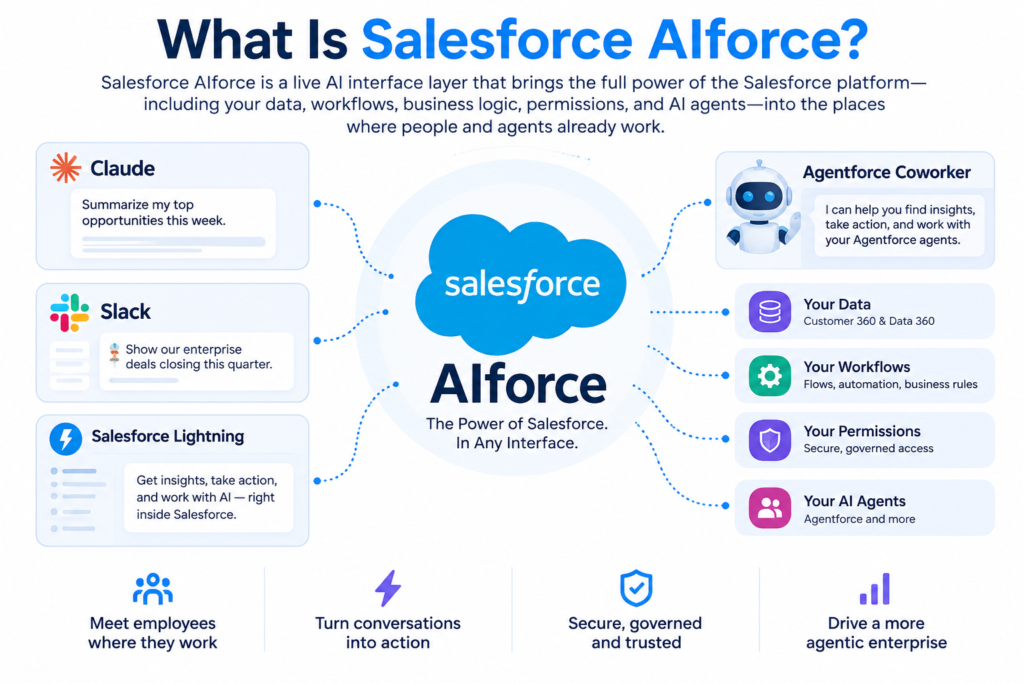
Salesforce AIforce is a live AI interface layer that allows people and AI agents to access Salesforce data, workflows, business logic, permissions, and actions through different AI-powered interfaces.
Instead of forcing every employee to work through a traditional Salesforce screen, AIforce is designed to bring Salesforce capabilities into the environment where the employee is already working.
That could be:
- Claude
- Slack
- Salesforce Lightning
- Agentforce Coworker
- Future AI applications
- Custom agent interfaces
- Enterprise productivity tools
Salesforce describes AIforce as a way to transform the Salesforce customers already have into a more dynamic interface that can assemble relevant data, applications, workflows, and business context depending on the task.
The important word here is context.
AIforce is not simply another chatbot sitting on top of CRM records.
Its value comes from connecting AI reasoning with the information and controls that already exist inside a company’s Salesforce environment.
That includes customer records, sales activity, service information, workflows, permissions, processes, metadata, automation, business rules, and connected enterprise data.
The AI therefore has the potential to understand not just what a record says, but also how the organization works around that record.
Why Salesforce AIforce Matters
Most businesses do not have a shortage of software.
They have a shortage of easy access to the knowledge hidden inside their software.
Consider a typical salesperson preparing for a customer meeting.
They may need to review:
- Account information
- Previous opportunities
- Recent emails
- Open support cases
- Meeting notes
- Renewal dates
- Product usage
- Internal Slack conversations
- Pipeline history
- Previous objections
- Customer sentiment
All of that information might exist somewhere.
The problem is finding it quickly enough to use it.
Traditional enterprise software usually expects the employee to become the integration layer.
The employee opens several systems, gathers information, compares it, remembers important details, and then decides what to do.
AIforce aims to reverse that model.
Instead of asking the employee to search through the system, the system can potentially bring together the relevant context for the employee.
The interface becomes less about:
“Where is the information?”
and more about:
“What do I need to know, and what should happen next?”
That difference could fundamentally change how employees interact with CRM platforms.
From Fixed Interfaces to Intelligent Interfaces
Traditional enterprise applications are usually designed around predetermined interfaces.
Someone decides which fields appear on the screen.
Someone creates the dashboard.
Someone builds the report.
Someone determines which information is shown.
That approach works well when everyone needs roughly the same experience.
But businesses rarely operate that way.
A CEO looking at an account wants something very different from a salesperson.
A service manager wants something different from both.
A finance team may need another view.
A regional sales director might care about a completely different set of information.
AIforce introduces the idea of composable interfaces.
Instead of always depending on a predefined dashboard, users may be able to describe what they need and receive a live interface built around that request.
For example:
“Show my five largest opportunities closing this month, include the latest activity, open support issues, decision makers, and next actions.”
Rather than manually creating several reports, filters, and views, an AI-powered interface could assemble the required information dynamically.
This is one of the more interesting ideas behind Salesforce AIforce.
The future CRM interface may not always be something an administrator designs months in advance.
It may increasingly be something that appears when a user asks for it.
AIforce and the Agentic Enterprise
AIforce also fits into Salesforce’s broader vision of what it calls the Agentic Enterprise.
The idea is that businesses will increasingly operate through a combination of:
- Human employees
- AI agents
- Enterprise applications
- Customer data
- Business processes
- Automation
- Governance
In that environment, AI is not simply used to generate text.
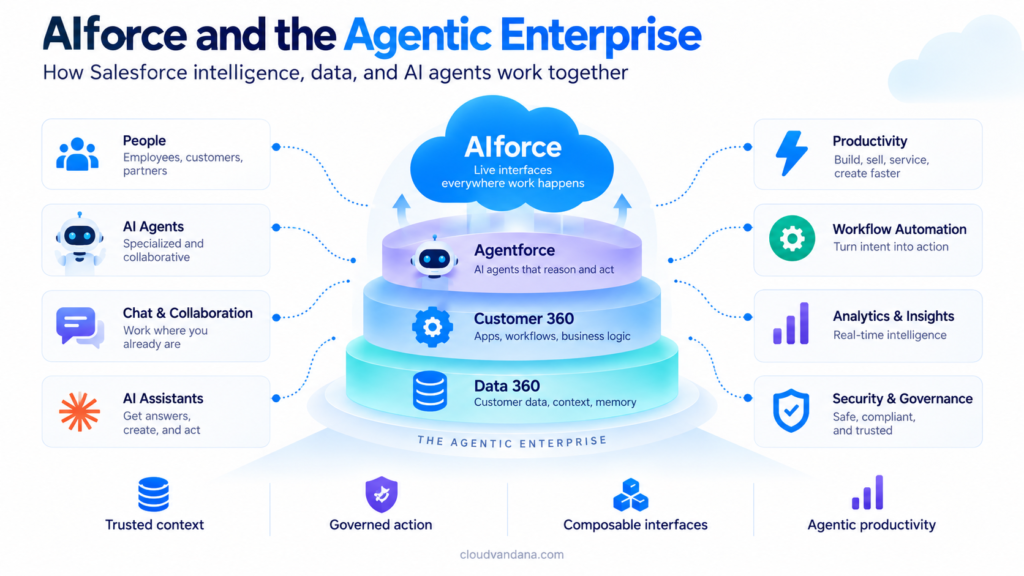
AI agents can reason about a business situation, retrieve information, select appropriate actions, trigger workflows, and collaborate with employees.
But intelligent agents need reliable business context.
A powerful AI model without access to the company’s actual data does not know:
Which customers matter most?
Which opportunity is genuinely at risk?
Which discount requires approval?
Which account belongs to which territory?
Who has permission to see a sensitive record?
What happens when an opportunity reaches a certain stage?
Which workflow should run?
That is where Salesforce’s existing platform becomes important.
AIforce is designed to connect AI interfaces with the enterprise context already available across Salesforce.
The Four Layers Behind Salesforce’s Agentic Enterprise
Salesforce’s current architecture brings together several major components.
Understanding them makes AIforce much easier to understand.
1. Data 360: The Data Foundation
AI needs context before it can provide useful answers.
Salesforce Data 360 is intended to help bring together data and context from different sources so agents can understand customers and the wider business.
Imagine asking:
“Which customers have the highest risk of leaving?”
Answering that properly may require more than a CRM record.
The system might need:
- Purchase history
- Support interactions
- Engagement levels
- Product usage
- Customer attributes
- Recent conversations
- Service issues
The quality of an AI agent’s answer depends heavily on the quality of the data available to it.
This is why enterprise AI projects often become data projects first.
If customer records are incomplete, duplicated, outdated, or badly structured, adding AI does not magically solve the problem.
It can simply allow inaccurate information to travel faster.
2. Customer 360: Business Context and Applications
Salesforce applications already contain years of organizational knowledge.
Sales Cloud knows how the sales organization operates.
Service Cloud contains service processes and customer histories.
Marketing systems contain engagement context.
Commerce platforms understand purchases, products, and transactions.
But there is another important layer: business logic.
Companies configure Salesforce around how they operate.
They build:
- Approval processes
- Validation rules
- Salesforce Flows
- Custom objects
- Permission sets
- Territory structures
- Automation
- Integrations
- Industry-specific processes
That business logic becomes extremely valuable when AI starts taking action.
An AI agent should not simply update anything it wants.
It needs to work within the rules of the business.
3. Agentforce: The Digital Workforce
Agentforce focuses on AI agents that can perform work.
Rather than only answering questions, agents can potentially carry out tasks using approved business actions.
For example, an AI sales agent might:
Identify a promising lead.
Review the account.
Analyze previous activity.
Recommend the next action.
Draft personalized outreach.
Create a follow-up task.
Update CRM information.
Route the opportunity.
Human employees can then remain involved wherever judgment, approval, relationship building, or strategic decision-making is required.
The goal is not simply to create smarter chatbots.
It is to create AI systems capable of participating in actual business processes.
4. AIforce: The Interface Layer
AIforce adds another piece.
It brings Salesforce capabilities into the different interfaces where people and agents work.
That distinction matters.
Agentforce focuses heavily on the agents doing work.
AIforce focuses on how people and agents access the intelligence and capabilities of the Salesforce platform.
In simple terms:
Data 360 provides context.
Customer 360 provides applications and business logic.
Agentforce provides digital agents.
AIforce makes those capabilities accessible through intelligent interfaces.
Together, they form a much broader enterprise AI architecture.
How Does Salesforce AIforce Work?
Imagine a salesperson starts the morning inside Claude.
Instead of opening Salesforce separately, the salesperson asks:
“Give me my priority deals for today.”
Through AIforce capabilities, the AI could potentially access the seller’s authorized Salesforce context.
It could look at:
- Pipeline changes
- Opportunity stages
- Account history
- Meetings
- Customer conversations
- Support activity
- Deal risks
- Pending tasks
The AI can then reason across that information and surface the most important opportunities.
The salesperson could then ask:
“Why is the Acme opportunity at risk?”
The system might identify that:
There has been no customer activity for two weeks.
A new support escalation is open.
The expected close date was moved twice.
A key decision maker has not responded.
The seller could follow with:
“Create a follow-up task and draft an email.”
The important difference is that the employee did not need to manually navigate through multiple records.
The conversation itself became the interface.
AIforce Is Designed Around Existing Permissions and Governance
Enterprise AI cannot ignore security.
Consumer AI tools can be useful when generating ideas, summarizing general information, or drafting content.
Enterprise systems are different.
They contain:
- Customer information
- Financial information
- Contracts
- Sales forecasts
- Internal conversations
- Personal data
- Confidential records
- Commercial strategy
Not every employee should see everything.
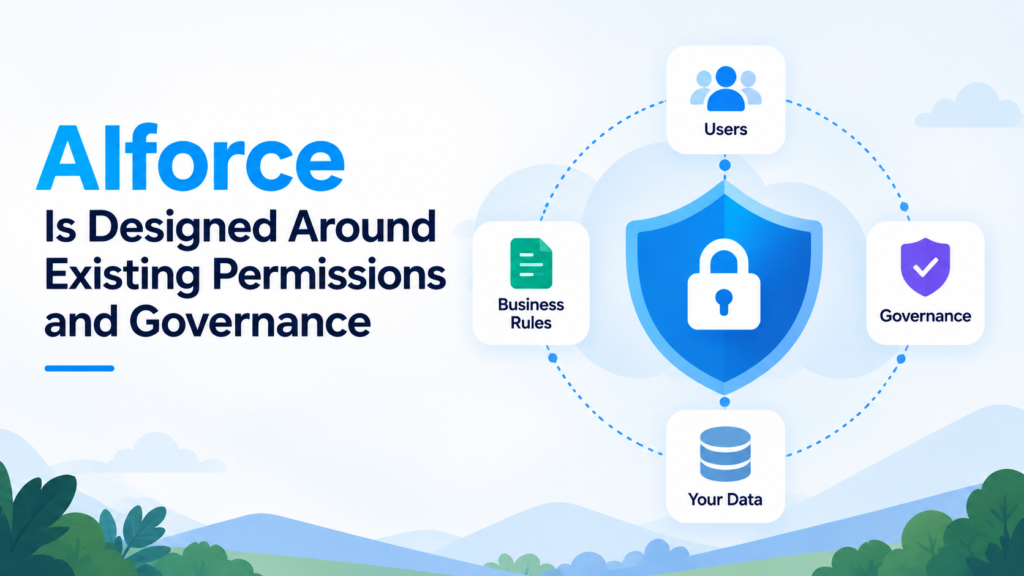
According to Salesforce, AIforce requests can operate using existing Salesforce permissions and business rules, helping ensure an agent sees only information available to the person making the request. Actions can also flow back through Salesforce’s controls.
That becomes extremely important as AI moves from answering questions to performing actions.
The real challenge in enterprise AI is not simply:
“Can AI do this?”
The better question is:
“Can AI do this securely, correctly, consistently, and under the right permissions?”
That is where governance becomes central.
What Does Zero Data Retention Mean for AIforce?
AIforce is also being positioned around Zero Data Retention with supported model experiences.
In practical terms, Salesforce says business data used to fulfill the request is not retained by the model provider after the interaction in supported configurations.
This reflects one of the biggest concerns enterprises have about generative AI.
Companies want the benefits of advanced AI models without losing control of sensitive business information.
Security therefore cannot be added later.
For enterprise AI, the trust architecture often becomes just as important as the model itself.
Claudeforce: Bringing Salesforce Into Claude
One of the first major examples of AIforce is Claudeforce.
Claudeforce represents Salesforce’s expanded partnership with Anthropic.
The first major product from this collaboration is Salesforce in Claude.
It connects Claude with Salesforce so sellers can access Salesforce context and perform approved actions directly inside Claude.
Salesforce says Salesforce in Claude includes 37 prebuilt sales skills, designed for tasks across the sales cycle.
These include activities related to areas such as:
- Prospecting
- Pipeline reviews
- Meeting preparation
- Deal analysis
- Customer health
- Account planning
- Pipeline hygiene
- Follow-up actions
The important idea is that Claude is not working only from a generic prompt.
It can work with the company’s actual Salesforce context.
A Practical Example of Salesforce in Claude
Suppose a sales representative asks:
“Which deals should I focus on this week?”
A normal AI assistant without company context would not know.
It has no idea what is currently happening in the salesperson’s pipeline.
Salesforce in Claude changes the situation.
The AI could reason across authorized Salesforce information and potentially identify:
- Deals approaching their close date
- Opportunities without recent activity
- Accounts with support problems
- Expansion possibilities
- Renewal risks
- Opportunities missing next steps
The seller could then ask:
“Prepare me for the meeting with this customer.”
The AI could bring together relevant account history and recent context.
Instead of spending 20 or 30 minutes searching through different systems, the salesperson begins with a prepared view.
That is a much more meaningful use of generative AI than simply asking it to draft another sales email.
Slackforce: Turning Conversations Into Live Business Interfaces
Another important part of the AIforce strategy is Slackforce.
Slack already acts as the communication layer for many organizations.
Teams discuss customers there.
Managers review projects there.
Employees share updates there.
AI agents may increasingly participate there as well.
The problem is that conversations and business systems often remain separated.
Someone discusses a deal in Slack.
Then they open Salesforce.
Then they find the opportunity.
Then they update it.
Then they return to Slack.
Slackforce is designed to reduce that separation.
Salesforce says Slackforce can bring live Salesforce context and intelligence into Slack conversations and workflows.
What Are Slackforce Surfaces?
One particularly interesting concept is Slackforce Surfaces.
Instead of showing only a text response, AI can potentially create an interactive interface inside the conversation.
Imagine a sales channel discussing quarterly performance.
Someone asks:
“Show enterprise opportunities above $100,000 closing this quarter.”
Rather than responding with paragraphs of text, the system could generate a live interface that team members can explore.
That interface could potentially include relevant live business data, filters, context, and actions.
Teams can therefore move from:
Talking about data
to:
Interacting with data inside the conversation.
This reflects the broader AIforce idea.
Interfaces become more fluid.
They appear where work is happening instead of forcing employees to constantly change applications.
Slack CRM Could Reduce Manual CRM Updates
Another capability connected with Slackforce is Slack CRM.
The concept is straightforward.
Instead of employees constantly moving between collaboration software and CRM, common Salesforce activities can happen directly inside Slack.
For example, users may be able to:
Create an account.
Update Salesforce records.
Add meeting notes.
Record customer information.
Trigger workflows.
All through a conversational interaction.
For Salesforce administrators and business leaders, this could address a familiar problem:
CRM adoption.
Employees sometimes avoid updating CRM because entering information feels like additional administrative work.
If CRM becomes part of the conversation employees are already having, that friction could decrease.
Agentforce Coworker: AI Inside Salesforce Lightning
AIforce is not only about bringing Salesforce into outside interfaces.
Salesforce is also improving the experience inside its own platform through Agentforce Coworker.
Agentforce Coworker acts as an AI teammate within Salesforce Lightning.
It can reason across information such as accounts, activity, and history, helping users surface insights and perform actions within the interface they already know. Salesforce says Coworker can also call specialized Agentforce agents that an organization has deployed.
This creates an interesting model.
An employee may interact with one main AI assistant.
Behind the scenes, that assistant can work with other specialized agents.
A seller might ask one question, while different agents handle:
Account research.
Product information.
Pricing.
Lead qualification.
Service history.
Opportunity analysis.
Instead of forcing employees to learn dozens of different AI tools, the interface can become simpler while the agent ecosystem behind it becomes more sophisticated.
What Could Salesforce AIforce Mean for Sales Teams?
Sales teams are likely to be among the first groups to see meaningful changes.
Sales representatives spend significant time collecting information.
Before a call they research the account.
After the call they update CRM.
During pipeline reviews they check multiple opportunities.
Before forecasting they review activity and deal movement.
AIforce could change that workflow.
Instead of searching for individual records, sellers could ask questions such as:
“Which deals changed since yesterday?”
“Which opportunities have no next step?”
“Where should I focus today?”
“Which customers may be ready for an expansion?”
“Prepare me for today’s meetings.”
This shifts CRM from being mainly a place where sellers enter information toward something that actively helps them use information.
What Could AIforce Mean for Customer Service?
Customer service teams face a similar challenge.
Support agents often need information from multiple sources.
A customer may contact support about one issue, but understanding that issue properly could require:
Purchase history.
Previous cases.
Account status.
Service entitlement.
Recent complaints.
Product usage.
Internal notes.
AIforce could potentially help surface that context faster.
Instead of manually reading through multiple tabs, the service agent could ask:
“Give me a summary of this customer’s issue and everything relevant from the last 30 days.”
The system could then bring together the information the employee is authorized to view.
The agent remains focused on solving the customer’s problem rather than searching for context.
What Could AIforce Mean for Salesforce Admins?
AI will not necessarily make Salesforce administrators less important.
It could make their work more strategic.
As AI agents gain more access to enterprise processes, administrators will need to think carefully about:
Data quality.
Permissions.
Automation.
Business rules.
Agent actions.
Governance.
Integration architecture.
Auditability.
Process design.
A badly designed CRM process does not become good simply because an AI agent runs it.
If anything, AI can amplify poor design.
If duplicate records exist, AI sees duplicate records.
If permissions are too broad, AI inherits those permissions.
If business logic is inconsistent, automated actions may expose that inconsistency.
Organizations therefore need strong Salesforce architecture before giving agents significant autonomy.
AIforce Makes Data Quality Even More Important
The excitement around enterprise AI often focuses on models.
But businesses should pay equal attention to data.
Consider this prompt:
“Which customers are most likely to renew?”
The AI needs reliable information about:
Customer activity.
Contracts.
Renewal dates.
Support interactions.
Product usage.
Revenue.
Engagement.
If half of those fields are missing, the answer becomes weaker.
This creates a simple rule for the AI era:
Better enterprise AI begins with better enterprise data.
Before introducing sophisticated agents, organizations should review:
Duplicate records.
Missing information.
Outdated records.
Data ownership.
Integration quality.
Field usage.
Data models.
Security.
Governance.
AI readiness is therefore not just an AI project.
It is a Salesforce optimization project.
AIforce vs Agentforce: What’s the Difference?
The names can easily create confusion.
Here is the simplest way to think about them.
Agentforce
Agentforce focuses on creating and deploying AI agents that can understand business context and perform work.
AIforce
AIforce is the interface layer that makes Salesforce intelligence, data, workflows, and agents available across different AI experiences.
So an organization could build several specialized Agentforce agents.
AIforce could then help employees interact with those capabilities from places such as Salesforce, Slack, Claude, or other supported interfaces.
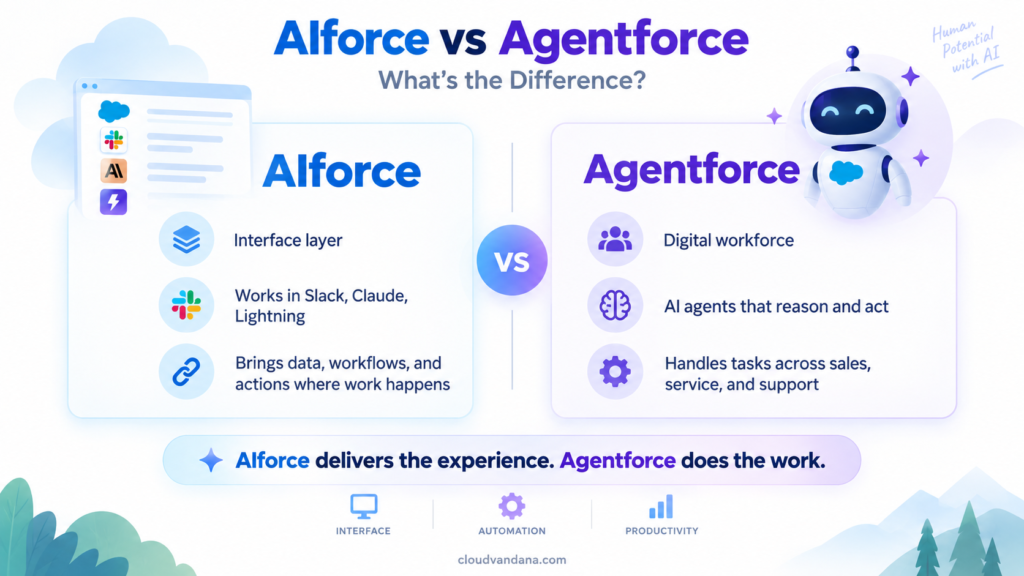
They are complementary rather than competing products.
AIforce vs Traditional Salesforce Interfaces
Traditional Salesforce screens are not disappearing overnight.
For many activities, structured interfaces remain extremely useful.
Administrators need configuration screens.
Analysts need detailed reports.
Sales representatives may still prefer opportunity views.
Service teams may continue using structured consoles.
The change is that the traditional UI may no longer be the only gateway into the Salesforce platform.
That is the important development.
People may increasingly choose the interface that makes sense for the task.
A complex configuration task might happen inside Salesforce.
A quick pipeline question might happen in Claude.
A team account review might happen in Slack.
A customer-support workflow may involve an Agentforce agent.
The Salesforce platform remains underneath these experiences.
The interface becomes flexible.
Why Composable Interfaces Could Be a Major Shift
Business software has historically been designed first and used later.
Developers and administrators decide what users need.
They build the interface.
Users then work within those limits.
Generative interfaces can reverse part of that process.
The user describes the outcome.
The interface is generated around the task.
For example:
A regional sales manager might say:
“Create a view showing my team’s largest deals, next meetings, risk signals, and open support cases.”
A service leader might ask:
“Show cases open for more than three days where the customer has premium support.”
A marketing manager might ask:
“Show high-value customers who engaged with our last campaign but have no active opportunity.”
Each person receives a different interface because each person has a different question.
That could significantly reduce dependence on static reports and dashboards for everyday analysis.
What Businesses Should Do Before Adopting AIforce
The technology is exciting.
But organizations should avoid treating AIforce as something they simply switch on and forget.
A successful adoption strategy should begin with the business.
Start With High-Value Use Cases
Do not start with:
“We need AI.”
Start with:
“Where are employees losing time?”
Look for activities such as:
Manual research.
Repeated data entry.
Meeting preparation.
Lead qualification.
Pipeline updates.
Case summarization.
Account research.
Internal knowledge searches.
Customer follow-ups.
Those are much easier to connect to measurable business value.
Review Salesforce Data Quality
Before expecting AI to reason across your CRM, examine the CRM itself.
Check whether records are:
Complete.
Current.
Consistent.
Correctly related.
Properly owned.
Free of unnecessary duplication.
AI cannot reliably compensate for years of poor data discipline.
Review Permissions
When AI can access more information faster, permissions become even more important.
Organizations should review:
Profiles.
Permission sets.
Object access.
Field-level access.
Connected systems.
Sensitive information.
External integrations.
The objective should be simple:
An AI assistant should not gain access to information that the employee using it should not see.
Audit Existing Automations
Many Salesforce organizations have built years of:
Flows.
Apex logic.
Validation rules.
Approval processes.
Integrations.
Scheduled jobs.
Before introducing additional agent actions, understand how those automations interact.
An AI agent triggering a workflow can potentially create downstream effects.
Good architecture matters.
Define Human Approval Points
Not every decision should be autonomous.
Businesses should decide where AI can act independently and where people should remain involved.
For example:
Drafting an email may require little risk.
Sending a large discount approval may require human review.
Updating a contact could be low risk.
Changing a contract may be high risk.
AI governance works better when these boundaries are intentional.
What Salesforce AIforce Says About the Future of Enterprise Software
The biggest idea behind AIforce is not a single feature.
It is the possibility that the relationship between people and software is changing.
For decades, humans learned how software worked.
We learned where menus were.
We learned which report to open.
We learned which fields to update.
We learned which screen contained the information.
Generative AI changes that relationship.
Increasingly, software can learn what the user wants.
The employee expresses an objective in normal language.
The system determines which information and actions are required.
That moves enterprise computing from:
Navigation-first software
toward:
Intent-first software.
That is a meaningful shift.
AIforce Could Make CRM Less Visible — and More Important
There is an interesting paradox here.
If AIforce succeeds, employees may spend less time looking directly at traditional CRM screens.
Yet Salesforce itself could become more important.
Why?
Because the platform becomes the trusted foundation behind many different AI experiences.
The employee might interact through Claude.
Or Slack.
Or Agentforce Coworker.
But Salesforce still provides customer context, permissions, workflows, data, and actions underneath.
The CRM becomes less visible as an interface while becoming more important as infrastructure.
That could be one of the defining changes in enterprise software over the next few years.
The Real Opportunity: Moving From AI Experiments to AI-Driven Work
Many companies have already experimented with generative AI.
Employees use it to:
Write emails.
Summarize documents.
Brainstorm ideas.
Generate content.
Create meeting notes.
Those use cases are helpful.
But they often remain disconnected from actual enterprise operations.
The next stage of AI adoption is different.
AI needs to understand:
Customers.
Processes.
Policies.
Permissions.
Workflows.
Business rules.
Historical activity.
Then it needs to participate in real work.
That is the direction products such as Salesforce AIforce, Agentforce, Claudeforce, Slackforce, and Agentforce Coworker are pointing toward.
AI moves from being a separate productivity tool to becoming part of the operational system of the company.
Salesforce AIforce and the Future of Trailblazers
The emergence of AI-powered interfaces also creates new opportunities for Salesforce professionals.
Admins, developers, consultants, architects, and business analysts will increasingly need skills that go beyond traditional CRM configuration.
They may need to understand:
Agent architecture.
Prompt and instruction design.
Data grounding.
AI governance.
Model context.
Agent actions.
Security boundaries.
Human-in-the-loop workflows.
AI testing.
Business-process redesign.
Integration architecture.
The most valuable Salesforce professionals may not simply be those who know where to configure something.
They will be the people who understand how humans, agents, data, applications, and automation should work together.
Is Your Salesforce Organization Ready for AIforce?
This may be the most useful question businesses can ask.
Not:
“Should we adopt AIforce?”
But:
“Is our Salesforce environment ready for agentic AI?”
A company may be ready if:
Its Salesforce data is reasonably clean.
Business processes are well defined.
Permissions are properly structured.
Automation is documented.
Integrations are reliable.
Teams understand where AI could remove meaningful friction.
Governance rules are established.
Human approval points are clear.
If those foundations are weak, the smartest step may be to improve them first.
Because AI adoption is rarely just about purchasing another product.
The quality of the outcome depends on the environment the AI enters.
Get Ready for Salesforce AIforce With CloudVandana
Salesforce AIforce points toward a future where CRM is no longer limited to one application screen.
Customer data, Salesforce workflows, automation, AI agents, and business intelligence can increasingly meet employees inside the tools where work is already happening.
But reaching that future requires more than enabling AI.
Your Salesforce environment needs the right data structure, automation, security, integrations, processes, and AI strategy behind it.
CloudVandana can help you prepare.
Whether you are exploring Salesforce AIforce, Agentforce, Data 360, Salesforce automation, AI agents, Salesforce integrations, or a broader CRM modernization initiative, our team can help you identify practical use cases and build the Salesforce foundation needed to support them.
Instead of implementing AI simply because it is new, build AI around the processes that can create measurable value for your business.
Ready to Make Your Salesforce Organization AI-Ready?
Talk to CloudVandana about your Salesforce and AI roadmap.
We can help you:
- Assess your existing Salesforce environment
- Identify high-value Agentforce and AI use cases
- Improve CRM data quality
- Modernize Salesforce automation
- Connect Salesforce with business applications
- Design secure AI-driven workflows
- Prepare your Salesforce architecture for agentic work
Start your Salesforce AI journey with CloudVandana today.
Frequently Asked Questions About Salesforce AIforce
1. What is Salesforce AIforce?
Salesforce AIforce is a live interface layer that brings Salesforce data, workflows, business logic, permissions, and actions into AI-powered interfaces. It allows users and AI agents to access Salesforce capabilities through environments such as Claude, Slack, Salesforce Lightning, and other supported experiences rather than always navigating through a traditional CRM interface.
2. When was Salesforce AIforce announced?
Salesforce unveiled AIforce during Dreamforce 2026 in September 2026 as part of its broader strategy for the Agentic Enterprise. The announcement expands Salesforce’s focus from AI agents alone toward intelligent interfaces that connect those agents with trusted enterprise data and workflows.
3. How is AIforce different from Agentforce?
Agentforce focuses primarily on AI agents that can reason and perform business tasks. AIforce acts as an interface layer that helps make Salesforce data, applications, workflows, and agent capabilities available through different AI experiences. In practice, Agentforce agents can be part of the wider environment that users access through AIforce.
4. Does AIforce replace Salesforce Lightning?
No. AIforce should not be viewed simply as a replacement for Salesforce Lightning. Traditional interfaces remain useful for structured workflows, administration, reporting, and complex processes. AIforce expands the ways people can interact with Salesforce by allowing conversational and dynamically generated interfaces alongside traditional screens.
5. What is Claudeforce?
Claudeforce is the expanded Salesforce and Anthropic partnership that connects Claude with trusted Salesforce business context. One of its first major offerings, Salesforce in Claude, provides 37 prebuilt sales skills designed to help sellers work with pipeline, accounts, meetings, prospecting, and other revenue activities directly through Claude.
6. What is Salesforce in Claude?
Salesforce in Claude is a plugin that brings Salesforce context and approved actions into Claude. It allows sellers to ask questions about their real sales environment, analyze opportunities, prepare for meetings, review pipelines, and take governed actions without constantly switching back to the traditional Salesforce interface.
7. What is Slackforce?
Slackforce brings Salesforce context and intelligence into Slack conversations and workflows. It is designed to allow people, agents, Salesforce information, and collaboration to come together within Slack, including interactive experiences that teams can explore and act on together.
8. What is Agentforce Coworker?
Agentforce Coworker is an AI teammate available within the Salesforce Lightning experience. It can reason across Salesforce business context, surface relevant insights, take approved actions, and work with specialized Agentforce agents that an organization has deployed.
9. Is Salesforce AIforce secure?
Salesforce is designing AIforce around existing Salesforce permissions, governance, and business rules. That means access to enterprise information can remain connected to the user’s existing permissions instead of creating a completely separate security model for every AI interface. Businesses should still carefully review their data access and governance before expanding AI capabilities.
10. What business problems could AIforce help solve?
Potential use cases include sales meeting preparation, pipeline analysis, account research, CRM updates, lead qualification, customer-service context gathering, internal knowledge discovery, workflow execution, management reporting, and other activities where employees currently spend significant time searching across business systems.
11. What should companies do before adopting AIforce?
Businesses should first review their Salesforce data quality, permissions, automation, integrations, business processes, and governance. They should also identify specific high-value business problems rather than beginning with AI technology alone. Strong CRM foundations will generally lead to more useful and reliable AI outcomes.
12. How can CloudVandana help with Salesforce AIforce and Agentforce?
CloudVandana can help businesses evaluate Salesforce environments, identify practical AI and Agentforce opportunities, improve Salesforce data and automation, integrate business systems, design AI-enabled workflows, and create a roadmap for adopting Salesforce’s evolving agentic capabilities.
Final Thoughts
Salesforce AIforce represents more than another addition to Salesforce’s AI portfolio.
It reflects a broader change in how enterprise software may work.
Employees have spent decades learning how to navigate applications.
The next generation of enterprise software may increasingly work the other way around.
Employees explain what they want.
AI understands the request.
Enterprise systems provide trusted context.
Agents perform approved actions.
And the interface appears around the work that needs to be done.
Salesforce is moving toward a world where its platform can operate behind Claude, Slack, Lightning, Agentforce, and future AI experiences while continuing to provide the data, security, business logic, automation, and governance companies depend on.
For businesses, the opportunity is significant.
But the companies that benefit most are unlikely to be those that simply activate the newest AI feature first.
They will be the companies that prepare their data, simplify their processes, modernize their automation, strengthen governance, and identify where AI can genuinely improve how people work.
AIforce may change the interface.
But strong business architecture will still determine what happens behind it.
And that is exactly where organizations should begin.

Digital Marketing Manager at Cloudvandana Solutions
YOU MIGHT ALSO LIKE

Salesforce AIforce: What It Means for the Future of Enterprise Software

The Biggest Dreamforce 2026 Theme: The Agentic Enterprise
Sales Cloud in 2026: From Pipeline Tracking to Smarter Selling
Agentforce Contact Center: What It Means for Modern Customer Service
Salesforce Flow Automation: 10 Business Processes You Should Automate