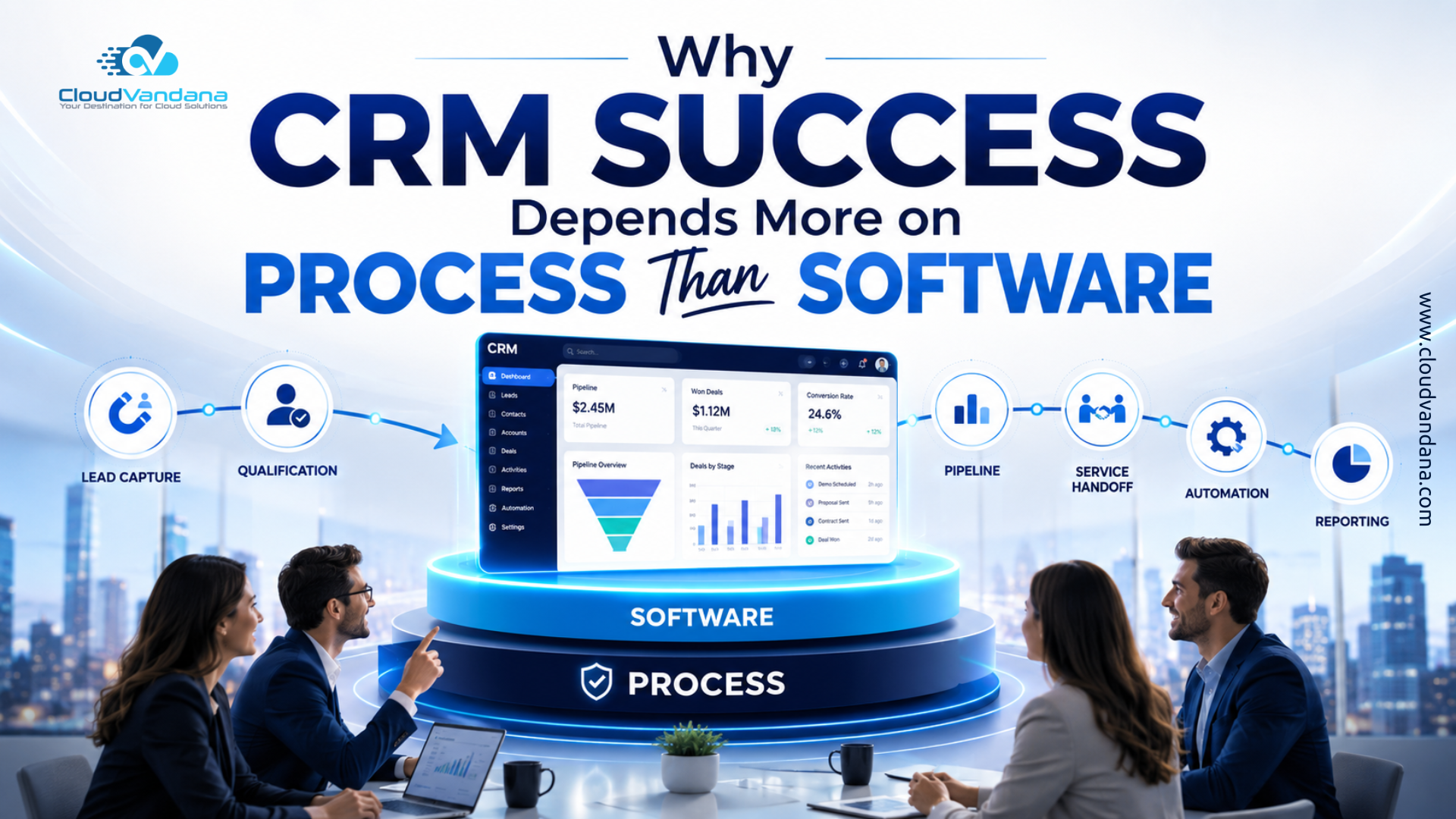
Introduction: The Real Reason CRM Projects Struggle
Businesses invest heavily in customer relationship management platforms with the expectation that sales will accelerate, customer service will improve, and teams will finally operate from a unified source of truth.
Then reality arrives.
Sales representatives continue tracking opportunities in spreadsheets. Customer service teams maintain separate notes. Marketing data remains disconnected. Reports become unreliable, duplicate records proliferate, and managers begin questioning whether the CRM platform was the right choice.
The software is usually blamed first.
However, most CRM difficulties are not created by technology alone. They emerge because the organization has attempted to digitize ambiguous, inconsistent, or poorly governed business processes.
A CRM platform can automate lead assignment, standardize sales stages, trigger service escalations, and generate sophisticated forecasts. But it cannot independently determine how a business should qualify leads, who owns each customer interaction, when an opportunity should advance, or which data employees must enter.
Those are process decisions.
CRM success therefore depends less on purchasing the most advanced software and more on building clear, usable, measurable processes around the customer lifecycle.
The platform matters. But the process determines whether the platform produces business value.
What Does CRM Success Actually Mean?
CRM success is often measured through technical milestones:
- The system was launched on time.
- Data was migrated.
- Users received login credentials.
- Integrations were activated.
- Dashboards were created.
These milestones are important, but they do not prove that the CRM is successful.
A successful CRM should produce measurable operational and commercial improvements. Depending on the organization, those improvements may include:
- Faster lead response times
- Higher sales conversion rates
- More accurate forecasting
- Better customer retention
- Shorter case resolution times
- Improved marketing attribution
- Fewer manual administrative tasks
- Stronger visibility across departments
- Higher employee productivity
- Consistent customer experiences
A CRM is successful when it becomes the natural operating environment for customer-facing work.
Employees should not treat it as an administrative repository that must be updated after the real work is completed. The CRM should guide the work itself.
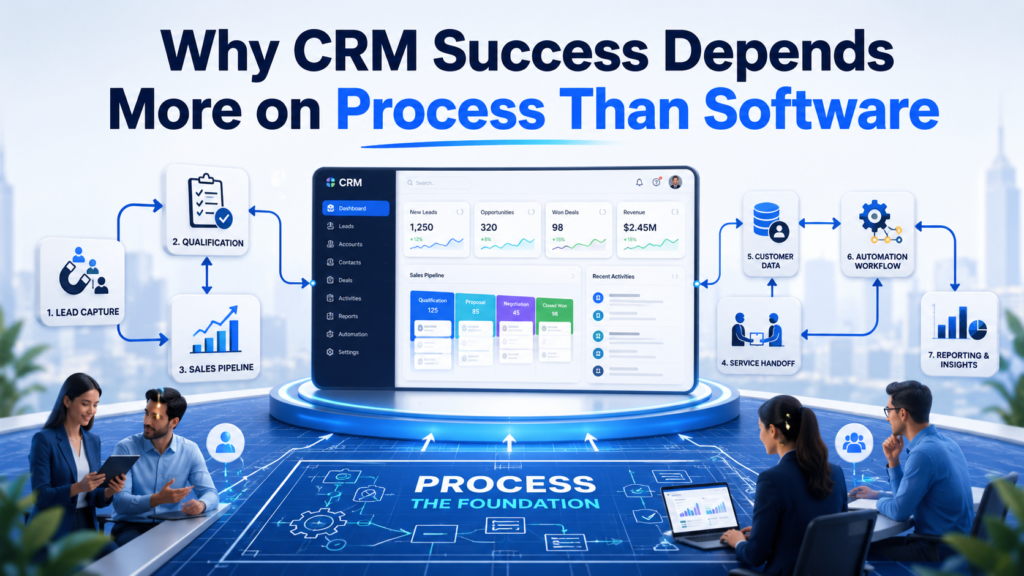
That distinction is critical. A system of record stores information. A well-designed CRM process helps teams decide what to do next.
Why Businesses Often Blame the Software
When CRM adoption remains low or reports become unreliable, blaming the platform is convenient.
The software appears to be the most visible component of the transformation. It has screens, fields, dashboards, licenses, workflows, and subscription costs. When employees struggle, the interface becomes an easy target.
Yet the underlying problems are often more elemental:
- Sales stages have unclear definitions.
- Different teams use different qualification criteria.
- Employees do not know which fields are mandatory.
- Lead ownership is disputed.
- Managers do not reinforce CRM usage.
- Existing processes were never documented.
- Automation was built around outdated practices.
- Too many approval steps delay progress.
- Reporting requirements were not defined before configuration.
- Teams were trained on features without understanding the business process.
Changing CRM platforms rarely resolves these issues.
An organization may migrate from one system to another and reproduce the same operational dysfunction in a more expensive environment. The interface changes, but the ambiguity survives.
This is why CRM transformation must begin with process analysis rather than software selection.
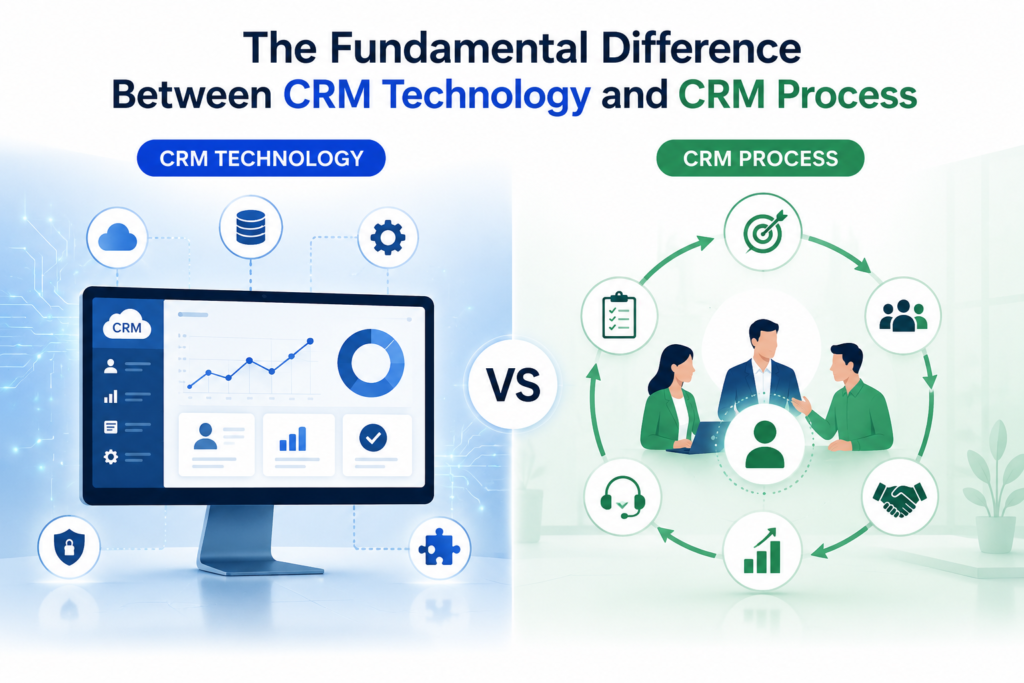
The Fundamental Difference Between CRM Technology and CRM Process
CRM technology provides capabilities. CRM processes determine how those capabilities are used.
For example, CRM software may support:
- Lead scoring
- Automated lead routing
- Opportunity management
- Email integration
- Case escalation
- Customer segmentation
- Approval workflows
- Revenue forecasting
- Marketing automation
- AI-generated recommendations
However, the organization must still define:
- What makes a lead qualified
- How leads should be prioritized
- Which representative should receive each lead
- When an opportunity should move to the next stage
- Which activities must occur before a proposal is sent
- When a service case should be escalated
- Who approves discounts
- Which customer segments require special treatment
- What constitutes a realistic forecast
- When employees should accept or override AI recommendations
The CRM cannot compensate for a lack of organizational clarity.
It can only execute the logic it is given.
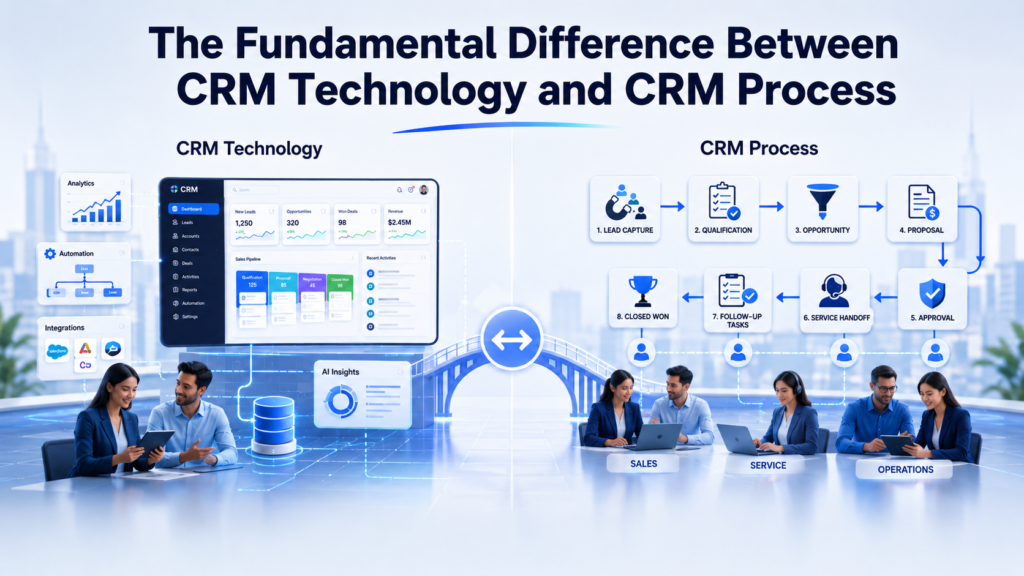
Software Enables the Process—It Does Not Create It
Technology is an amplifier.
When a business process is clear, efficient, and well governed, CRM software can amplify its effectiveness. Automation can reduce delays, improve consistency, and provide real-time visibility.
When the process is fragmented or contradictory, software amplifies the disorder.
A confusing manual process becomes a confusing digital process. An unnecessary approval becomes an automated bottleneck. Inconsistent data entry becomes unreliable reporting at scale.
This is why automation should never be mistaken for improvement.
Automating a dysfunctional process does not transform it. It merely makes the dysfunction operate faster.
Before configuring automation, businesses should ask:
- Is this process necessary?
- Is each step clearly defined?
- Is there a clear owner?
- Does the process support a measurable business outcome?
- Are exceptions understood?
- Can employees realistically follow it?
- Should any steps be removed before automation?
Process simplification should precede process digitization.
Why Buying a Leading CRM Does Not Guarantee Results
Modern CRM platforms are extraordinarily capable. Salesforce, for example, can support complex sales operations, service environments, customer data strategies, analytics, integrations, automation, and AI-powered workflows.
But purchasing advanced technology does not automatically create operational maturity.
A premium CRM platform placed inside an organization with inconsistent processes will still generate inconsistent outcomes.
Consider two businesses using the same CRM.
The first business has clearly defined stages, mandatory data standards, strong management accountability, automated follow-ups, and regular pipeline reviews.
The second business allows every sales representative to manage opportunities differently. Fields are optional, stages are subjective, and managers use separate spreadsheets for forecasting.
Both companies technically have the same software.
They do not have the same CRM capability.
The competitive advantage comes from how the platform is embedded into the operating model.
Start With Business Outcomes, Not Features
CRM initiatives often begin with feature discussions.
Stakeholders request dashboards, artificial intelligence, automated emails, integrations, custom objects, mobile access, and advanced analytics. These requests may be valid, but they should not be the starting point.
The starting point should be business outcomes.
Examples include:
- Reduce lead response time from 12 hours to 30 minutes.
- Improve opportunity conversion by 15%.
- Reduce manual sales administration by five hours per representative each week.
- Increase first-contact resolution for service cases.
- Improve forecast accuracy.
- Reduce customer onboarding delays.
- Create a unified view of customer interactions.
- Increase renewal visibility 90 days before contract expiration.
Once the outcome is clear, the required process becomes easier to design. Only then should technology features be selected.
This sequence prevents organizations from building impressive functionality that employees do not need.
The correct order is:
Business outcome → Process → People → Data → Technology
Many underperforming CRM projects reverse this order.
Map the Customer Journey Before Configuring the CRM
CRM configuration should reflect how customers actually move through the business.
That journey may begin with an advertisement, website visit, referral, event, phone call, or partner introduction. It may continue through qualification, discovery, proposal, negotiation, onboarding, service, renewal, and expansion.
Each stage includes decisions, handoffs, data requirements, and customer expectations.
A customer journey map should identify:
- The customer’s objective at each stage
- The team responsible for the interaction
- Information collected or generated
- Actions that should occur
- Approval requirements
- Potential delays
- Common customer frustrations
- Handoffs between departments
- Performance metrics
- Automation opportunities
Without this mapping, CRM configuration becomes an assemblage of isolated features.
With it, the CRM can support a connected customer experience.
Standardize Sales Processes Before Automating Them
Sales teams frequently develop individual working styles. Experienced representatives may rely on intuition, personal notes, inbox folders, or spreadsheets.
Some flexibility is healthy. But excessive process variation makes CRM reporting and forecasting unreliable.
A standardized sales process should define:
- How new leads enter the system
- Required qualification criteria
- Expected response time
- Discovery requirements
- Opportunity creation rules
- Sales stages
- Stage exit criteria
- Follow-up expectations
- Proposal procedures
- Discount approval rules
- Closing requirements
- Handoff to delivery or customer success
Standardization does not mean eliminating professional judgment. It means ensuring that critical steps are consistently followed.
The CRM can then reinforce the process through validation rules, guided screens, automated tasks, approvals, and alerts.
Build a Clear Lead Management Process
Lead management is one of the most common sources of CRM inefficiency.
A lead may enter through a website form, campaign, webinar, advertisement, referral, purchased list, marketplace, or inbound call. Without clear routing and qualification rules, promising leads may remain untouched while low-value enquiries consume attention.
An effective lead management process should define:
Lead capture
Determine which channels create CRM records and what information must be collected.
Data validation
Standardize names, email formats, phone numbers, company information, source attribution, and consent data.
Duplicate prevention
Identify whether the person or company already exists before creating another record.
Lead routing
Assign leads based on geography, product, industry, company size, availability, or account ownership.
Response expectations
Establish service-level agreements for first contact.
Qualification
Define the characteristics, needs, authority, timing, and commercial fit required for progression.
Nurturing
Create a structured path for leads that are not yet ready for sales engagement.
Conversion
Specify when and how a lead becomes an account, contact, and opportunity.
Software can execute these rules efficiently, but the organization must establish them first.
Define Opportunity Stages With Precision
Opportunity stages often appear straightforward. Terms such as Discovery, Proposal, Negotiation, and Closed Won seem self-explanatory.
In practice, they are interpreted differently by different people.
One representative may move an opportunity to Proposal after discussing pricing. Another may wait until a formal document has been sent. A third may skip the stage entirely.
This inconsistency damages forecast accuracy.
Each opportunity stage should have objective entry and exit criteria.
For example:
Discovery completed
- Business needs are documented.
- Key stakeholders are identified.
- Budget range has been discussed.
- Decision timeline is understood.
- Next meeting is scheduled.
Proposal submitted
- Scope has been validated.
- Pricing has been approved.
- Proposal has been delivered.
- Customer feedback date is confirmed.
Negotiation
- Commercial or contractual terms are under active discussion.
- Decision-makers are engaged.
- Remaining objections are documented.
- Target close date is credible.
Precise stage definitions convert subjective pipeline updates into meaningful business intelligence.
Align Sales, Service, and Marketing Workflows
Customers do not experience businesses as separate departments.
They expect every team to understand their history, needs, preferences, and previous interactions. Yet many organizations operate through departmental silos.
Marketing may generate leads without knowing whether sales follows up. Sales may close a deal without providing service teams with sufficient context. Service may identify expansion opportunities that never reach account managers.
A process-driven CRM should connect these workflows.
Marketing should understand lead quality and revenue attribution. Sales should see campaign engagement and service history. Service teams should access commercial commitments and account priorities.
Alignment requires shared definitions, agreed handoffs, and consistent data—not merely shared software.
A unified CRM interface cannot create collaboration when departments continue following incompatible processes.
Assign Clear Ownership Across the Customer Lifecycle
CRM records frequently become neglected because ownership is unclear.
Who owns a lead before qualification? Who updates the opportunity after a technical meeting? Who creates the onboarding record? Who manages the renewal? Who acts when a customer raises a high-priority service issue?
Every critical stage should have a named owner.
Ownership may be assigned to an individual, role, queue, or team. What matters is that responsibility is visible and enforceable.
Good CRM process design also defines what happens when:
- An employee is absent
- A representative leaves the company
- An account changes territory
- A customer purchases multiple products
- A case requires cross-functional support
- An opportunity remains inactive
- A renewal becomes at risk
Clear ownership reduces stagnation and prevents customers from falling into organizational lacunae.
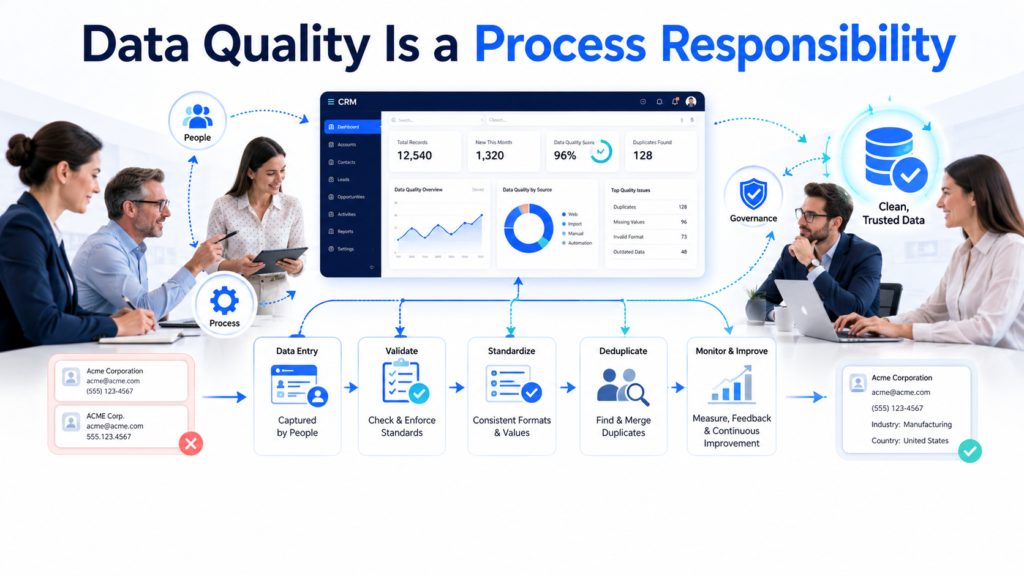
Data Quality Is a Process Responsibility
Data quality is often treated as an IT problem. It is not.
Technology teams can configure duplicate rules, validation checks, field formats, and integration controls. However, reliable CRM data depends on how employees create, update, review, and use information.
Data governance processes should define:
- Which fields are mandatory
- Who owns each data category
- Standard naming conventions
- Duplicate management procedures
- Record creation rules
- Data enrichment methods
- Retention and deletion requirements
- Consent management
- Quality review frequency
- Correction responsibilities
Businesses should also avoid collecting data simply because the CRM allows it.
Every field creates an operational obligation. Someone must enter it, maintain it, validate it, and use it.
If a field does not support a decision, workflow, customer interaction, compliance requirement, or report, it may not belong in the process.
Why CRM Adoption Depends on Workflow Design
Employees do not resist CRM systems merely because they dislike change.
They often resist because the system makes their work slower.
A sales representative may be required to update numerous fields that do not support the sale. A service agent may need to move between several screens to find customer information. A manager may request CRM updates but continue using spreadsheets during pipeline meetings.
These contradictions teach employees that CRM usage is administrative theatre rather than valuable work.
Adoption improves when the system:
- Reduces repeated data entry
- Shows relevant information at the right time
- Automates routine tasks
- Provides useful reminders
- Makes collaboration easier
- Supports mobile work
- Simplifies approvals
- Helps employees prioritize actions
- Produces trustworthy insights
- Replaces, rather than duplicates, legacy tools
The best adoption strategy is a CRM process that employees find genuinely useful.
Make the CRM Easier Than Employees’ Existing Methods
A CRM must compete with familiar alternatives.
Spreadsheets are flexible. Email is immediate. Personal notes are convenient. Messaging applications feel effortless.
If the CRM requires more work without providing visible value, employees will return to those tools.
The CRM experience should therefore be designed around employee efficiency.
For example, instead of asking representatives to manually create follow-up tasks, automation can generate them after meetings. Instead of requiring managers to chase updates, dashboards can identify inactive opportunities. Instead of re-entering customer details, integrations can synchronize information across systems.
The goal is not to force employees into the CRM through surveillance.
The goal is to make the CRM the easiest and most productive way to complete their work.
Avoid Excessive Customization
Customization is one of the greatest strengths of modern CRM platforms. It is also a frequent source of complexity.
Organizations often add fields, objects, workflows, approvals, page layouts, and integrations in response to isolated requests. Over time, the system becomes difficult to navigate and expensive to maintain.
Every customization should solve a verified business problem.
Before approving it, ask:
- Which process does this support?
- How many employees will use it?
- What measurable outcome should improve?
- Could standard functionality solve the problem?
- Does it create additional maintenance?
- Will it complicate reporting or integration?
- Is the underlying process stable?
- Can the requirement be simplified?
A CRM should fit the business, but it should not preserve every historical idiosyncrasy.
Sometimes the better decision is to improve the process rather than customize the platform around it.
Automate Only Stable and Proven Processes
Automation is attractive because it promises speed and consistency.
However, automating a process that changes every week creates technical debt. Teams continually modify flows, rules, alerts, and integrations while users lose confidence in the system.
A process should generally be automated when:
- The steps are clearly documented.
- Ownership is established.
- Inputs are reliable.
- Exceptions are understood.
- The process occurs frequently enough to justify automation.
- The expected outcome is measurable.
- Employees agree that the process reflects real work.
Begin with high-volume, low-ambiguity activities such as task creation, notifications, routing, data synchronization, reminders, and status updates.
More complex decisions can be automated gradually as the organization gains process maturity.
Why Leadership Involvement Determines CRM Success
CRM transformation cannot be delegated entirely to administrators, consultants, or IT teams.
Leadership must define priorities, resolve cross-functional disagreements, reinforce accountability, and demonstrate that CRM data will be used to manage the business.
Employees observe what leaders do.
If managers request accurate CRM updates but use separate spreadsheets in meetings, the spreadsheet becomes the real system of record. If leadership tolerates incomplete records, process standards become optional. If executives request constant customization without prioritization, complexity expands.
Effective leaders:
- Communicate why the CRM matters
- Connect CRM usage to business outcomes
- Use CRM dashboards during reviews
- Hold teams accountable for data quality
- Resolve ownership disputes
- Sponsor process standardization
- Support training and change management
- Fund continuous improvement
CRM adoption becomes durable when leadership behaviour aligns with CRM expectations.
Train Employees on Processes, Not Just Buttons
Many CRM training programs focus on navigation.
Employees learn how to create a lead, update an opportunity, log an activity, or close a case. They may understand which buttons to press without understanding why the actions matter.
Effective training should explain the full process.
A sales representative should understand:
- Why qualification criteria exist
- What each opportunity stage means
- Which information managers use for forecasting
- When follow-up tasks are generated
- How marketing engagement supports conversations
- What happens after an opportunity closes
- How incomplete data affects other teams
Training should be role-specific, scenario-based, and reinforced over time.
Employees rarely retain everything from a single launch session. They need practical exercises, accessible documentation, office hours, refresher training, and support for new features.
CRM competence is an operational capability, not a one-time event.
Use Metrics That Reflect Business Outcomes
CRM dashboards should measure more than activity volume.
A large number of calls, emails, records, or tasks does not necessarily indicate progress. Metrics should connect behaviour to outcomes.
Useful CRM performance metrics may include:
Sales metrics
- Lead response time
- Lead-to-opportunity conversion
- Opportunity conversion rate
- Average sales cycle
- Pipeline coverage
- Stage velocity
- Forecast accuracy
- Win rate
- Average deal value
Service metrics
- First response time
- Average resolution time
- First-contact resolution
- Escalation rate
- Case backlog
- Customer satisfaction
- Repeat case volume
Marketing metrics
- Qualified lead volume
- Campaign conversion
- Cost per qualified opportunity
- Pipeline influenced
- Revenue attribution
- Lead nurturing progression
Adoption and data metrics
- Active user rate
- Record completeness
- Duplicate rate
- Overdue activity volume
- Opportunities without next steps
- Stale records
Metrics should reveal where the process is working and where intervention is required.
Establish CRM Governance
Without governance, CRM systems evolve through a continuous stream of disconnected requests.
One department asks for a new field. Another requests a custom workflow. A manager wants a special report. An integration adds more data. None of these changes may be harmful individually, but collectively they can create an unwieldy system.
CRM governance provides a structured method for evaluating and prioritizing change.
A governance model should define:
- Who can request changes
- How requests are documented
- Who evaluates business value
- Who assesses technical impact
- How priorities are determined
- Which standards must be followed
- How changes are tested
- Who approves deployment
- How users are informed
- How obsolete functionality is removed
A cross-functional governance group can ensure that CRM decisions support enterprise goals rather than isolated departmental preferences.
Governance is not bureaucracy for its own sake. It protects usability, scalability, data integrity, and long-term return on investment.
Treat CRM Implementation as an Operating Model Change
A CRM implementation is often managed as a technology project with a start date, launch date, and completion date.
That framing is incomplete.
CRM implementation changes how employees sell, serve, communicate, collaborate, report, and make decisions. It affects roles, incentives, accountability, data ownership, and management routines.
It is therefore an operating model change.
A process-first implementation should include:
- Executive alignment
- Stakeholder interviews
- Current-state process analysis
- Future-state process design
- Customer journey mapping
- Data assessment
- Role and ownership definition
- Change impact analysis
- Configuration and integration
- User acceptance testing
- Training and communication
- Post-launch support
- Continuous optimization
The technical build is only one workstream within a broader transformation.
Continuously Review and Improve CRM Processes
Business processes do not remain static.
Products change. Teams expand. Territories shift. Customer expectations evolve. New channels emerge. Regulations change. Automation and AI create new possibilities.
A CRM that matched the business two years ago may no longer support the current operating model.
Organizations should conduct regular CRM reviews to examine:
- User adoption
- Data quality
- Workflow performance
- Automation failures
- Approval delays
- Integration reliability
- Reporting accuracy
- User feedback
- New business requirements
- Unused fields and functionality
- Security and access
- AI and data readiness
Quarterly process reviews can identify friction before it becomes entrenched.
CRM optimization should be treated as a continuing business discipline, not an occasional technical repair exercise.
Common Signs Your CRM Problem Is Actually a Process Problem
Several warning signs indicate that the software may not be the primary issue.
Employees use different definitions for the same sales stage
This suggests that stage criteria have not been standardized.
Managers maintain separate forecasting spreadsheets
The CRM process may not capture the information required for reliable forecasting.
Reports contain incomplete or contradictory data
Data ownership, mandatory fields, and entry standards may be unclear.
Leads remain unassigned or untouched
Routing rules, service-level agreements, or ownership procedures may be missing.
Users complain about excessive data entry
The process may collect unnecessary information or duplicate work performed elsewhere.
Automation frequently requires manual correction
The underlying process may contain too many ambiguities or exceptions.
Teams request constant customization
The organization may be using technology to compensate for unresolved process disagreements.
Customer handoffs are inconsistent
Responsibilities between marketing, sales, onboarding, service, and customer success may not be defined.
Training does not improve adoption
The system may not provide enough value within the employee’s daily workflow.
Leadership distrusts CRM dashboards
Process compliance and data governance may be inadequate.
These symptoms should trigger process investigation before the organization replaces its CRM platform.
A Process-First Framework for CRM Success
Businesses can improve CRM performance by following a structured framework.
Step 1: Define measurable outcomes
Identify the business improvements the CRM must support.
Step 2: Document current processes
Map how work is actually performed, including informal practices and workarounds.
Step 3: Identify friction and redundancy
Find delays, duplicate activities, unclear ownership, unnecessary approvals, and data gaps.
Step 4: Design the future-state process
Simplify the workflow and establish consistent standards.
Step 5: Define roles and accountability
Assign ownership for records, actions, decisions, and data quality.
Step 6: Establish data requirements
Determine which information is necessary and how it will be governed.
Step 7: Configure the CRM
Use standard functionality wherever practical and customize only where business value is clear.
Step 8: Automate selectively
Begin with stable, repeatable processes and expand gradually.
Step 9: Test with real users
Validate the process through realistic scenarios before launch.
Step 10: Train by role and workflow
Teach employees how the CRM supports their responsibilities and outcomes.
Step 11: Measure performance
Track adoption, process efficiency, data quality, and business results.
Step 12: Optimize continuously
Review feedback and improve the system as the business evolves.
This framework helps organizations avoid technology-led implementation and create a CRM environment grounded in operational reality.
How Salesforce Supports Process-Driven CRM Transformation
Salesforce provides a powerful foundation for process-led customer relationship management.
Its capabilities can support:
- Standardized lead and opportunity management
- Sales process guidance
- Automated workflows using Salesforce Flow
- Service case routing and escalation
- Approval processes
- Customer data consolidation
- Role-based dashboards
- Integration with enterprise systems
- Data validation and duplicate management
- Marketing and customer engagement
- AI-powered recommendations and agents
- Cross-functional collaboration
However, these capabilities generate value only when they are configured around well-designed business processes.
Salesforce should not merely mirror old spreadsheets or fragmented departmental workflows. It should help the organization simplify work, establish consistency, improve visibility, and create a more connected customer experience.
That requires thoughtful discovery, architecture, implementation, training, governance, and ongoing optimization.
How CloudVandana Helps Businesses Improve CRM Performance
CRM challenges are rarely solved by adding more fields, purchasing additional licenses, or activating isolated features.
Businesses need a clear understanding of how their customer-facing processes operate today, where friction exists, and how Salesforce can support a stronger future-state model.
CloudVandana helps organizations align Salesforce technology with real business processes.
Our Salesforce services include:
- CRM strategy and discovery
- Business process assessment
- Salesforce implementation
- Salesforce customization
- Workflow and Salesforce Flow automation
- Sales Cloud and Service Cloud optimization
- Data migration and data quality improvement
- Third-party system integration
- Reporting and dashboard development
- User adoption and training support
- Salesforce health checks
- Managed services and ongoing optimization
- Data Cloud and Agentforce readiness
Whether your business is implementing Salesforce for the first time or struggling with an underperforming CRM, CloudVandana can help identify the operational issues behind the technology symptoms.
Build a CRM That Supports the Way Your Business Should Work
Do not let unclear processes, unreliable data, or low user adoption limit your Salesforce investment.
Partner with CloudVandana to design efficient CRM processes, automate the right workflows, improve user adoption, and create a scalable Salesforce environment that drives measurable business growth.
Book a free consultation with CloudVandana today and turn your CRM into a genuine business execution platform.
Conclusion
CRM success does not begin with software.
It begins with clarity.
Businesses must understand how leads are managed, how opportunities progress, how customers move between teams, how data is governed, and how employees are expected to work.
The CRM platform then provides the structure, automation, visibility, and intelligence needed to execute those processes consistently.
Without process discipline, even the most sophisticated CRM can become an expensive database. With the right processes, the CRM becomes something far more valuable: a coordinated operating system for customer growth.
The technology is important.
But the process is what makes it work.
Frequently Asked Questions
1. Why do CRM implementations fail?
CRM implementations often fail because businesses focus heavily on software configuration while neglecting process design, data quality, employee adoption, leadership involvement, and change management. The system may be technically functional but disconnected from how employees actually work.
2. What is the most important factor in CRM success?
The most important factor is having clear, standardized, and measurable business processes. The CRM should support those processes through automation, data management, reporting, and workflow guidance.
3. Is CRM software less important than business process?
CRM software remains important because it provides the technical capabilities required to manage customer relationships at scale. However, the software cannot produce meaningful results unless the organization defines how it should be used.
4. How can businesses improve CRM user adoption?
Businesses can improve adoption by simplifying workflows, reducing unnecessary data entry, automating repetitive work, offering role-specific training, involving users in design decisions, and ensuring managers consistently use CRM data.
5. Should processes be changed before implementing a CRM?
Yes. Businesses should assess and improve their current processes before configuring the CRM. Digitizing an inefficient process usually creates a faster but still inefficient workflow.
6. How does poor data quality affect CRM success?
Poor data quality leads to inaccurate reports, duplicate communication, ineffective automation, unreliable forecasts, and weak customer experiences. Data quality must be supported by clear ownership, standards, validation rules, and regular reviews.
7. What is a process-first CRM implementation?
A process-first CRM implementation begins by defining business outcomes, mapping workflows, identifying ownership, establishing data requirements, and simplifying operations before configuring technology.
8. How much CRM customization is necessary?
Customization should be limited to requirements that deliver clear business value and cannot be addressed effectively through standard functionality. Excessive customization can increase complexity, maintenance costs, and adoption challenges.
9. When should CRM processes be automated?
Processes should be automated when they are stable, repeatable, clearly owned, supported by reliable data, and connected to measurable outcomes. Ambiguous or frequently changing processes should be improved before automation.
10. How often should businesses review their CRM processes?
Businesses should conduct formal CRM reviews at least quarterly. High-growth or rapidly changing organizations may need more frequent reviews of adoption, workflows, automation, data quality, and reporting.
11. Can changing CRM software solve low adoption?
Changing software may help when the current platform genuinely lacks required capabilities. However, low adoption often results from difficult workflows, weak training, excessive data entry, unclear expectations, or poor leadership alignment. These issues can continue after migration.
12. How can CloudVandana improve an existing Salesforce system?
CloudVandana can assess current Salesforce processes, identify adoption and data issues, simplify workflows, improve automation, optimize Sales Cloud or Service Cloud, strengthen reporting, integrate business systems, and provide ongoing managed support.

Atul Gupta is CloudVandana’s founder and an 8X Salesforce Certified Professional who works with globally situated businesses to create Custom Salesforce Solutions.
Atul Gupta, a dynamic leader, directs CloudVandana’s Implementation Team, Analytics, and IT functions, ensuring seamless operations and innovative solutions.
YOU MIGHT ALSO LIKE

Financial Services Cloud: A Complete Guide for Banking and Wealth Management
How MuleSoft Connects Salesforce With ERP, Finance and Business Systems

Salesforce Customer 360: Connecting Sales, Service and Marketing Teams

Salesforce and Anthropic Launch Claudeforce: What It Means for the Future of Enterprise AI

Salesforce AIforce: What It Means for the Future of Enterprise Software