Introduction: Work Management Is Entering a New Era
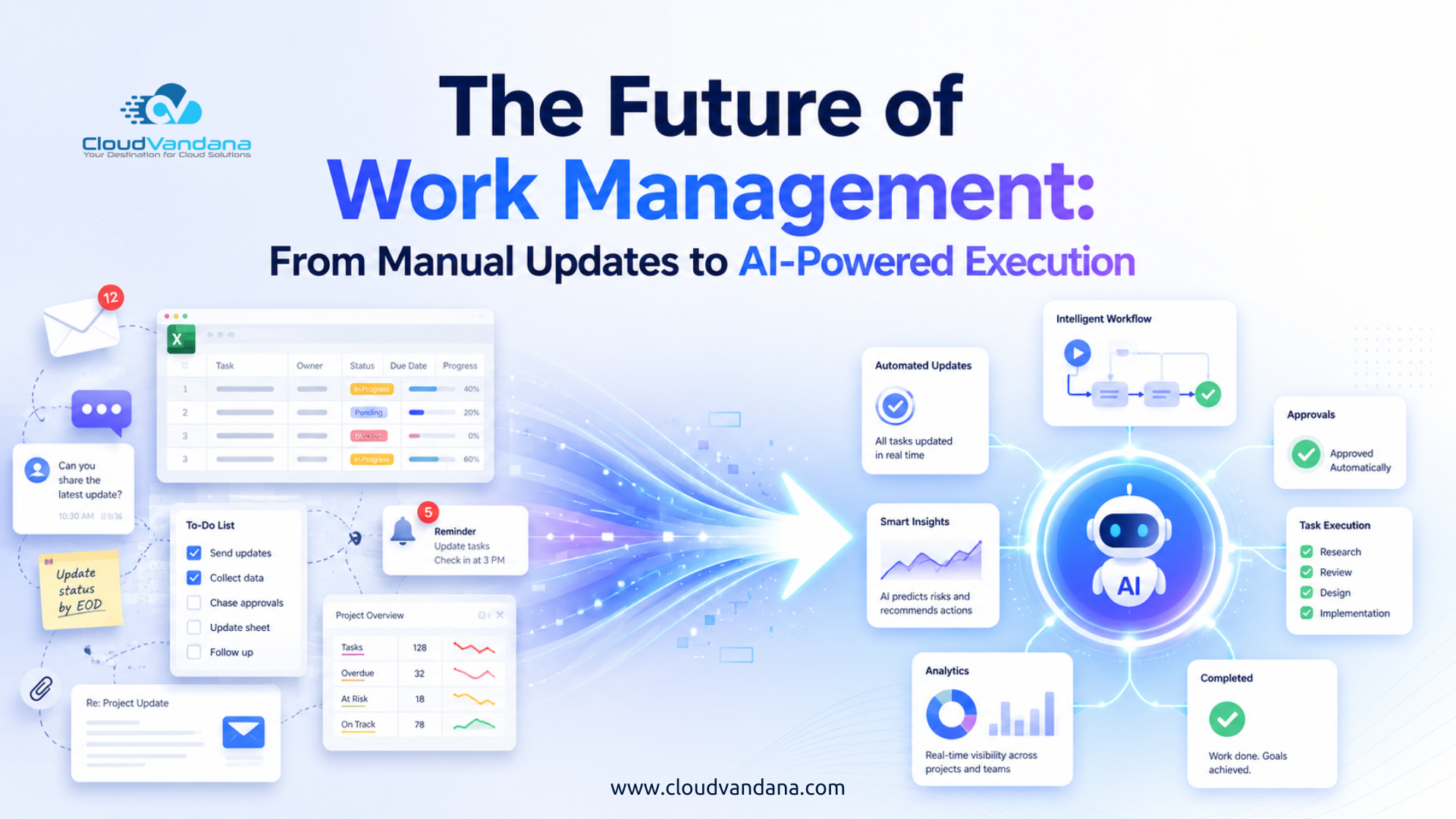
For years, businesses have used project boards, spreadsheets, email threads, meetings, and status reports to organize work. These tools improved visibility, but they did not eliminate the administrative burden surrounding work.
Employees still update tasks manually. Managers still chase progress reports. Project leaders still spend hours preparing dashboards. Teams still move information from one system to another.
This model is beginning to change.
The future of work management is not simply about creating better task lists or more attractive dashboards. It is about building intelligent systems that can understand work, identify what needs attention, coordinate activities, and initiate the next step.
Work management is moving from passive tracking to active execution.
AI-powered platforms can now interpret natural-language requests, generate project plans, summarize progress, detect risks, recommend priorities, assign work, and trigger business processes. As AI agents become more capable, they will move beyond assisting employees and begin executing clearly defined portions of work autonomously.
This transition will reshape how businesses plan projects, manage teams, allocate resources, and measure performance.
What Is Work Management?
Work management is the systematic process of planning, organizing, assigning, tracking, and completing work across a business.
It includes more than traditional project management. Project management usually focuses on defined initiatives with specific timelines and deliverables. Work management covers a broader operational landscape, including:
- Recurring business processes
- Departmental workflows
- Customer requests
- Marketing campaigns
- Sales activities
- Service operations
- Product development
- Employee onboarding
- IT support
- Cross-functional projects
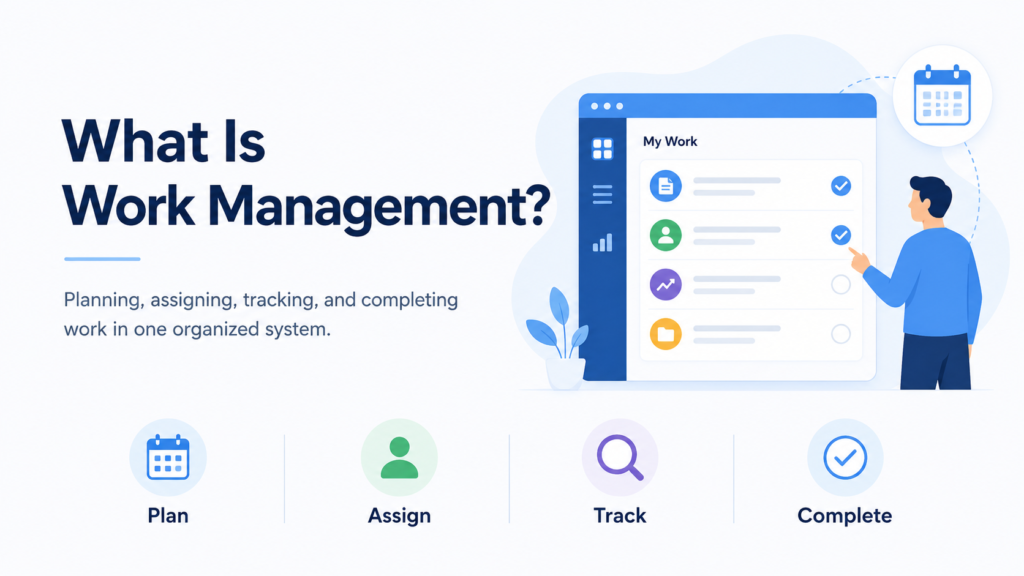
An effective work management system helps organizations understand what work is being performed, who is responsible, when it is due, and how it contributes to business objectives.
Traditional systems provide visibility into this information. Intelligent systems go further by helping teams decide what should happen next.
Why Traditional Work Management No Longer Works
Traditional work management platforms were designed for a business environment in which humans entered information, reviewed dashboards, made decisions, and manually triggered actions.
That structure is becoming inadequate.
Modern businesses operate across multiple applications, distributed teams, rapidly changing customer expectations, and increasingly complex workflows. Employees may use a CRM, a project management platform, a communication tool, a document repository, an enterprise resource planning system, and several specialist applications during a single process.
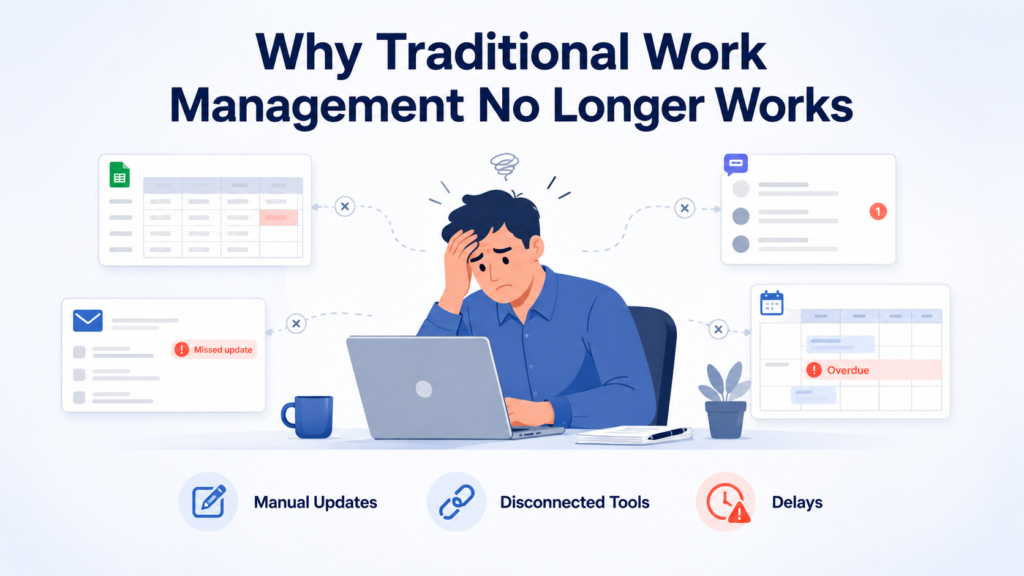
When every activity requires manual coordination, productivity deteriorates.
The Hidden Cost of Manual Status Updates
Status updates appear harmless. In reality, they create substantial organizational friction.
Employees pause productive work to update task fields. Managers ask for progress in meetings. Project leaders consolidate information from several platforms. Executives receive reports that may already be outdated.
The problem becomes particularly acute when a business manages hundreds of projects or thousands of recurring tasks.
Manual updates create three major weaknesses:
Information is delayed. A task may be complete, blocked, or deprioritized before the system reflects the change.
Information is inconsistent. Different employees use different terminology and reporting standards.
Information is incomplete. Teams often update only the fields they consider necessary, leaving managers without sufficient context.
AI-powered work management reduces this dependence on deliberate manual reporting. The system can infer progress from activities, connected applications, conversations, documents, and workflow events.
Fragmented Tools Create Fragmented Execution
Businesses have invested heavily in specialized software. However, each platform often becomes an isolated repository of tasks and information.
A customer request may begin in email, move into a CRM, create a task in a work management platform, require a file from cloud storage, and produce a conversation in a messaging application.
Employees must connect these steps mentally and operationally.
This fragmentation creates duplicate work, missed handoffs, inconsistent records, and limited accountability. It also prevents leaders from seeing the complete operational picture.
The future of work management depends on connected systems in which information moves automatically and AI can interpret context across applications.
Managers Spend Too Much Time Chasing Information
Managers should spend their time improving decisions, coaching employees, resolving critical issues, and directing strategy.
Instead, many managers function as human integration layers.
They ask for updates, reconcile conflicting information, prepare reports, remind employees about deadlines, and move work between departments. This administrative burden grows as the organization becomes more complex.
AI-powered execution can absorb much of this coordination work. It can identify missing updates, summarize progress, highlight dependencies, recommend interventions, and automatically notify the appropriate stakeholder.
The manager remains accountable, but no longer has to supervise every informational movement.
The Shift from Work Tracking to Work Execution
Most work management software answers four basic questions:
- What needs to be done?
- Who is responsible?
- When is it due?
- What is its current status?
AI-powered work management introduces a fifth and more consequential question:
What action should happen next?
This distinction separates work tracking from work execution.
A conventional platform records that a contract is waiting for approval. An intelligent platform identifies the correct approver, checks whether required information is present, sends the approval request, follows up if no action is taken, and updates the project when approval is granted.
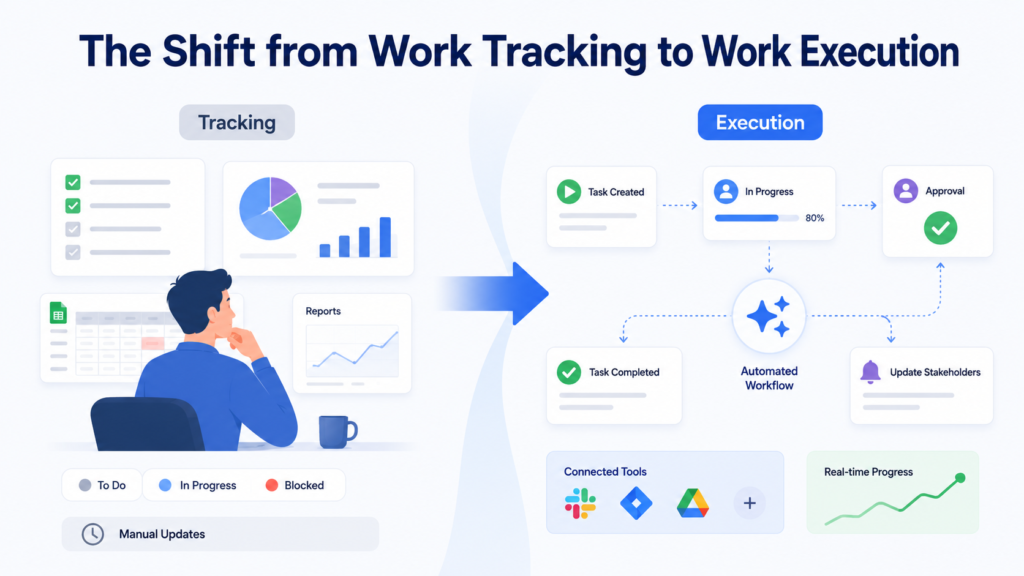
A conventional system shows that a campaign is delayed. An intelligent system identifies the blocked creative asset, finds the responsible team, estimates the likely impact, recommends a revised schedule, and alerts affected stakeholders.
The system becomes an operational participant rather than a passive database.
How Work Management Technology Has Evolved
The current transformation did not happen suddenly. Work management has progressed through several distinct phases.
Phase One: Spreadsheets and Email
Early digital work management depended on spreadsheets, shared documents, calendars, and email.
These tools were flexible and accessible, but they were difficult to scale. Version control became problematic. Ownership remained ambiguous. Information was frequently buried in inboxes.
Spreadsheets still have value, but they were never designed to coordinate complex, real-time business execution.
Phase Two: Cloud-Based Work Management Platforms
Cloud platforms introduced centralized boards, task ownership, due dates, dashboards, comments, notifications, and mobile access.
Teams gained a shared operational workspace. Managers could see progress without requesting a new spreadsheet each week.
However, these platforms still depended heavily on manual data entry. The software stored work but rarely understood it.
Phase Three: Rule-Based Workflow Automation
Automation enabled organizations to trigger actions based on predefined conditions.
For example:
- When a task is completed, notify the manager.
- When a lead reaches a certain stage, create a follow-up activity.
- When a request is submitted, assign it to the appropriate department.
- When a deadline approaches, send a reminder.
This reduced repetitive work, but rule-based automation remained rigid. Every condition, branch, and exception had to be anticipated in advance.
Complex workflows became difficult to maintain.
Phase Four: AI-Powered Execution
AI introduces interpretation, prediction, and contextual decision support.
Instead of following only fixed instructions, AI can analyze unstructured information, understand intent, recognize patterns, and recommend or initiate actions.
A user can describe an objective in plain language. The system can convert that objective into tasks, dependencies, milestones, responsibilities, and workflows.
This is the foundation of AI-powered execution.
What Is AI-Powered Work Execution?
AI-powered work execution is the use of artificial intelligence to plan, coordinate, monitor, and complete business activities with reduced manual intervention.
It combines several capabilities:
- Natural-language understanding
- Generative AI
- Workflow automation
- Predictive analytics
- Machine learning
- Business rules
- System integrations
- AI agents
- Human approval controls
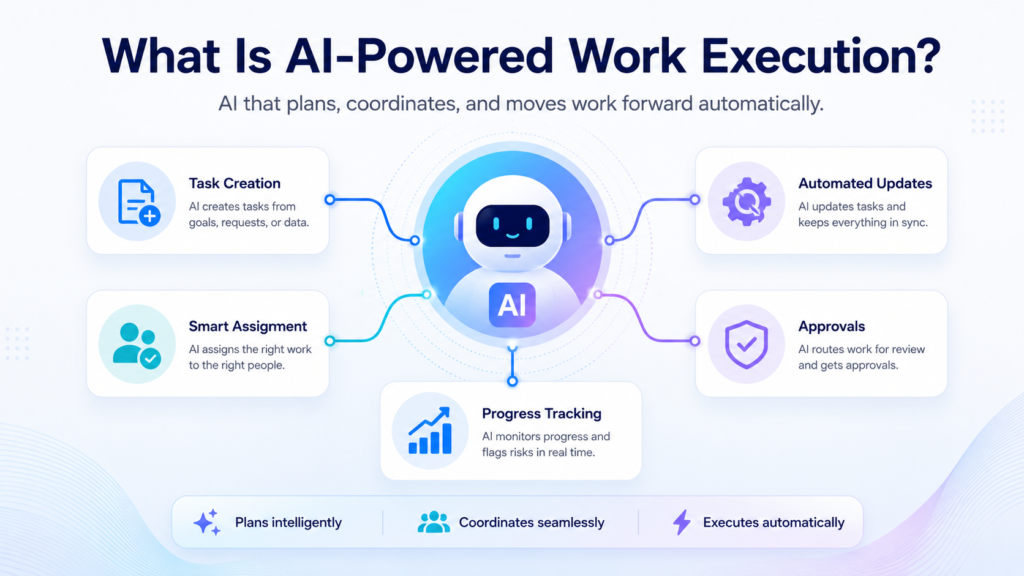
The objective is not to remove employees from every process. It is to remove unnecessary administrative steps and help people complete meaningful work more efficiently.
AI-powered execution can operate at different levels of autonomy.
At the lowest level, AI recommends an action. At the next level, it prepares the action and asks for approval. At a higher level, it performs the action automatically within established boundaries.
Organizations can choose the appropriate level based on risk, complexity, and governance requirements.
How AI Changes the Work Management Lifecycle
Traditional work management follows a linear lifecycle:
Plan the work, assign tasks, execute activities, update progress, review reports, and adjust the plan.
AI makes the lifecycle continuous.
Planning can be updated as new information arrives. Priorities can shift according to customer urgency or resource availability. Progress can be inferred from connected systems. Risks can be identified before deadlines are missed.
The work plan becomes dynamic rather than static.
This matters because business conditions rarely remain unchanged throughout a project. Customer requirements evolve. Employees become unavailable. Budgets change. Dependencies move. New opportunities emerge.
An intelligent work management system can respond to these changes without requiring teams to rebuild the entire plan manually.
Natural-Language Work Planning
One of the most visible changes will be the ability to plan work through conversation.
A manager may enter:
“Create a six-week product launch plan for our new customer service application. Include website updates, email campaigns, sales enablement, customer training, and launch-day support.”
The AI can generate:
- Workstreams
- Tasks
- Milestones
- Dependencies
- Suggested owners
- Deadlines
- Risk checkpoints
- Approval stages
The manager can then refine the plan by asking the system to reduce the timeline, reassign work, or prioritize specific deliverables.
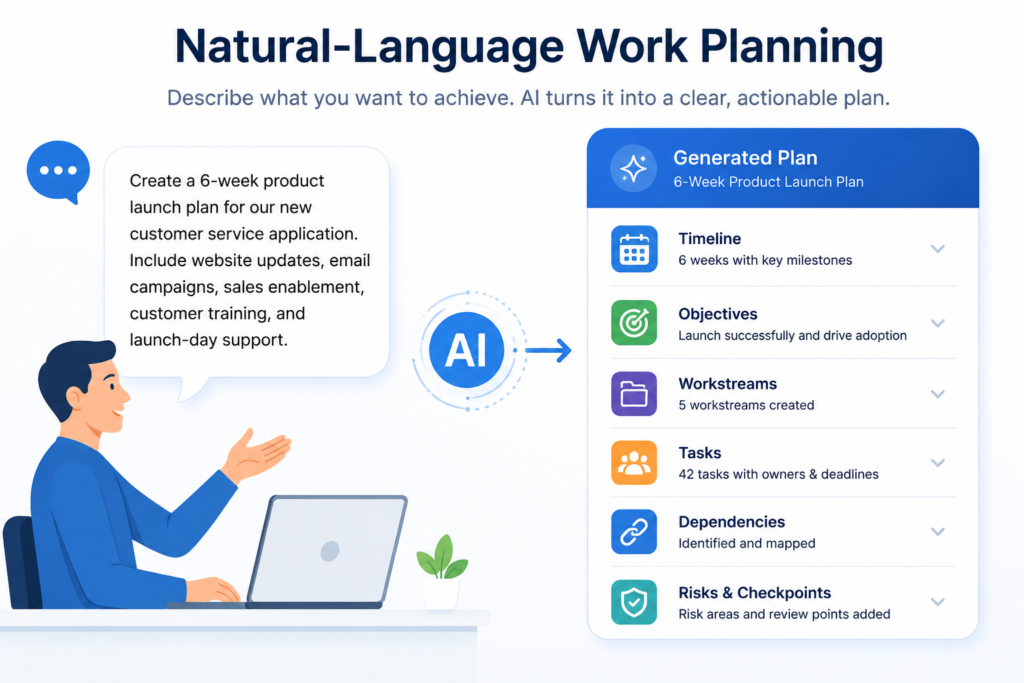
This does not eliminate planning expertise. It accelerates the mechanical part of planning so that leaders can focus on strategy, trade-offs, and quality.
Intelligent Task Creation and Assignment
Task creation is often inconsistent. Some tasks contain detailed instructions, while others contain only a vague title. Assignment may depend on whoever happens to be available or visible.
AI can improve both activities.
It can extract action items from meetings, emails, documents, customer requests, and CRM records. It can then create structured tasks containing relevant context, deadlines, linked files, and expected outcomes.
Assignment can be based on:
- Employee skills
- Current workload
- Departmental responsibility
- Historical performance
- Time-zone availability
- Customer relationship
- Project familiarity
- Required permissions
The result is more precise work distribution and fewer delays caused by ambiguous ownership.
Dynamic Prioritization Based on Business Context
A static priority field does not reflect the true importance of work.
A task marked “high priority” three weeks ago may no longer be urgent. A routine customer request may suddenly become critical if it affects a strategic account.
AI-powered systems can evaluate priority continuously using business context.
They may consider:
- Revenue impact
- Customer value
- Deadline proximity
- Project dependencies
- Service-level agreements
- Compliance requirements
- Resource availability
- Risk exposure
- Executive objectives
This creates a more rational sequence of work. Employees can focus on activities that produce the greatest business value rather than simply completing the newest or most visible request.
Automated Status Reporting
Status reporting is one of the clearest opportunities for immediate improvement.
AI can analyze task changes, comments, documents, CRM updates, meeting notes, and workflow activity to create concise progress summaries.
Instead of asking every employee to prepare a weekly update, the system can generate a report containing:
- Completed work
- Upcoming milestones
- Delayed activities
- New risks
- Decisions required
- Resource constraints
- Changes from the previous reporting period
Employees can review and correct the summary before it is distributed.
This approach reduces reporting fatigue while preserving human oversight.
Predictive Risk and Delay Detection
Traditional dashboards often identify a problem after it has already occurred. The task turns red only when the deadline is missed.
Predictive work management attempts to identify the conditions that precede failure.
For example, the system may detect that:
- A task has no recent activity.
- A dependency is progressing more slowly than expected.
- An employee has been assigned more work than usual.
- Similar projects experienced delays at the same stage.
- An approval request has remained unanswered.
- Required information is missing.
- Customer sentiment has deteriorated.
AI can calculate the probability of delay and recommend corrective action.
Early intervention is valuable because project failure is rarely caused by a single dramatic event. It is usually the result of several small issues that remain unresolved.
AI-Powered Resource and Capacity Planning
Resource planning is difficult because workload is not always visible.
Two employees may each have ten tasks, but one employee’s tasks may require several weeks of concentrated effort while the other’s can be completed in a few hours.
AI can evaluate task complexity, historical completion time, skills, deadlines, and current assignments to estimate capacity more accurately.
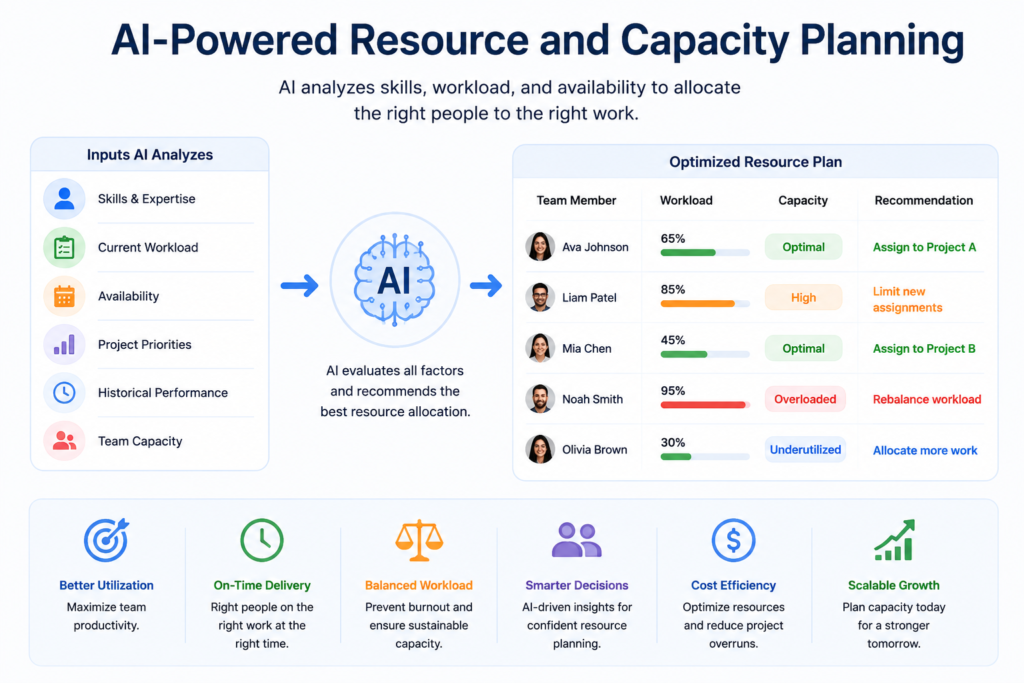
It can help managers answer questions such as:
- Which team is likely to become overloaded?
- Who has the skills and availability for a new project?
- Which deadline is unrealistic?
- Where should temporary resources be added?
- What work can be postponed with minimal business impact?
This creates a more equitable and efficient allocation of work.
Contextual Knowledge Retrieval
Employees frequently lose time searching for information.
They look through folders, email threads, old tasks, CRM notes, knowledge bases, and communication channels. Even when the information exists, finding the correct and current version can be difficult.
AI-powered work management can retrieve relevant knowledge within the context of the task.
For example, an employee working on a customer renewal may receive:
- Previous contract information
- Recent support cases
- Meeting summaries
- Product usage data
- Renewal guidelines
- Pricing documents
- Suggested next steps
The employee does not need to search several systems independently. The system assembles the relevant context at the moment it is required.
AI Agents and Autonomous Workflow Execution
AI agents represent the next major stage of work management.
An AI agent is a software-based system that can interpret an objective, choose actions, use connected tools, and complete a sequence of tasks within defined boundaries.
A work management agent may:
- Review new requests
- Classify their intent
- Create tasks
- Collect missing information
- Assign responsibility
- Schedule meetings
- Update business systems
- Generate documents
- Request approvals
- Monitor deadlines
- Escalate exceptions
Unlike a simple automation, an agent can respond to variable conditions.
For instance, a customer onboarding agent may follow different paths based on contract type, customer size, region, product selection, and missing documentation. It can make contextual decisions without requiring every possible pathway to be programmed manually.
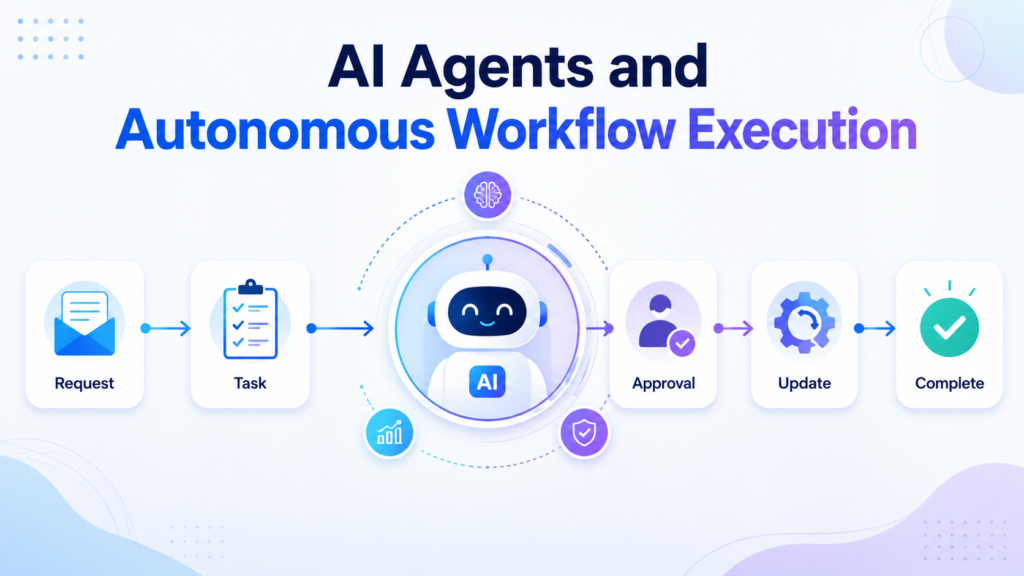
Human supervision remains essential for high-impact decisions, but routine execution can become significantly more autonomous.
The Role of Humans in AI-Powered Work Management
AI-powered execution does not make human judgment obsolete.
AI is effective at processing large volumes of information, recognizing patterns, generating content, and performing repetitive actions. Humans remain better at navigating ambiguity, building relationships, exercising empathy, evaluating ethical implications, and making consequential strategic decisions.
The most effective work management model will combine both capabilities.
AI will handle coordination, documentation, routine analysis, and structured execution. Employees will focus on creativity, customer relationships, negotiation, innovation, and complex problem-solving.
The objective should be augmentation rather than indiscriminate replacement.
Businesses that treat AI solely as a cost-cutting mechanism may achieve short-term efficiency but damage trust, service quality, and institutional knowledge.
How the Manager’s Role Will Change
Managers will spend less time collecting information and more time interpreting it.
Their responsibilities will increasingly include:
- Defining objectives
- Setting decision boundaries
- Reviewing AI recommendations
- Managing exceptions
- Coaching employees
- Improving workflow design
- Monitoring quality
- Ensuring responsible AI usage
- Aligning execution with strategy
A manager may supervise a blended workforce consisting of employees, automated workflows, and AI agents.
This will require a new form of operational literacy. Managers will need to understand when an AI system should act autonomously, when approval is required, and when a process should remain entirely human-led.
Benefits of AI-Powered Work Management
Organizations that implement AI-powered work management effectively can achieve several advantages.
Reduced Administrative Work
AI can prepare reports, create tasks, update records, summarize meetings, and coordinate routine activities.
Faster Execution
Work moves forward without waiting for employees to perform every administrative handoff manually.
Better Visibility
Real-time information from connected systems provides a more accurate view of progress.
Earlier Risk Detection
Predictive analysis helps teams intervene before delays become unavoidable.
Improved Decision-Making
Managers receive contextual recommendations rather than isolated data points.
Greater Process Consistency
AI and automation can ensure that required steps are followed across teams and projects.
More Scalable Operations
Organizations can manage increasing volumes of work without expanding administrative overhead at the same rate.
Better Employee Experience
Employees spend less time updating tools and more time completing valuable work.
Practical Use Cases Across Business Teams
AI-powered execution is not limited to one department. Its value increases when work moves across multiple business functions.
Sales and Revenue Operations
AI can create follow-up tasks from sales calls, update CRM records, summarize opportunities, identify stalled deals, prepare account plans, and remind representatives about commitments.
It can also coordinate contract reviews, pricing approvals, solution consultations, and customer handoffs.
Marketing and Creative Teams
Marketing teams can use AI to convert campaign briefs into structured plans, generate initial content variations, track approvals, identify delayed assets, and summarize campaign performance.
Creative judgment remains human, but production coordination becomes faster.
Customer Service and Operations
AI can classify customer requests, create cases, retrieve relevant knowledge, recommend responses, route work, and escalate sensitive issues.
It can also identify recurring problems and generate improvement tasks for product or operations teams.
IT and Project Delivery
IT teams can automate service requests, incident classification, software access approvals, project reporting, resource allocation, and change-management workflows.
AI can summarize technical issues and connect them to previous incidents or documentation.
Human Resources and Employee Operations
HR teams can automate onboarding plans, document collection, policy requests, training assignments, interview coordination, and employee support workflows.
Sensitive decisions involving performance, compensation, or employment status should retain strong human oversight.
How to Prepare for AI-Powered Work Management
AI cannot repair a fundamentally incoherent operating model. Businesses must establish a strong process foundation before introducing advanced execution capabilities.
Audit Existing Workflows
Identify how work currently moves through the organization.
Document the systems involved, manual steps, decision points, approvals, delays, duplicate activities, and recurring exceptions.
The purpose is not merely to create a process map. It is to identify where coordination consumes more effort than execution.
Standardize Processes Before Automating Them
Automating an inconsistent process usually creates faster inconsistency.
Teams should agree on essential stages, ownership rules, required information, approval criteria, and completion standards.
Not every variation must be eliminated. However, the core process must be sufficiently clear for a system to understand and support it.
Connect Critical Business Systems
AI-powered execution requires access to relevant business context.
Work management platforms should be integrated with systems such as:
- Customer relationship management software
- Document storage
- Communication platforms
- Calendars
- Enterprise resource planning systems
- Customer support tools
- Human resources platforms
Integrations should be designed around business outcomes rather than connecting applications without a clear operational purpose.
Improve Data Quality
Poor data produces unreliable automation and weak AI recommendations.
Businesses should address duplicate records, inconsistent naming conventions, missing fields, obsolete information, and unclear ownership.
Data governance is not an auxiliary technical task. It is a prerequisite for trustworthy AI execution.
Begin with High-Value, Low-Risk Workflows
The first use case should create visible value without exposing the organization to unnecessary risk.
Good starting points include:
- Meeting summaries
- Task creation
- Status reporting
- Internal request routing
- Deadline reminders
- Document classification
- Knowledge retrieval
- Draft communications
These workflows allow teams to evaluate accuracy and adoption before introducing greater autonomy.
Establish AI Governance
Organizations should define what AI is permitted to do.
Governance should address:
- Data access
- Privacy
- Security
- Approval thresholds
- Decision authority
- Audit trails
- Model accuracy
- Error handling
- Bias monitoring
- Regulatory requirements
Employees should understand when AI-generated information must be reviewed and how to report incorrect or unsafe behavior.
Train Employees for AI-Assisted Work
Technology adoption depends on confidence.
Employees need practical training on how to describe objectives, review AI-generated work, validate recommendations, protect sensitive information, and escalate exceptions.
Training should also explain why the technology is being introduced. Uncertainty increases when employees believe AI is being deployed without transparency.
Measure Business Outcomes
Success should not be measured solely by the number of AI features enabled.
Businesses should track outcomes such as:
- Reduction in manual updates
- Faster cycle times
- Fewer missed deadlines
- Lower rework rates
- Improved customer response times
- Increased project predictability
- Better employee satisfaction
- Reduced administrative cost
The objective is better execution, not technological ornamentation.
Common Risks and Implementation Challenges
AI-powered work management introduces considerable potential, but it also creates new risks.
Over-automation: Some workflows require empathy, negotiation, discretion, or contextual judgment.
Poor-quality inputs: Incomplete data can lead to misleading recommendations.
Insufficient transparency: Employees may distrust decisions they cannot understand.
Weak access controls: AI systems should not expose confidential information to unauthorized users.
Process rigidity: Excessive standardization can suppress necessary flexibility.
Automation dependency: Teams should know how to continue essential operations if a system becomes unavailable.
Unclear accountability: A human owner must remain responsible for business outcomes, even when AI performs part of the process.
These risks can be managed through staged implementation, human oversight, strong governance, and regular performance reviews.
Should Businesses Build or Buy AI Work Management Solutions?
Most businesses will benefit from a combination of configurable platforms and targeted custom development.
Buying an established work management solution provides faster deployment, maintained infrastructure, security features, integrations, and ongoing product innovation.
Custom development may be appropriate when the business has distinctive workflows, proprietary decision logic, specialist compliance requirements, or complex system integrations.
The central question is not whether the solution is built or purchased. It is whether the technology fits the organization’s operational model.
A sophisticated platform configured around a poor process will still perform poorly. A simpler platform aligned with clear workflows can produce substantial value.
What the Future Workplace Will Look Like
The future workplace will be more conversational, connected, predictive, and adaptive.
Employees will describe outcomes instead of manually constructing every task. Systems will generate work plans, gather context, and recommend priorities. Routine coordination will happen automatically.
Dashboards will evolve from static reporting surfaces into interactive decision environments. Users will ask questions such as:
- Which projects are most likely to miss their deadlines?
- What is preventing this customer onboarding from progressing?
- Which tasks can be postponed without affecting revenue?
- Where is the team overloaded?
- What decisions require management attention today?
AI will respond with evidence, recommendations, and executable next steps.
The organizations that benefit most will not necessarily be those with the greatest number of AI tools. They will be those that redesign work carefully, connect their systems, establish governance, and create a productive partnership between employees and intelligent technology.
How CloudVandana Helps Businesses Modernize Work Management
Moving from manual updates to AI-powered execution requires more than activating an AI feature.
Businesses need clear workflows, connected applications, reliable data, practical automation, and a scalable implementation strategy.
CloudVandana helps organizations modernize work management through:
- Work management consulting
- monday.com implementation and optimization
- Workflow automation
- Custom app development
- Salesforce consulting and integration
- AI agent and business process automation
- Cloud storage integrations
- Document workflow automation
- Cross-platform data synchronization
- Managed support and continuous improvement
CloudVandana also develops productivity applications that extend work management platforms and help teams simplify file operations, document creation, cloud storage access, and sales workflows.
The objective is not to add more software to an already crowded technology environment. It is to create a connected execution system in which work moves forward with fewer manual steps and greater operational clarity.
Ready to Move Beyond Manual Work Management?
Manual updates, disconnected tools, and repetitive coordination limit how quickly a business can grow.
CloudVandana can help you evaluate your current workflows, identify the strongest automation opportunities, integrate critical systems, and build a practical roadmap for AI-powered execution.
Talk to CloudVandana today to transform your work management processes into connected, intelligent, and scalable business operations.
Conclusion
The future of work management will not be defined by larger task boards or more frequent notifications.
It will be defined by systems that understand objectives, organize activities, identify risks, coordinate resources, and execute routine work.
Manual updates will not disappear completely, but they will become the exception rather than the foundation of operational visibility.
AI-powered execution gives businesses an opportunity to reduce administrative friction and create a more responsive operating model. Employees can focus on decisions, relationships, creativity, and complex problems while intelligent systems manage repetitive coordination.
The transition should be deliberate. Businesses must improve processes, connect systems, strengthen data quality, and establish appropriate governance.
Organizations that begin this work now will be better prepared for a future in which competitive advantage depends not only on what a business knows, but also on how intelligently and rapidly it can execute.
Frequently Asked Questions
1. What is the future of work management?
The future of work management involves connected platforms that use AI, automation, predictive analytics, and AI agents to plan, coordinate, monitor, and execute work. These systems will reduce manual updates and help teams make faster, context-aware decisions.
2. What is AI-powered work management?
AI-powered work management uses artificial intelligence to support activities such as project planning, task creation, assignment, prioritization, status reporting, risk detection, knowledge retrieval, and workflow execution.
3. How is AI different from traditional workflow automation?
Traditional automation follows predefined rules. AI can interpret unstructured information, understand natural-language requests, identify patterns, and respond to variable conditions. The two technologies are often combined.
4. Will AI replace project managers?
AI is unlikely to replace the complete role of a project manager. It will automate administrative tasks and provide decision support, allowing project managers to focus on strategy, stakeholder communication, risk resolution, and team leadership.
5. Can AI automatically update project status?
Yes. AI can analyze task activity, messages, documents, meetings, CRM updates, and connected workflow events to generate or recommend status updates. Human review may still be required for important reports.
6. What are AI agents in work management?
AI agents are software systems that can interpret goals, select actions, use connected applications, and complete multi-step workflows within defined limits. They may create tasks, collect information, update systems, request approvals, and escalate exceptions.
7. What business processes can be automated with AI?
Common processes include status reporting, meeting follow-ups, task creation, customer onboarding, service request routing, document generation, approval coordination, sales follow-ups, employee onboarding, and project risk monitoring.
8. What data does an AI work management system need?
The system may require access to tasks, deadlines, workload information, documents, communication history, CRM records, customer requests, project dependencies, and operational policies. Access should be controlled through strong security and governance.
9. How can a business start using AI for work management?
Start by auditing existing workflows, identifying repetitive manual activities, improving data quality, integrating critical systems, and selecting one high-value, low-risk use case. Expand gradually after measuring performance.
10. What are the risks of AI-powered work management?
Risks include inaccurate recommendations, poor data quality, privacy concerns, excessive automation, unclear accountability, employee resistance, and weak access controls. Human oversight and formal AI governance help reduce these risks.
11. How does AI improve employee productivity?
AI reduces time spent on repetitive activities such as searching for information, preparing reports, creating tasks, updating systems, and coordinating routine handoffs. Employees can dedicate more time to complex and valuable work.
12. How can CloudVandana support AI-powered work management?
CloudVandana can help businesses assess workflows, implement and optimize work management platforms, integrate Salesforce and other systems, develop custom applications, automate processes, improve data movement, and create an actionable AI adoption roadmap.

Atul Gupta is CloudVandana’s founder and an 8X Salesforce Certified Professional who works with globally situated businesses to create Custom Salesforce Solutions.
Atul Gupta, a dynamic leader, directs CloudVandana’s Implementation Team, Analytics, and IT functions, ensuring seamless operations and innovative solutions.
YOU MIGHT ALSO LIKE

The Biggest Dreamforce 2026 Theme: The Agentic Enterprise
Sales Cloud in 2026: From Pipeline Tracking to Smarter Selling
Agentforce Contact Center: What It Means for Modern Customer Service
Salesforce Flow Automation: 10 Business Processes You Should Automate
Why Clean Salesforce Data Is the Foundation of Successful AI Agents