Salesforce can transform the way a growing business manages leads, customers, sales, service, marketing, operations, and reporting.
But Salesforce success does not happen just because a company buys licenses.
It happens when the implementation is planned around business outcomes, user adoption, clean data, smart automation, and long-term scalability.
For growing businesses, this matters even more. A small business can sometimes survive with manual spreadsheets, disconnected tools, and informal processes. A growing business cannot. As the team expands, the cracks become visible. Leads get missed. Follow-ups become inconsistent. Reports lose accuracy. Managers struggle to forecast revenue. Customer support teams operate without full context. Leadership starts asking a serious question: “Why are we working harder but still moving slower?”
That is exactly where a Salesforce implementation checklist becomes essential.
A checklist keeps the implementation focused, structured, measurable, and business-friendly. It helps teams avoid rushed configuration, poor data migration, weak training, unnecessary customization, and low adoption.
Salesforce describes CRM implementation as the process of setting up and integrating a CRM system based on business needs, configuration, and team training. In other words, implementation is not just a technical activity. It is a business transformation project.
This guide gives growing businesses a practical Salesforce implementation checklist they can use before, during, and after launch.
What Salesforce Implementation Really Means
Salesforce implementation is the process of designing, configuring, customizing, integrating, testing, launching, and optimizing Salesforce so it supports real business operations.
It includes:
- Understanding business goals
- Mapping customer-facing processes
- Configuring Salesforce objects, fields, page layouts, and automation
- Migrating existing data
- Setting up reports and dashboards
- Integrating third-party tools
- Training users
- Supporting the business after go-live
A good implementation does not simply recreate old processes inside a new CRM. That is one of the biggest mistakes growing businesses make.
If the existing sales process is unclear, Salesforce will not magically fix it. If data is messy, Salesforce will expose the mess faster. If users do not understand why they should use the system, adoption will remain weak.
Salesforce should become a growth engine, not just a database.
That means every configuration decision should answer one simple question:
How does this help the business sell better, serve better, decide faster, or scale smarter?
Why Salesforce Implementation Fails Without a Clear Plan
Many Salesforce implementations fail because teams start building too quickly.
They create fields before defining reporting needs.
They build automation before understanding the process.
They migrate data before cleaning it.
They customize Salesforce before checking whether standard features can solve the problem.
They train users after go-live instead of preparing them early.
This creates a complicated CRM that users do not trust.
For growing businesses, complexity is dangerous. The goal should not be to build the most advanced Salesforce org immediately. The goal should be to build the right foundation first.
Salesforce Well-Architected provides guidance for creating solutions that are trusted, easy, and adaptable. That is a useful mindset for growing businesses because the CRM should remain secure, usable, and scalable as the company evolves.
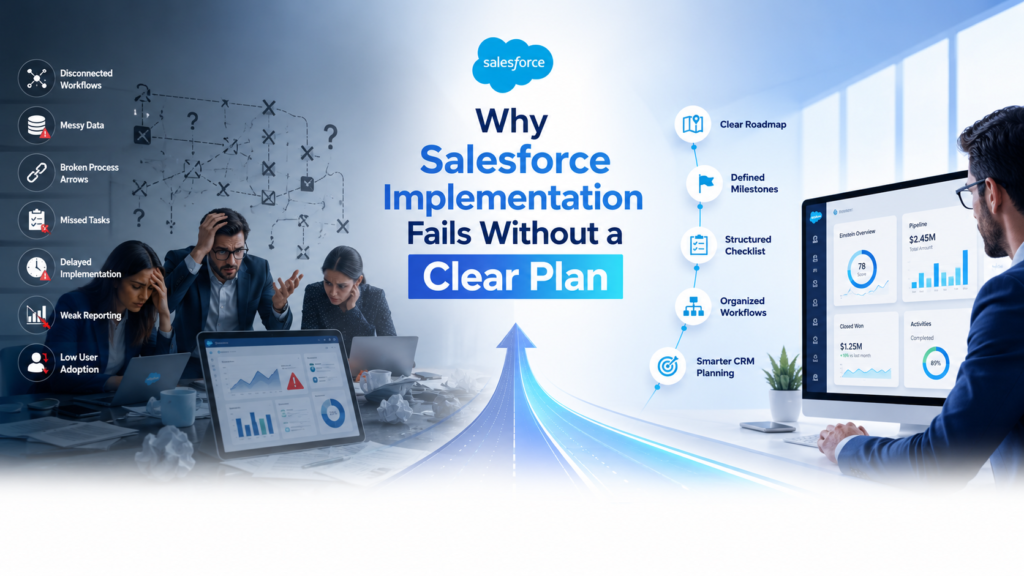
A strong implementation plan reduces confusion. It also gives everyone a shared roadmap.
Leadership knows what outcomes to expect.
Sales teams know how leads and opportunities will move.
Service teams know how cases will be handled.
Admins know what to configure.
Developers know what requires customization.
Managers know which reports matter.
That alignment is the real foundation of Salesforce success.
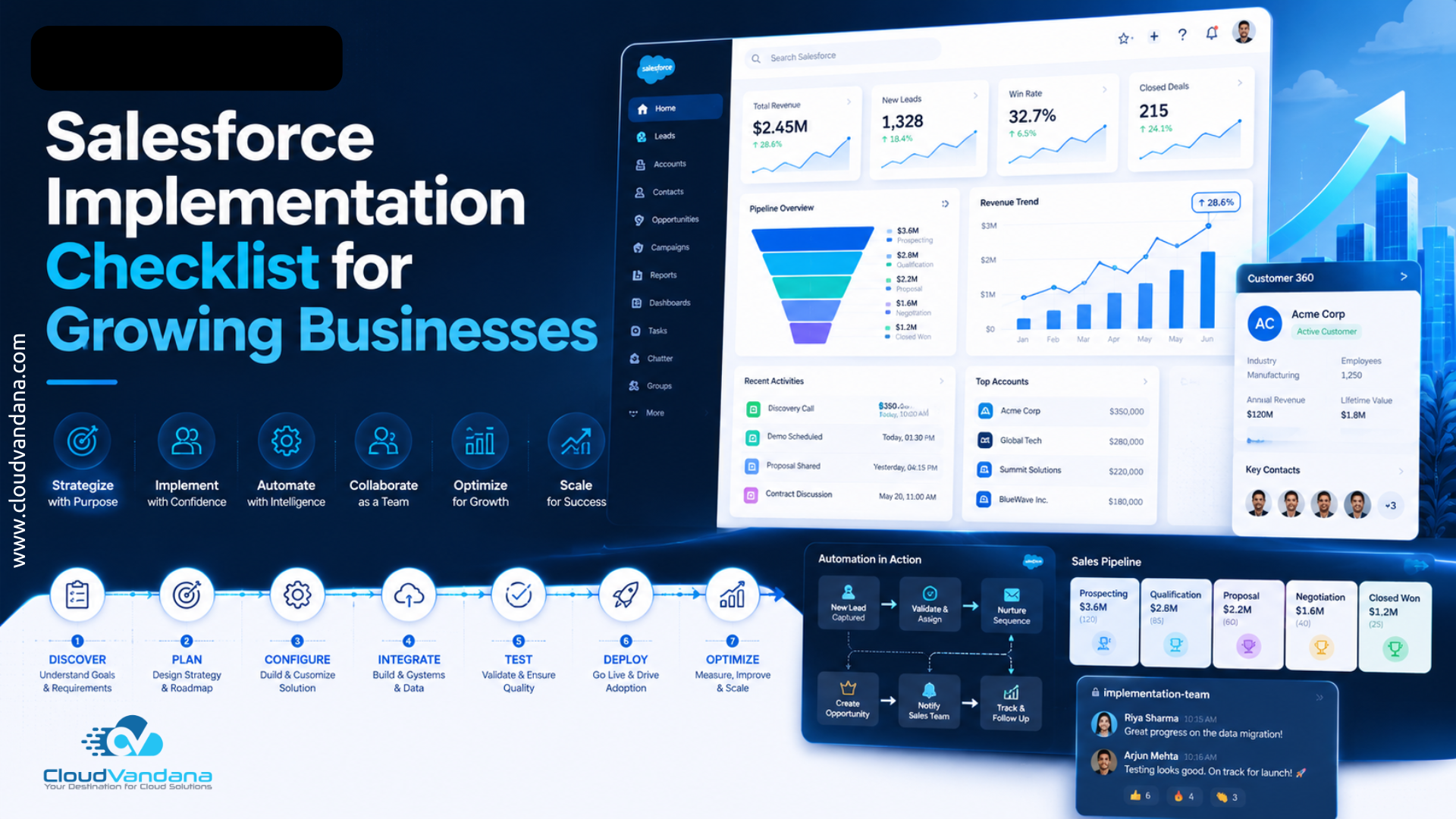
Salesforce Implementation Checklist at a Glance
Here is the complete checklist before going deeper into each phase:
- Define business goals
- Identify stakeholders
- Map current processes
- Define future-state workflows
- Select the right Salesforce products
- Decide MVP scope
- Document requirements
- Design the data model
- Plan user access and security
- Prepare reporting requirements
- Clean existing data
- Map fields for migration
- Set duplicate rules
- Plan integrations
- Configure standard Salesforce features
- Build automation using Flow
- Customize only where necessary
- Test in sandbox
- Conduct user acceptance testing
- Train users by role
- Prepare go-live plan
- Monitor adoption
- Optimize after launch
- Build a long-term support plan
- Prepare for AI, Data Cloud, and Agentforce readiness
Now let’s break this down into a practical implementation roadmap.
Phase 1: Strategy and Planning
1. Define Clear Business Outcomes
Before opening Salesforce Setup, define the business outcomes.
This is the most important step.
A growing business should not implement Salesforce with vague goals like “improve sales” or “manage customers better.” Those goals are too broad. They do not guide decisions.
Instead, define measurable outcomes.
For example:
- Reduce lead response time from 24 hours to 2 hours
- Improve sales pipeline visibility
- Increase follow-up consistency
- Reduce manual reporting effort
- Improve forecast accuracy
- Centralize customer communication
- Automate repetitive sales or support tasks
- Give leadership real-time dashboards
- Improve service case resolution time
These outcomes become the implementation compass.
Every object, field, automation, report, and integration should connect back to them.
Without this clarity, Salesforce becomes a feature-heavy system with weak business direction.
2. Identify Stakeholders and Decision Makers
Salesforce affects multiple teams. So the implementation should not be controlled by only one person or one department.
Key stakeholders may include:
- Business owner or executive sponsor
- Sales leader
- Service leader
- Marketing leader
- Operations manager
- Salesforce admin
- Finance representative
- IT or integration owner
- End users from each department
The executive sponsor is especially important. This person keeps the project aligned with business goals, removes blockers, and encourages adoption.
Growing businesses often underestimate stakeholder alignment. They assume users will accept Salesforce once it is launched.
That rarely happens.
Users support systems they understand. They adopt systems that make their daily work easier.
So involve them early. Ask what slows them down. Ask what information they need. Ask what reports managers struggle to create. Ask where handoffs break.
The best requirements often come from the people doing the work every day.
3. Map the Customer Journey
Salesforce should reflect how customers move through your business.
This includes the full journey:
- Lead capture
- Lead qualification
- Sales follow-up
- Opportunity creation
- Proposal or quotation
- Deal closure
- Onboarding
- Customer service
- Renewal
- Upsell or cross-sell
- Long-term relationship management
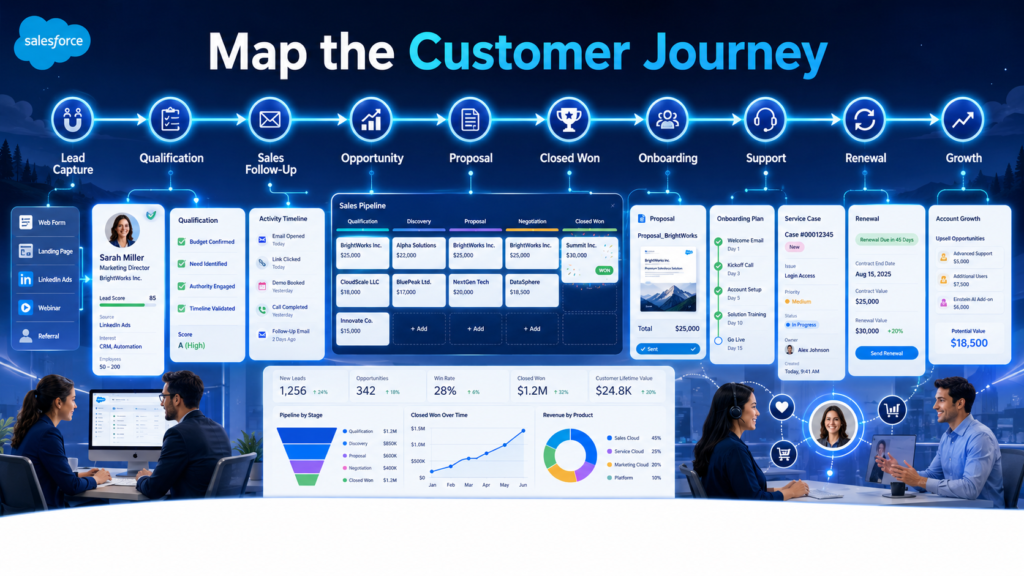
Many implementations become fragmented because teams only map one department.
Sales focuses on opportunities.
Service focuses on cases.
Marketing focuses on campaigns.
Leadership focuses on dashboards.
But customers do not experience your business in departments. They experience one connected journey.
That is why customer journey mapping is essential.
It helps define what information should move from marketing to sales, from sales to service, and from service back to account management.
When Salesforce is designed around the customer journey, teams get better visibility and fewer handoff failures.
4. Select the Right Salesforce Cloud and Features
Salesforce has many products. Growing businesses should choose based on current needs and future growth, not just trends.
Common Salesforce products include:
- Sales Cloud for lead, opportunity, account, contact, pipeline, and forecasting management
- Service Cloud for customer support, cases, queues, knowledge, and service automation
- Marketing Cloud for personalized marketing and campaign journeys
- Experience Cloud for customer, partner, or employee portals
- CPQ for complex quoting and pricing
- Data 360, formerly Data Cloud, for unifying customer data and creating trusted customer profiles
- Agentforce for building autonomous AI agents that can support employees and customers
Salesforce describes Agentforce as an AI agent platform for building and customizing autonomous agents that support employees and customers across the Salesforce ecosystem. Salesforce also positions Data 360 as the real-time data engine that unifies fragmented customer data into a trusted Customer 360 profile.
For a growing business, this does not mean everything should be implemented at once.
Start with what supports the most urgent business outcomes.
Then scale.
5. Decide the MVP Scope
A Salesforce implementation should begin with a minimum viable product, or MVP.
This means launching the essential version first.
Not the smallest version.
Not the cheapest version.
The most useful version.
Your MVP should include the features users need to do their work effectively from day one.
For a Sales Cloud implementation, the MVP may include:
- Lead management
- Account and contact management
- Opportunity stages
- Sales activities
- Basic automation
- Core dashboards
- Email integration
- Data migration
- Role-based access
For a Service Cloud implementation, the MVP may include:
- Case management
- Support queues
- Assignment rules
- Email-to-case
- Case escalation
- Knowledge setup
- Basic service dashboards
The MVP protects the project from unnecessary bloat.
Growing businesses often want to solve every problem in the first release. That creates delays, confusion, and budget pressure.
Start focused. Launch well. Improve continuously.
Phase 2: Process and System Design
6. Audit Existing Sales, Service, and Marketing Processes
Before configuring Salesforce, review how the business currently works.
Document each process:
- How are leads captured?
- Who qualifies leads?
- What makes a lead sales-ready?
- When is an opportunity created?
- What are the sales stages?
- How are proposals sent?
- How are customers onboarded?
- How are support cases received?
- How are escalations handled?
- Which reports are created manually?
This audit reveals inefficiencies.
You may discover duplicate work, missing ownership, unclear approvals, or inconsistent follow-ups.
Do not automate a broken process.
Fix the process first. Then build it in Salesforce.
That one principle can save months of future cleanup.
7. Define the Salesforce Data Model
The data model defines how information is structured inside Salesforce.
For growing businesses, the core objects usually include:
- Leads
- Accounts
- Contacts
- Opportunities
- Products
- Quotes
- Cases
- Campaigns
- Activities
- Custom objects when needed
A strong data model answers:
- What information should be stored?
- Which fields are required?
- Which fields should be picklists?
- Which objects need relationships?
- Which records should users create manually?
- Which records should automation create?
- Which data is needed for reports?
- Which data is needed for AI readiness later?
Poor data modeling creates long-term problems.
Too many fields confuse users.
Too few fields weaken reporting.
Wrong field types make automation difficult.
Unclear relationships create duplicate records.
Keep the data model clean, intentional, and scalable.
8. Plan User Roles, Profiles, and Permissions
Security design is not just an IT concern. It directly affects user experience, compliance, and operational control.
Growing businesses should define:
- Who can view records?
- Who can edit records?
- Who can delete records?
- Who can export data?
- Who can approve discounts?
- Who can modify dashboards?
- Who can access sensitive customer information?
Salesforce role hierarchy helps provide managers visibility into their team’s data, while sharing settings and permissions help control access at different levels.
A practical access model should follow this rule:
Give users the access they need to do their work, not unlimited access by default.
This protects data and reduces accidental mistakes.
9. Create a Reporting and Dashboard Strategy
Reports should not be an afterthought.
They should be designed before configuration.
Why? Because reports depend on data structure.
If leadership wants to track lead source ROI, lead source must be captured correctly.
If sales managers want accurate pipeline reports, opportunity stages must be standardized.
If service leaders want case resolution metrics, case fields and status values must be designed properly.
Common dashboards for growing businesses include:
- Sales pipeline dashboard
- Lead conversion dashboard
- Sales activity dashboard
- Forecast dashboard
- Customer support dashboard
- Case SLA dashboard
- Marketing campaign dashboard
- Executive performance dashboard
A good Salesforce dashboard should answer business questions quickly.
Not every dashboard needs 20 charts. Sometimes five accurate charts are more valuable than 25 decorative ones.
10. Design Automation Carefully
Automation is one of Salesforce’s biggest strengths.
But careless automation can make Salesforce difficult to maintain.
Start by identifying repetitive tasks:
- Assigning leads
- Sending follow-up reminders
- Updating opportunity stages
- Creating tasks
- Notifying managers
- Escalating cases
- Updating fields
- Triggering approval processes
Salesforce Flow provides no-code, point-and-click automation tools that can create guided experiences, behind-the-scenes automation, and approval automation. Salesforce notes that automation can reduce manual processes, improve accuracy, improve productivity, and reduce costs.
Still, automation should be designed with discipline.
Document every Flow.
Use clear naming conventions.
Avoid overlapping automation.
Test for edge cases.
Review automation before every major release.
The best automation feels invisible to users. It removes friction without creating confusion.
Phase 3: Data Migration and Integration
11. Clean Existing Business Data
Data migration is one of the riskiest parts of Salesforce implementation.
Growing businesses often have data scattered across:
- Spreadsheets
- Old CRMs
- Email inboxes
- ERP systems
- Marketing tools
- Support platforms
- Accounting software
- Internal databases
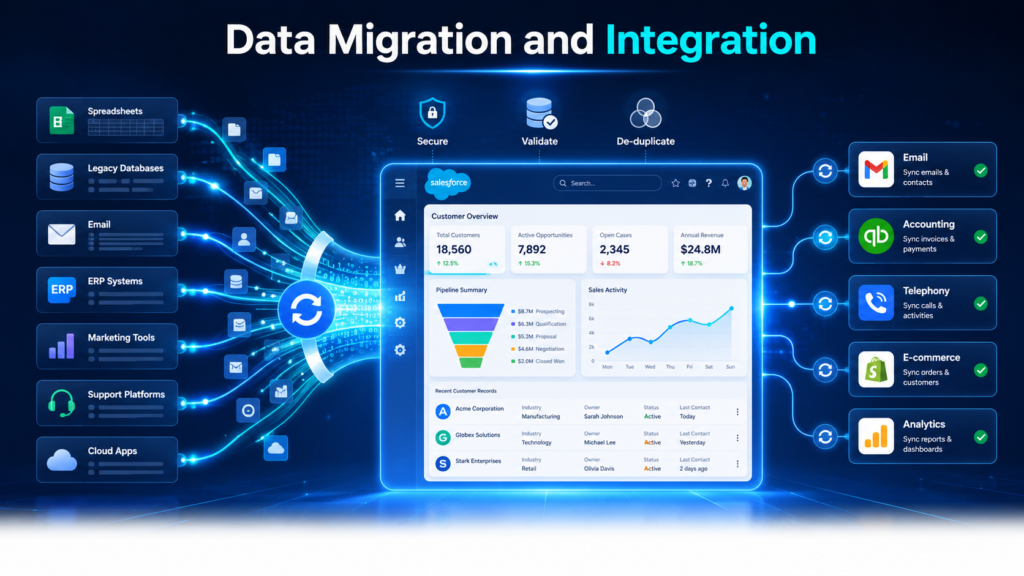
Before migration, clean the data.
Remove outdated records.
Standardize naming formats.
Validate email addresses.
Fix missing phone numbers.
Remove duplicate accounts.
Standardize country, state, industry, and source values.
Identify inactive customers and old opportunities.
Bad data weakens user trust.
If sales teams see duplicate accounts or wrong contact details on day one, they may stop trusting Salesforce immediately.
Clean data creates credibility.
12. Map Fields Before Migration
Field mapping connects old data fields to Salesforce fields.
For example:
- Company Name maps to Account Name
- First Name maps to Contact First Name
- Email maps to Contact Email
- Deal Value maps to Opportunity Amount
- Lead Status maps to Lead Status
- Support Ticket Status maps to Case Status
This sounds simple, but growing businesses often discover inconsistencies during mapping.
One spreadsheet may use “Closed Won.”
Another may use “Won.”
Another may use “Deal Closed.”
Another may leave the value blank.
Field mapping forces standardization.
Create a migration workbook that includes:
- Source field name
- Salesforce field name
- Field type
- Required or optional status
- Transformation rule
- Sample data
- Owner
- Notes
This makes migration more predictable and reduces rework.
13. Prevent Duplicate Records
Duplicate records are one of the fastest ways to damage Salesforce adoption.
Salesforce provides duplicate rules that define what happens when users view or create duplicate records. It also provides standard duplicate rules for business accounts, person accounts, contacts, and leads, with the option to create custom rules.
Before go-live, define duplicate management rules for:
- Leads
- Contacts
- Accounts
- Custom objects
- Email-based matching
- Phone-based matching
- External ID matching
Salesforce’s Data Import Wizard can also prevent duplicate records by matching records using fields such as Salesforce ID or external ID for supported imports.
A growing business should also decide how duplicates will be handled after launch.
Who reviews duplicate reports?
Who merges records?
How often is duplicate cleanup performed?
Which records are considered the master record?
Duplicate prevention is not a one-time activity. It is part of data governance.
14. Plan Third-Party Integrations
Salesforce becomes more powerful when it connects with the rest of the business ecosystem.
Common integrations include:
- Email platforms
- ERP systems
- Accounting software
- Marketing automation tools
- Telephony systems
- WhatsApp or SMS platforms
- E-commerce platforms
- Customer support tools
- Document generation tools
- File storage platforms
- Payment systems
Before integration, define:
- What data needs to move?
- Which system is the source of truth?
- Should the sync be one-way or two-way?
- How often should data sync?
- What happens when sync fails?
- Who monitors integration errors?
- Which fields should be locked from manual editing?
A poor integration can create duplicate data, incorrect reports, and operational chaos.
A good integration creates flow.
It removes manual work and gives teams a connected view of the customer.
15. Validate Data After Migration
Data migration is not complete when records are imported.
It is complete when the data is validated.
Check:
- Record counts
- Required fields
- Ownership
- Lookup relationships
- Picklist values
- Date formats
- Currency values
- Attachments
- Duplicate records
- Report accuracy
- Sample customer records
Ask business users to review migrated data before go-live.
Sales managers should check accounts and opportunities.
Service managers should check cases.
Marketing managers should check campaign data.
Finance teams should check revenue-related fields.
Validation protects the launch.
Skipping validation can create painful surprises after users start working in Salesforce.
Phase 4: Build and Configuration
16. Configure Salesforce Before Customizing
Salesforce offers powerful standard features.
Use them first.
Configuration may include:
- Objects
- Fields
- Page layouts
- Record types
- Validation rules
- Lightning pages
- Reports
- Dashboards
- Email templates
- Assignment rules
- Approval processes
- Queues
- Permission sets
Customization should come later.
Growing businesses sometimes request custom development too early because they want Salesforce to match their old process exactly.
But the old process may not be ideal.
A configuration-first approach keeps Salesforce easier to maintain, easier to upgrade, and easier for admins to manage.
Customize only when standard Salesforce features cannot meet a clear business requirement.
17. Customize Only Where Business Value Is Clear
Customization is not bad. Unnecessary customization is bad.
Custom development can be valuable for:
- Complex business logic
- Advanced integrations
- Custom user interfaces
- Industry-specific workflows
- Custom portals
- Product configuration
- Unique approval logic
- Advanced automation
- Lightning Web Components
But every customization should be justified.
Ask:
- What business problem does this solve?
- Can standard Salesforce handle it?
- How many users will benefit?
- Will this increase maintenance effort?
- Will this affect future scalability?
- Is this required for MVP or a later phase?
Growing businesses need flexibility. Over-customization can reduce that flexibility.
Build what matters. Avoid ornamental complexity.
18. Use Salesforce Flow for Scalable Automation
Salesforce Flow should be part of almost every modern implementation.
It can automate tasks, guide users, update records, create records, send notifications, and support approval processes.
But Flow should be built with architecture in mind.
Best practices include:
- Use clear naming conventions
- Document Flow purpose
- Keep entry criteria specific
- Avoid unnecessary record updates
- Test with different user profiles
- Use fault paths
- Avoid conflicting automation
- Review old automation before adding new automation
- Build in sandbox first
Salesforce’s Flow migration guidance also recommends cataloging existing automation, identifying redundant processes, and migrating in a sandbox first to protect data during changes.
For growing businesses, Flow is not just a productivity tool. It is a scalability tool.
It allows teams to handle more work without adding unnecessary manual effort.
19. Build in a Sandbox Environment
Never build major changes directly in production.
A sandbox gives teams a safe environment to configure, test, and validate changes before they affect real users.
Use sandbox environments for:
- Configuration changes
- Automation testing
- Data migration testing
- Integration testing
- User acceptance testing
- Training preparation
- Release validation
This reduces risk.
Salesforce DevOps Center supports change and release management and brings DevOps best practices into the development process.
Growing businesses may not need a complex enterprise release process from day one, but they do need basic release discipline.
That means tracking changes, testing properly, and deploying carefully.
20. Prepare for Release and Deployment
Deployment is the moment changes move from sandbox to production.
A release plan should include:
- Deployment date
- Deployment owner
- Components included
- Pre-deployment checklist
- Backup plan
- Data migration steps
- User communication
- Testing plan
- Rollback plan
- Post-deployment validation
Do not deploy major changes at the worst possible time.
Avoid peak sales days, billing days, campaign launch days, or customer support-heavy periods.
A clean deployment feels uneventful.
That is the goal.
The best go-live is not dramatic. It is calm, controlled, and well-supported.
Phase 5: Testing, Training, and Go-Live
21. Run Functional Testing
Functional testing confirms that the system works as designed.
Test:
- Lead creation
- Lead conversion
- Opportunity creation
- Stage updates
- Task creation
- Email alerts
- Assignment rules
- Approval processes
- Case creation
- Escalation rules
- Reports
- Dashboards
- Integrations
- User permissions
Testing should include positive and negative scenarios.
For example:
Positive test: A sales rep creates a lead with all required details.
Negative test: A sales rep tries to save a lead without required fields.
Both matter.
Good testing prevents user frustration after launch.
22. Conduct User Acceptance Testing
User acceptance testing, or UAT, confirms that Salesforce supports real business work.
This is not just technical testing.
Actual users should test real scenarios.
Sales users should test lead follow-up, opportunity updates, activity tracking, and pipeline reports.
Service users should test case creation, ownership, status changes, escalations, and customer communication.
Managers should test dashboards, approvals, and team visibility.
Ask users:
- Is this easy to use?
- Does this match your daily work?
- What feels confusing?
- What is missing?
- What creates extra effort?
- Which reports do you need?
UAT feedback is extremely valuable.
It helps fix adoption risks before launch.
23. Train Users by Role
Training should not be one generic session for everyone.
Different roles need different training.
Sales reps need to know how to manage leads, opportunities, tasks, and activities.
Sales managers need to know how to review pipelines, dashboards, and forecasts.
Service agents need to know how to manage cases, queues, and knowledge.
Admins need deeper configuration and support training.
Leadership needs dashboard and decision-making visibility.
Salesforce’s CRM adoption guidance emphasizes that adoption is about getting teams to fully embrace and effectively use the CRM so the business can improve customer experiences and maximize ROI.
Training should include:
- Live sessions
- Role-based guides
- Short videos
- Practice exercises
- FAQs
- Internal champions
- Post-launch office hours
Users should leave training with confidence, not confusion.
24. Prepare a Go-Live Plan
The go-live plan should be clear and practical.
Include:
- Launch date
- Final data migration timing
- Deployment steps
- User access confirmation
- Communication plan
- Training completion status
- Support contacts
- Known limitations
- Issue tracking process
- First-week support schedule
Send users a simple launch message.
Tell them:
- What is changing
- Why it matters
- When to start using Salesforce
- Where to find training material
- Who to contact for help
A good go-live plan reduces anxiety.
People are more open to change when they know what to expect.
25. Monitor the First 30 Days After Launch
The first 30 days after go-live are critical.
Monitor:
- Login activity
- Record creation
- Field completion
- Lead follow-up
- Opportunity updates
- Case resolution
- Dashboard usage
- User questions
- Support tickets
- Data quality issues
- Automation errors
Do not disappear after launch.
Users need support while new habits form.
A successful Salesforce implementation is not measured only by go-live. It is measured by what happens after go-live.
Are teams using it?
Are managers trusting the reports?
Are processes smoother?
Are manual tasks reduced?
Is leadership getting better visibility?
That is where the real value appears.
Phase 6: Optimization and Growth
26. Measure Adoption and Business Impact
After launch, measure adoption and business results.
Key adoption metrics include:
- Active users
- Login frequency
- Records created
- Activities logged
- Required field completion
- Opportunity updates
- Case updates
- Dashboard views
Business impact metrics include:
- Lead response time
- Lead conversion rate
- Sales cycle length
- Pipeline accuracy
- Forecast accuracy
- Win rate
- Customer response time
- Case resolution time
- Revenue visibility
Adoption is not just “users logged in.”
True adoption means Salesforce has become part of daily business operations.
27. Improve Reports and Dashboards
Initial dashboards are rarely perfect.
As users begin working in Salesforce, reporting needs become clearer.
Review dashboards after 30, 60, and 90 days.
Ask leaders:
- Which reports do you use most?
- Which reports are missing?
- Which charts are confusing?
- Which KPIs matter now?
- Which fields are not reliable?
- Which decisions are easier because of Salesforce?
Then improve.
Dashboards should evolve with the business.
Growing businesses change quickly. Salesforce reporting should keep pace.
28. Prepare Salesforce for AI, Data, and Agentforce
Modern Salesforce implementation should also consider future AI readiness.
Even if a growing business is not implementing Agentforce or Data 360 immediately, the foundation should be prepared.
That means:
- Clean customer data
- Standardized fields
- Clear ownership
- Strong permissions
- Accurate knowledge articles
- Reliable automation
- Connected systems
- Good data governance
- Documented processes
Salesforce has emphasized that AI agents are only as good as the data they use, making clean, unified, understandable data essential for agent readiness.
This is important because growing businesses do not want to rebuild the foundation later.
A clean Salesforce implementation today can support AI, analytics, automation, and customer personalization tomorrow.
29. Build a Long-Term Support Model
Salesforce is not a one-time project.
It needs ongoing support.
A long-term support model should include:
- Admin support
- User support
- Enhancement requests
- Data cleanup
- Release management
- Automation review
- Integration monitoring
- Dashboard improvements
- Security reviews
- Quarterly health checks
- User training refreshers
Growing businesses should also create a governance process.
Decide how new requests are reviewed.
Decide who approves changes.
Decide how urgent issues are handled.
Decide how documentation is maintained.
Without governance, Salesforce can slowly become cluttered.
With governance, it stays healthy.
Salesforce Implementation Checklist Summary
Here is a practical checklist growing businesses can use:
Strategy Checklist
- Define business outcomes
- Identify executive sponsor
- List key stakeholders
- Map customer journey
- Select Salesforce products
- Decide MVP scope
- Document success metrics
Process Checklist
- Audit current workflows
- Define future-state processes
- Standardize sales stages
- Standardize service statuses
- Define approval rules
- Identify automation opportunities
- Document reporting needs
Data Checklist
- Audit existing data sources
- Remove outdated records
- Standardize values
- Map fields
- Define required fields
- Set duplicate rules
- Test data migration
- Validate migrated records
Security Checklist
- Define roles
- Define profiles
- Define permission sets
- Set record visibility
- Review sensitive fields
- Confirm manager access
- Test user permissions
Build Checklist
- Configure standard features
- Create fields and layouts
- Build reports and dashboards
- Create automation with Flow
- Set up integrations
- Build in sandbox
- Document changes
Testing Checklist
- Run functional testing
- Test integrations
- Test automation
- Test permissions
- Conduct UAT
- Fix issues
- Retest before deployment
Training Checklist
- Prepare role-based training
- Create user guides
- Train managers
- Train end users
- Train admins
- Run practice sessions
- Provide post-launch support
Go-Live Checklist
- Finalize deployment plan
- Complete final data migration
- Confirm user access
- Send launch communication
- Monitor system behavior
- Track user issues
- Support users closely
Optimization Checklist
- Review adoption
- Improve dashboards
- Fix data quality issues
- Optimize automation
- Review integrations
- Plan next-phase enhancements
- Conduct quarterly health checks
How CloudVandana Helps Growing Businesses Implement Salesforce
A growing business needs more than a technical setup. It needs a Salesforce implementation partner that understands business processes, CRM scalability, data migration, automation, integrations, adoption, and post-launch support.
CloudVandana provides end-to-end Salesforce services, including implementation, customization, development, integration, data migration, support, managed services, and Salesforce consulting. CloudVandana’s Salesforce Implementation Services page highlights a step-by-step approach covering discovery and planning, configuration and customization, integration and data migration, testing, training, go-live, and post-launch support.
CloudVandana can help growing businesses with:
- Salesforce implementation planning
- Business process discovery
- Sales Cloud implementation
- Service Cloud implementation
- Marketing Cloud implementation
- Experience Cloud implementation
- CPQ and Billing implementation
- Salesforce Flow automation
- Data migration and cleanup
- Third-party integrations
- Custom Salesforce development
- Lightning Web Components
- Reports and dashboards
- User training
- Post-launch support
- Salesforce optimization
- AI, Data 360, and Agentforce readiness
The goal is simple.
Build a Salesforce environment that your teams trust, your leaders rely on, and your business can scale with.
Is your growing business planning a Salesforce implementation or struggling with an existing setup?
CloudVandana can help you implement Salesforce the right way, from strategy and configuration to automation, data migration, integrations, training, and long-term support.
Start with a Salesforce implementation consultation and build a CRM that supports real business growth.
Talk to CloudVandana today and turn Salesforce into a scalable growth engine for your business.
Conclusion
Salesforce implementation is one of the most important technology decisions a growing business can make.
Done well, it gives teams better visibility, faster workflows, cleaner data, stronger customer relationships, and smarter decision-making.
Done poorly, it becomes another complicated system that users avoid.
The difference is planning.
A Salesforce implementation checklist helps growing businesses move step by step. It keeps the project aligned with outcomes, not just features. It helps teams avoid rushed decisions, poor data migration, weak automation, and low adoption.
The best Salesforce implementations are not built around technology alone.
They are built around people, processes, data, and growth.
Start with clear goals.
Design around the customer journey.
Keep the MVP focused.
Clean the data.
Use automation wisely.
Train users properly.
Support the business after go-live.
Then keep improving.
That is how Salesforce becomes more than a CRM.
It becomes the operational backbone of a growing business.
FAQs
1. What is a Salesforce implementation checklist?
A Salesforce implementation checklist is a structured list of steps businesses follow to plan, configure, test, launch, and optimize Salesforce. It helps ensure that business goals, data migration, automation, security, training, and adoption are handled properly.
2. Why do growing businesses need a Salesforce implementation checklist?
Growing businesses need a checklist because their processes, teams, data, and customer operations are expanding. A checklist helps prevent confusion, missed requirements, poor data quality, and low user adoption during Salesforce implementation.
3. What is the first step in Salesforce implementation?
The first step is defining clear business outcomes. Before configuring Salesforce, businesses should know what they want to improve, such as lead response time, sales visibility, customer support, forecasting, reporting, or automation.
4. How long does Salesforce implementation take?
Salesforce implementation timelines vary based on scope, clouds, integrations, data migration, customization, and training needs. A focused MVP implementation may take a few weeks, while a complex multi-cloud implementation can take several months.
5. What data should be cleaned before Salesforce migration?
Businesses should clean accounts, contacts, leads, opportunities, cases, customer records, email addresses, phone numbers, duplicate records, outdated records, and inconsistent picklist values before migration.
6. Should growing businesses customize Salesforce immediately?
Not always. Growing businesses should first use Salesforce standard configuration wherever possible. Customization should be used only when there is a clear business need that standard Salesforce features cannot support.
7. Why is user training important in Salesforce implementation?
User training is important because Salesforce success depends on adoption. If users do not understand how Salesforce helps their daily work, they may avoid the system or enter poor-quality data.
8. What is the role of Salesforce Flow in implementation?
Salesforce Flow helps automate business processes, reduce manual work, guide users, update records, send notifications, and support approvals. It is an important tool for scalable Salesforce automation.
9. What are common Salesforce implementation mistakes?
Common mistakes include unclear goals, poor data migration, too much customization, weak user training, missing executive sponsorship, no testing, bad reporting setup, and lack of post-launch support.
10. How can businesses measure Salesforce implementation success?
Success can be measured through adoption rates, lead response time, conversion rates, sales cycle length, forecast accuracy, case resolution time, dashboard usage, data quality, and user feedback.
11. How does Salesforce implementation prepare businesses for AI and Agentforce?
A strong Salesforce implementation creates clean data, clear processes, strong permissions, reliable automation, and connected systems. These are essential foundations for future AI, Data 360, and Agentforce readiness.
12. How can CloudVandana help with Salesforce implementation?
CloudVandana helps growing businesses with Salesforce implementation planning, configuration, customization, data migration, integrations, Flow automation, reports, dashboards, user training, post-launch support, and long-term Salesforce optimization.

Atul Gupta is CloudVandana’s founder and an 8X Salesforce Certified Professional who works with globally situated businesses to create Custom Salesforce Solutions.
Atul Gupta, a dynamic leader, directs CloudVandana’s Implementation Team, Analytics, and IT functions, ensuring seamless operations and innovative solutions.
YOU MIGHT ALSO LIKE

Sales Cloud in 2026: From Pipeline Tracking to Smarter Selling
Agentforce Contact Center: What It Means for Modern Customer Service
Salesforce Flow Automation: 10 Business Processes You Should Automate
Why Clean Salesforce Data Is the Foundation of Successful AI Agents
The Rise of Agentic Workflows: What Businesses Need to Know in 2026